Manual installation and configuration of NVIDIA drivers on a Proxmox VE 9 host, plus the LXC wiring needed to expose the GPU to one or more containers. Covers driver install, persistence service, optional NVENC patch and the per-container setup.
Note
Targeted at Proxmox VE 9 (Debian Trixie). PVE 7 (Bullseye) and PVE 8 (Bookworm) are no longer covered.
Check whether the open-source nouveau driver is already blacklisted:
cat /etc/modprobe.d/blacklist.confIf blacklist nouveau does not appear, add it and reboot:
echo "blacklist nouveau" '>>' /etc/modprobe.d/blacklist.conf
reboot
If you ran the ProxMenux Post-Install script (or any other Proxmox post-install tooling), the repositories are already in place — skip this step.
Otherwise, on a vanilla PVE 9 install with no enterprise subscription:
nano /etc/apt/sources.list.d/proxmox.sourcesMake sure it contains the no-subscription source for Trixie:
Types: deb
URIs: http://download.proxmox.com/debian/pve
Suites: trixie
Components: pve-no-subscription
Signed-By: /usr/share/keyrings/proxmox-archive-keyring.gpg
And the Debian sources at /etc/apt/sources.list.d/debian.sources:
Types: deb
URIs: http://deb.debian.org/debian/
Suites: trixie trixie-updates
Components: main contrib non-free non-free-firmware
Signed-By: /usr/share/keyrings/debian-archive-keyring.gpg

Types: deb
URIs: http://security.debian.org/debian-security/
Suites: trixie-security
Components: main contrib non-free non-free-firmware
Signed-By: /usr/share/keyrings/debian-archive-keyring.gpgapt update && apt dist-upgrade -yInstall the build tools and kernel headers needed to compile the NVIDIA kernel module:
apt-get install -y git
apt-get install -qqy pve-headers-$(uname -r) gcc makeCheck the latest stable driver:
https://download.nvidia.com/XFree86/Linux-x86_64/latest.txtHeads up
Replace latest.txt in the URL with the version number to find the installer file ending in .run. The full driver list is at:
https://download.nvidia.com/XFree86/Linux-x86_64/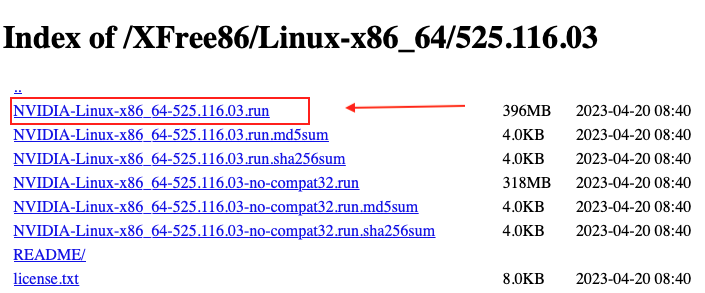
Throughout the rest of this guide, replace <VERSION> with the actual version (for example 580.95.05).
mkdir -p /opt/nvidia
cd /opt/nvidia
wget https://download.nvidia.com/XFree86/Linux-x86_64/'<'VERSION'>'/NVIDIA-Linux-x86_64-'<'VERSION'>'.run
chmod +x NVIDIA-Linux-x86_64-'<'VERSION'>'.run
First pass — this disables nouveau and prepares the system:
./NVIDIA-Linux-x86_64-'<'VERSION'>'.run --no-questions --ui=none --disable-nouveau
reboot
After the host comes back, run the installer again to compile and install the kernel module:
/opt/nvidia/NVIDIA-Linux-x86_64-'<'VERSION'>'.run --no-questions --ui=noneEdit the modules-load configuration:
nano /etc/modules-load.d/modules.confAdd the VFIO and NVIDIA modules:
vfio
vfio_iommu_type1
vfio_pci
vfio_virqfd
nvidia
nvidia_uvm
Save (Ctrl+X) and rebuild initramfs:
update-initramfs -u -k allSo that /dev/nvidia* device nodes are created when the modules load:
nano /etc/udev/rules.d/70-nvidia.rules# /etc/udev/rules.d/70-nvidia.rules
# Create /dev/nvidia0, /dev/nvidia1 ... and /dev/nvidiactl when nvidia module is loaded
KERNEL=="nvidia", RUN+="/bin/bash -c ''/usr/bin/nvidia-smi -L''"
# Create the CUDA node when nvidia_uvm CUDA module is loaded
KERNEL=="nvidia_uvm", RUN+="/bin/bash -c ''/usr/bin/nvidia-modprobe -c0 -u''"Save (Ctrl+X).
The persistence daemon keeps the GPU initialised between uses, which avoids the latency hit and occasional state loss that happens when the kernel module is loaded and unloaded repeatedly:
cd /opt/nvidia
git clone https://github.com/NVIDIA/nvidia-persistenced.git
cd nvidia-persistenced/init
./install.sh
reboot
Verify the driver is loaded and the service is running after reboot:
nvidia-smi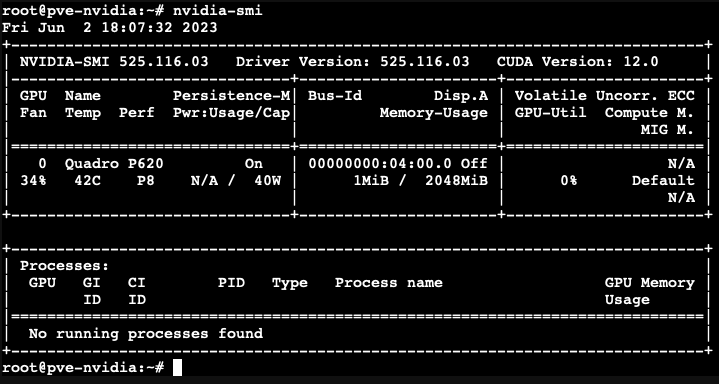
systemctl status nvidia-persistenced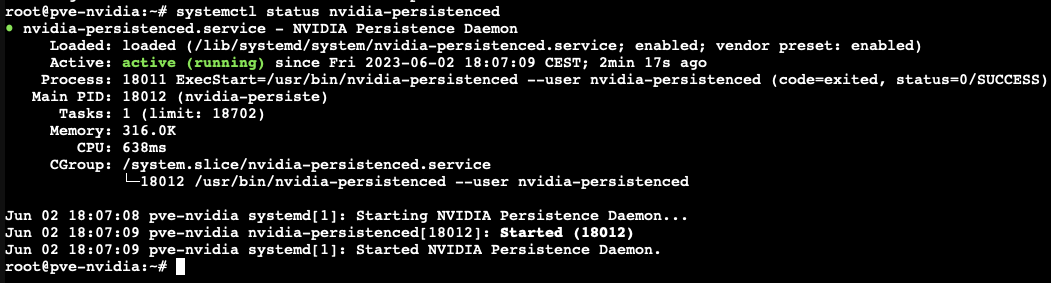
Consumer NVIDIA GPUs ship with a hardcoded limit on the number of simultaneous NVENC encoding sessions (typically 3, 5 or 8 depending on generation). The keylase patch removes that restriction. Useful when running Plex / Jellyfin / Frigate transcoding workloads.
cd /opt/nvidia
git clone https://github.com/keylase/nvidia-patch.git
cd nvidia-patch
./patch.sh
The patch must be re-applied after every driver update. The keylase repo also includes patch-fbc.sh for the FBC (frame buffer capture) limit if you need it.
On the host:
ls -l /dev/nv*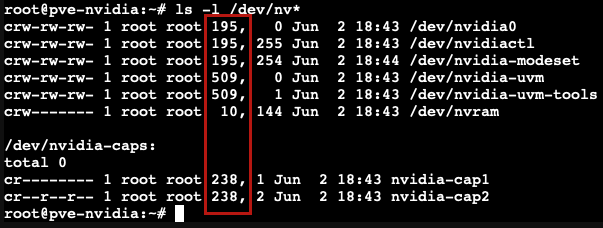
Note the major numbers — they vary between systems. Typical values:
| Device | Typical major |
|---|---|
/dev/nvidia0, /dev/nvidiactl | 195 |
/dev/nvidia-uvm, /dev/nvidia-uvm-tools | 509 (varies) |
/dev/dri/* | 226 |
/dev/nvidia-modeset | 195 (shares with nvidia) |
Stop the container first if it's running. Open its config file (replace <CTID> with the container ID):
nano /etc/pve/lxc/'<'CTID'>'.confComment out any pre-existing lxc.cgroup2.devices.allow or /dev/dri lines that conflict, then append the NVIDIA wiring (adjust the major numbers to match what ls -l /dev/nv* showed on your host):
lxc.cgroup2.devices.allow: c 195:* rwm
lxc.cgroup2.devices.allow: c 509:* rwm
lxc.cgroup2.devices.allow: c 10:* rwm
lxc.cgroup2.devices.allow: c 238:* rwm
lxc.mount.entry: /dev/nvidia0 dev/nvidia0 none bind,optional,create=file
lxc.mount.entry: /dev/nvidiactl dev/nvidiactl none bind,optional,create=file
lxc.mount.entry: /dev/nvidia-uvm dev/nvidia-uvm none bind,optional,create=file
lxc.mount.entry: /dev/nvidia-modeset dev/nvidia-modeset none bind,optional,create=file
lxc.mount.entry: /dev/nvidia-uvm-tools dev/nvidia-uvm-tools none bind,optional,create=file
lxc.mount.entry: /dev/nvram dev/nvram none bind,optional,create=file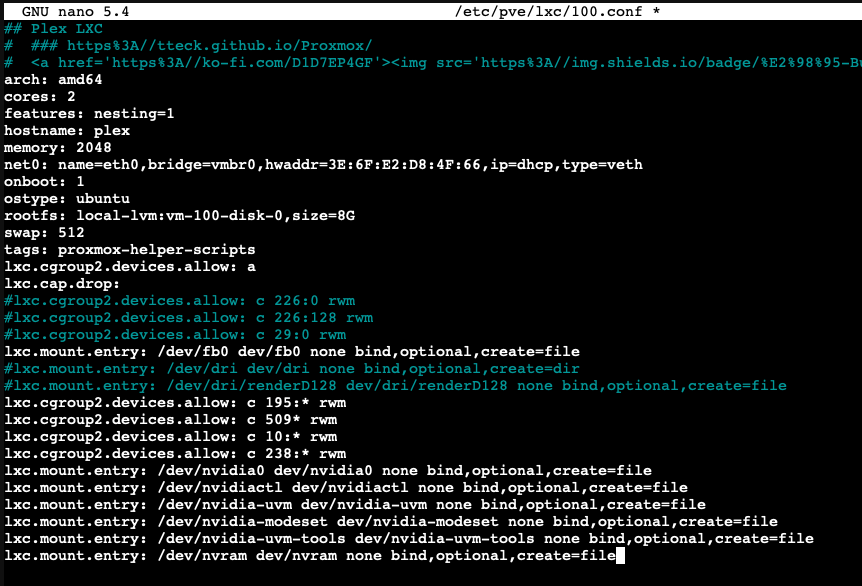
Save (Ctrl+X) and start the container.
Important
The kernel module is already loaded by the host — the container only needs the userland libraries that match the same driver version:
mkdir -p /opt/nvidia
cd /opt/nvidia
wget https://download.nvidia.com/XFree86/Linux-x86_64/'<'VERSION'>'/NVIDIA-Linux-x86_64-'<'VERSION'>'.run
chmod +x NVIDIA-Linux-x86_64-'<'VERSION'>'.run
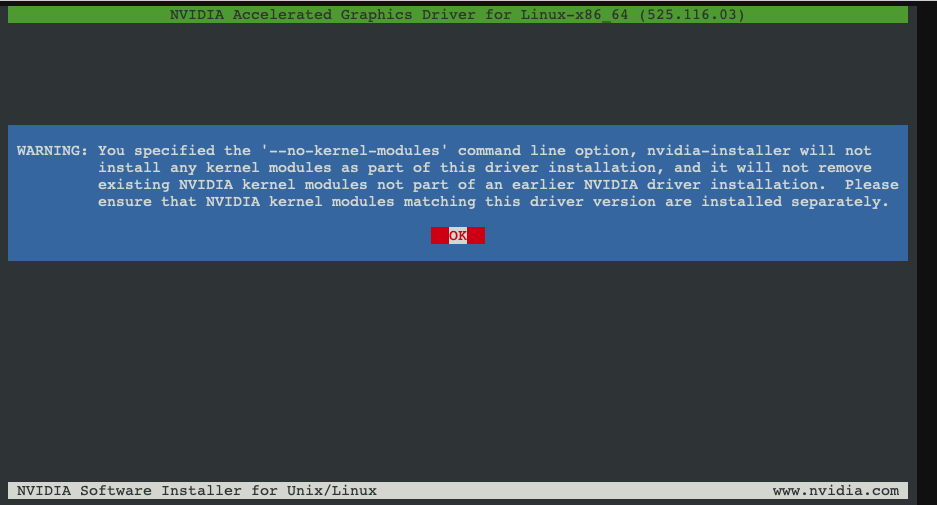
./NVIDIA-Linux-x86_64-'<'VERSION'>'.run --no-kernel-module
Accept the defaults at every prompt.
nvidia-smi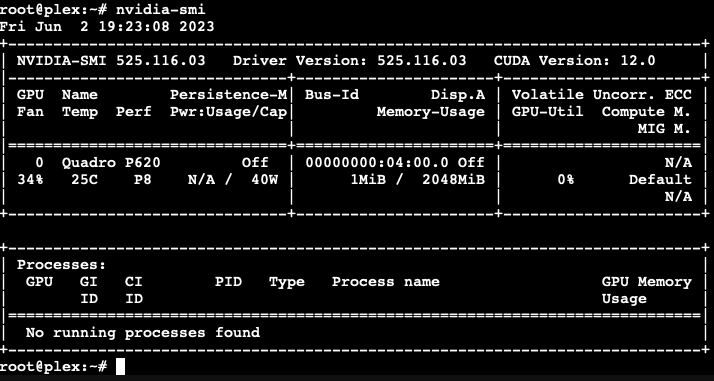
ls -l /dev/nv*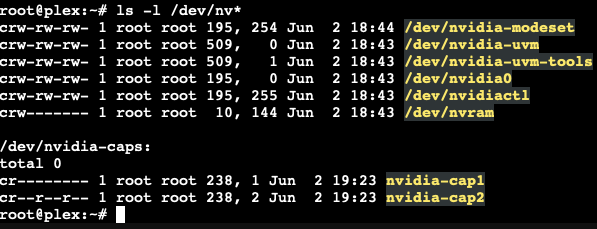
You should see the GPU listed and the device nodes mounted into the container's filesystem.
For Plex / Jellyfin, transcode a video and check the dashboard / logs — hardware-accelerated transcoding is now active.
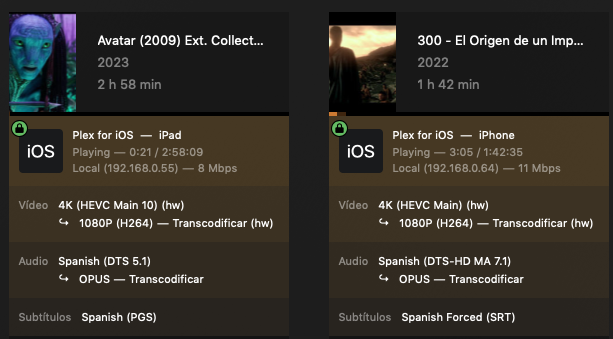
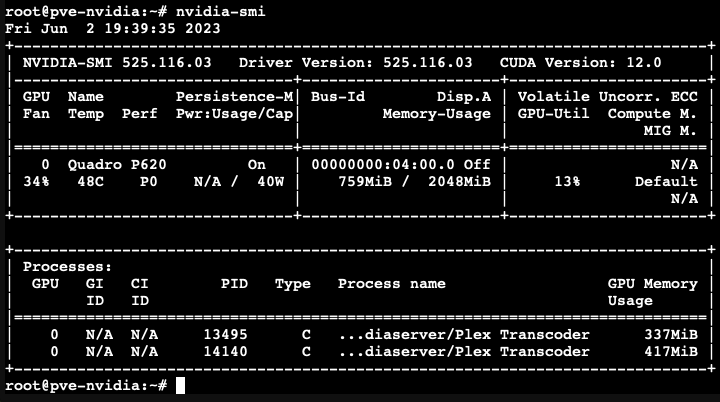
To wire the GPU into another container, repeat section 5 for each additional CTID. The driver install inside the container only needs to be done once per container.
If the container runs Docker and you want containers-inside-the-container to use the GPU, install nvidia-docker2. From inside the LXC:
wget https://raw.githubusercontent.com/MacRimi/manuales/main/NVIDIA/nvidia-docker.sh
chmod +x nvidia-docker.sh
./nvidia-docker.sh
The script handles the repository setup, package install and Docker daemon configuration in one go.
nvidia-smi on the host shows the GPU, but inside the container it errors with "No devices found": the driver versions don't match. Re-download the same <VERSION> inside the container and run with --no-kernel-module.apt-get install pve-headers-$(uname -r) and confirm uname -r matches the running kernel../patch.sh from /opt/nvidia/nvidia-patch.systemctl status nvidia-persistenced and start / enable it.ls /dev/nv* shows nothing: the major numbers in the LXC config don't match the host's. Re-run ls -l /dev/nv* on the host and adjust the lxc.cgroup2.devices.allow lines accordingly.