
Restoring a backup
The full restore workflow: from picking an archive to a working host. Documents the compatibility check, the two restore modes, the on-boot dispatcher, the post-boot reinstall pass, and the mechanisms that make cross-host and cross-kernel restores predictable.
The restore reproduces the source, not just the files
Three actions on a backup
Selecting a backup from the list opens a menu with three actions.
| Action | Detail |
|---|---|
| View | Opens a read-only view of the archive: manifest.json contents (source hostname, PVE version, kernel, hardware, installed components), the list of paths inside rootfs/, and a diff of what would change on the current host if the backup were applied. |
| Download | Exports the archive as a portable .tar.zst file (tar compressed with zstd). It can be extracted on any Linux system with tar --zstd -xf FILE.tar.zst, or on macOS/Windows with any tool that supports zstd (7-Zip, PeaZip, Keka…). The extracted tree contains manifest.json, metadata/ and rootfs/ — exactly the same layout the restore consumes. Useful for offline inspection or for restoring on a host without access to the original destination (PBS, Borg). |
| Restore | The write path. Extracts the archive into a staging directory, runs the compatibility check, and presents the mode picker (Full or Custom). |
The compatibility check
Before any file is written, hb_compat_check compares the state described in the manifest against the target host. The check runs read-only and produces four independent outputs that drive the rest of the restore.
| Output | What it drives |
|---|---|
| Direction flag | HB_COMPAT_KERNEL_DIRECTION — one of same, bk_newer or bk_older. Compares the backup's major kernel version against the target's. Drives the cross-kernel safe-subset filter (only fires on bk_older) and the hydration pass documented on the cross-kernel page. |
| Skip-paths list | RS_SKIP_PATHS — every path the restore must NOT apply. Populated by two mechanisms: hardware drift (missing NIC, missing storage ID, foreign ZFS pool) and — when the direction is bk_older — the cross-kernel unsafe-paths list. |
| NIC remap plan | When a NIC on the target has the same MAC as one on the source but a different name (typical after a motherboard swap), the compatibility check registers a rename plan (HB_NIC_REMAP) that will rewrite /etc/network/interfaces during the restore. |
| Rollback plan | Computed by compute_rollback_plan.sh. Lists VMs, LXCs and components present on the target but not in the backup. The user opts in during the confirmation dialog to have these removed as part of the restore, so the target ends up matching the backup exactly. |
The check also emits a structured report (HB_COMPAT_RESULTS) categorised as PASS / INFO / WARN / FAIL. WARN and FAIL entries surface in the pre-restore panel; the restore refuses to proceed only when a FAIL is present that the user cannot resolve by clicking Continue.
Full restore vs Custom restore
Once the compatibility check is complete, the restore mode menu appears. The choice determines what is applied, not how — both modes share the same underlying pipeline.
| Mode | Detail |
|---|---|
| Full restore | Applies every path in the archive that survives the drift and cross-kernel filters. Also runs the package install and the component auto-reinstall pass. This is the default and the recommended choice — the goal is to reproduce the source, not pick pieces. |
| Custom restore | Opens a checklist showing every path the archive carries. The user ticks a subset. Paths blocked by the cross-kernel filter appear greyed out and cannot be selected. Package install and component auto-reinstall are skipped by default in Custom mode — the user is signalling that they want partial application, not a full reproduction. |
How paths are classified
Every path selected for the restore is classified by hb_classify_path into one of three categories. The category determines when the path is applied to the system and why.
| Class | Behaviour |
|---|---|
| hot | Paths applied immediately to the running system. The service that consumes them picks up the change on its own or at the next reload — no reboot required. These are the bulk of a backup: /etc/ssh, /etc/apt, /etc/cron.*, /root, /usr/local/bin, general service configuration files, etc. |
| reboot | Paths applied immediately as well, but whose actual effect only kicks in on the next boot: the kernel only reads /etc/default/grub when the bootloader starts, /etc/fstab when filesystems are mounted at boot, /etc/modules when modules are loaded, etc. The file is in place the moment it is applied but the system has to reboot to consume it. Examples: /etc/default/grub, /etc/kernel, /etc/modules, /etc/fstab, /etc/zfs, /etc/initramfs-tools. |
| dangerous | Paths that are NOT applied on the running system — a live write could corrupt state or drop the active connection. These are staged in the pending set and written by the post-boot dispatcher after the reboot, when the cluster is up but the system is not yet fully in use. Examples: /etc/pve (pmxcfs is a live FUSE mount; writing directly to it bypasses it), /var/lib/pve-cluster (live cluster data), /etc/network (could reconfigure the very interface the user is connected on over SSH and drop the session). |
The full restore workflow
The complete pipeline from archive selection to a working restored host. Each stage feeds the next; the state written by earlier stages is consumed by later ones.
┌─────────────────────────────────────────────────────────────────┐
│  Archive → staging_root/                                        │
│    manifest.json   metadata/   rootfs/                          │
└──────────────────────────────┬──────────────────────────────────┘
                               │
                               ▼
   ┌─────────────────────────────────────────────────────────┐
   │  1. hb_compat_check                                     │
   │     · hardware drift → RS_SKIP_PATHS                    │
   │     · kernel direction → same / bk_newer / bk_older     │
   │     · NIC remap plan                                    │
   │     · hydration plan (bk_older only)                    │
   │     · rollback plan                                     │
   └──────────────────────────────┬──────────────────────────┘
                                  │
                                  ▼
   ┌─────────────────────────────────────────────────────────┐
   │  2. Confirmation dialog                                 │
   │     Shows: hot count, pending count, drift, hydration,  │
   │     NIC remap, cross-kernel note, reinstalls preview    │
   └──────────────────────────────┬──────────────────────────┘
                                  │ (accepted)
                                  ▼
   ┌─────────────────────────────────────────────────────────┐
   │  3. Apply hot paths → LIVE                              │
   │     _rs_apply rsyncs each hot path                      │
   │     from staging_root/rootfs to /                       │
   │     (skips paths in RS_SKIP_PATHS)                      │
   └──────────────────────────────┬──────────────────────────┘
                                  │
                                  ▼
   ┌─────────────────────────────────────────────────────────┐
   │  4. _rs_prepare_pending_restore                         │
   │     /var/lib/proxmenux/pending-restore/                 │
   │       ├── apply-on-boot.list                            │
   │       ├── plan.env                                      │
   │       ├── rs-skip-paths.txt                             │
   │       └── rootfs/ (deferred paths)                      │
   │     Enable proxmenux-restore-onboot.service             │
   └──────────────────────────────┬──────────────────────────┘
                                  │
                                  ▼
   ┌─────────────────────────────────────────────────────────┐
   │  4b. _rs_import_data_pools                              │
   │      Imports non-root ZFS pools whose disks are all     │
   │      present; retries with -f on foreign hostid;        │
   │      skips with a warning when disks are missing.       │
   │      Log: /var/log/proxmenux/restore-datapools-*.log    │
   └──────────────────────────────┬──────────────────────────┘
                                  │
                                  ▼
   ┌─────────────────────────────────────────────────────────┐
   │  5. _rs_run_complete_extras                             │
   │     packages.manual.list                                │
   │       → cascade-safe filter                             │
   │       → apt-get install                                 │
   └──────────────────────────────┬──────────────────────────┘
                                  │
                                  ▼
   ┌─────────────────────────────────────────────────────────┐
   │  6. REBOOT                                              │
   └──────────────────────────────┬──────────────────────────┘
                                  │
                                  ▼
   ┌─────────────────────────────────────────────────────────┐
   │  7. apply_pending_restore.sh (on early boot)            │
   │     Reads plan.env                                      │
   │     Applies apply-on-boot.list (filtered)               │
   │     Installs the postboot systemd unit                  │
   └──────────────────────────────┬──────────────────────────┘
                                  │
                                  ▼
   ┌─────────────────────────────────────────────────────────┐
   │  8. apply_cluster_postboot.sh (~10 minutes)             │
   │     Runs after pve-cluster is up                        │
   │     · Applies /etc/pve entries to pmxcfs                │
   │     · update-initramfs -u -k all                        │
   │     · update-grub / proxmox-boot-tool refresh           │
   │     · component --auto-reinstall (nvidia, coral, ...)   │
   │     · Boot sanity check                                 │
   │     · Notification: "Host restore finished"             │
   └─────────────────────────────────────────────────────────┘
The pending-restore machinery
Paths classified as reboot or dangerous, and hydration writes, are staged for the next boot instead of being applied live. This is done through a small, self-contained set of files under /var/lib/proxmenux/pending-restore/:
| File | Content |
|---|---|
| apply-on-boot.list | One relative path per line — the exact set of paths apply_pending_restore.sh will apply from the staged rootfs. Reading this file tells the user exactly what will change on the next boot. |
| plan.env | Environment variables sourced by the on-boot script: restore ID, compatibility flags (HB_COMPAT_CROSS_VERSION, HB_COMPAT_KERNEL_DIRECTION, HB_HYDRATION_APPLIED), rollback opt-in flag, cluster options. |
| rs-skip-paths.txt | The final RS_SKIP_PATHS list, persisted so apply_pending_restore.sh applies the same exclusions after reboot that were computed during the interactive step. Prevents drift-affected or cross-kernel-unsafe paths from being restored at boot time. |
| rootfs/ | The staged files themselves — the exact bytes that will be laid down. Kept on the same filesystem as / so the on-boot rsync is fast and does not depend on external storage still being reachable at boot. |
The proxmenux-restore-onboot.service systemd unit is enabled at the end of the interactive step. It is a one-shot service that fires early on the next boot, calls apply_pending_restore.sh, then disables itself. The unit is gated by ConditionPathExists=/var/lib/proxmenux/pending-restore/state, so on any boot without a pending restore it is a no-op.
The post-boot dispatcher — apply_cluster_postboot.sh
Where the interactive step ends and where the actual host reproduction happens. apply_cluster_postboot.sh is installed as a second one-shot systemd unit (proxmenux-apply-cluster-postboot.service) whose After=/Wants= targets ensure it runs only after pve-cluster and network-online are up. This is where the host-visible restore actions land.
| Task | Detail |
|---|---|
| Apply /etc/pve | /etc/pve is a live pmxcfs FUSE mount — it cannot be written to on early boot. The dispatcher copies files from the pending rootfs to the live /etc/pve once the cluster filesystem is up, one file at a time, without restarting pve-cluster. The captured /var/lib/pve-cluster/config.db from the backup (or the promoted config.db.raw-fallback) is materialised with the systemctl stop pve-cluster → atomic file copy → systemctl start pve-cluster pattern, so pmxcfs re-reads the restored state on the way back up. |
| Rebuild initramfs and bootloader | Runs update-initramfs -u -k all across every installed kernel, then either update-grub (GRUB installs) or proxmox-boot-tool refresh (systemd-boot / ZFS installs). Skipped if the interactive step determined nothing changed in the paths that affect these tools. |
| Component auto-reinstall | Reads the restored components_status.json and iterates over the registered installers (nvidia_driver, coral_driver, amdgpu_top, intel_gpu_tools). Each installer runs in --auto-reinstall mode, reads its previously-recorded version from the state file, and rebuilds against the target's current kernel. The interactive flow does not do this — reinstalling drivers against a kernel that has not yet booted is meaningless. |
| Boot sanity check | Before firing the completion notification, verifies that proxmox-boot-tool status shows a configured ESP, every /boot/vmlinuz-* has a matching /lib/modules/<ver> directory, and /vmlinuz resolves. Any inconsistency is surfaced in the notification instead of being hidden. |
| Completion notification | Sends the Host restore finished event through hb_notify_lifecycle. Includes total duration, applied path count, sanity-check warnings if any, and a link to the log at /var/log/proxmenux/proxmenux-cluster-postboot-*.log. If notifications are not configured, the event is silent — the log still records everything. |
What the post-boot looks like on the console
On the host's physical console, a successful dispatcher run ends with a [ OK ] Finished proxmenux-apply-cluster-postboot.service line. When that line appears — usually alongside the OKs for multi-user.target and graphical.target — the restore is completely finished: components reinstalled, boot artifacts regenerated, cluster reconciled.
![Proxmox physical console showing '[ OK ] Finished proxmenux-apply-cluster-postboot.service - ProxMenux Apply Cluster Configs (post-boot).' followed by the OK for multi-user.target and graphical.target, with the host login prompt above.](/images/docs/backup-restore/postboot-completion-console.png)
Live progress in the Monitor's Backups tab
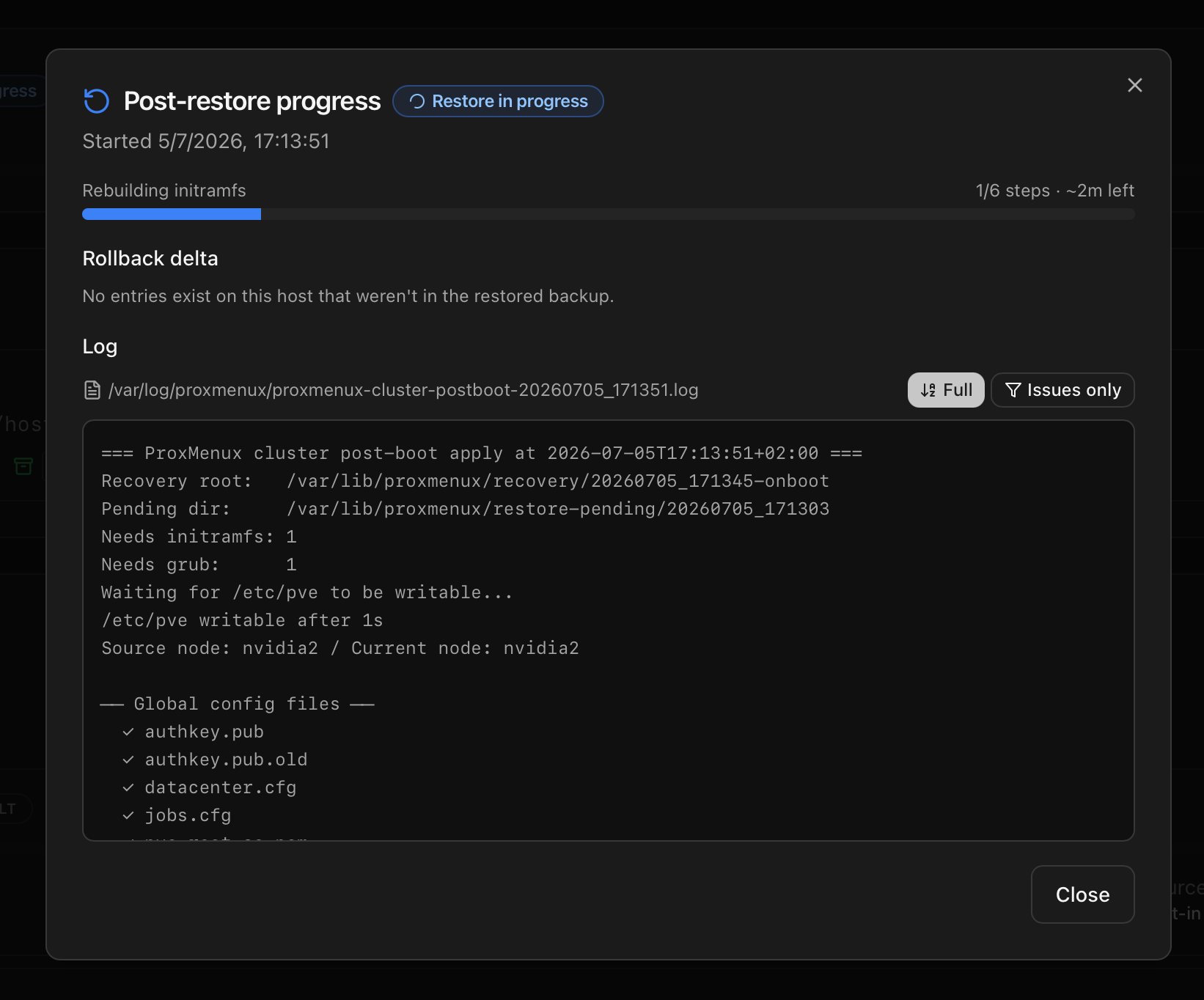
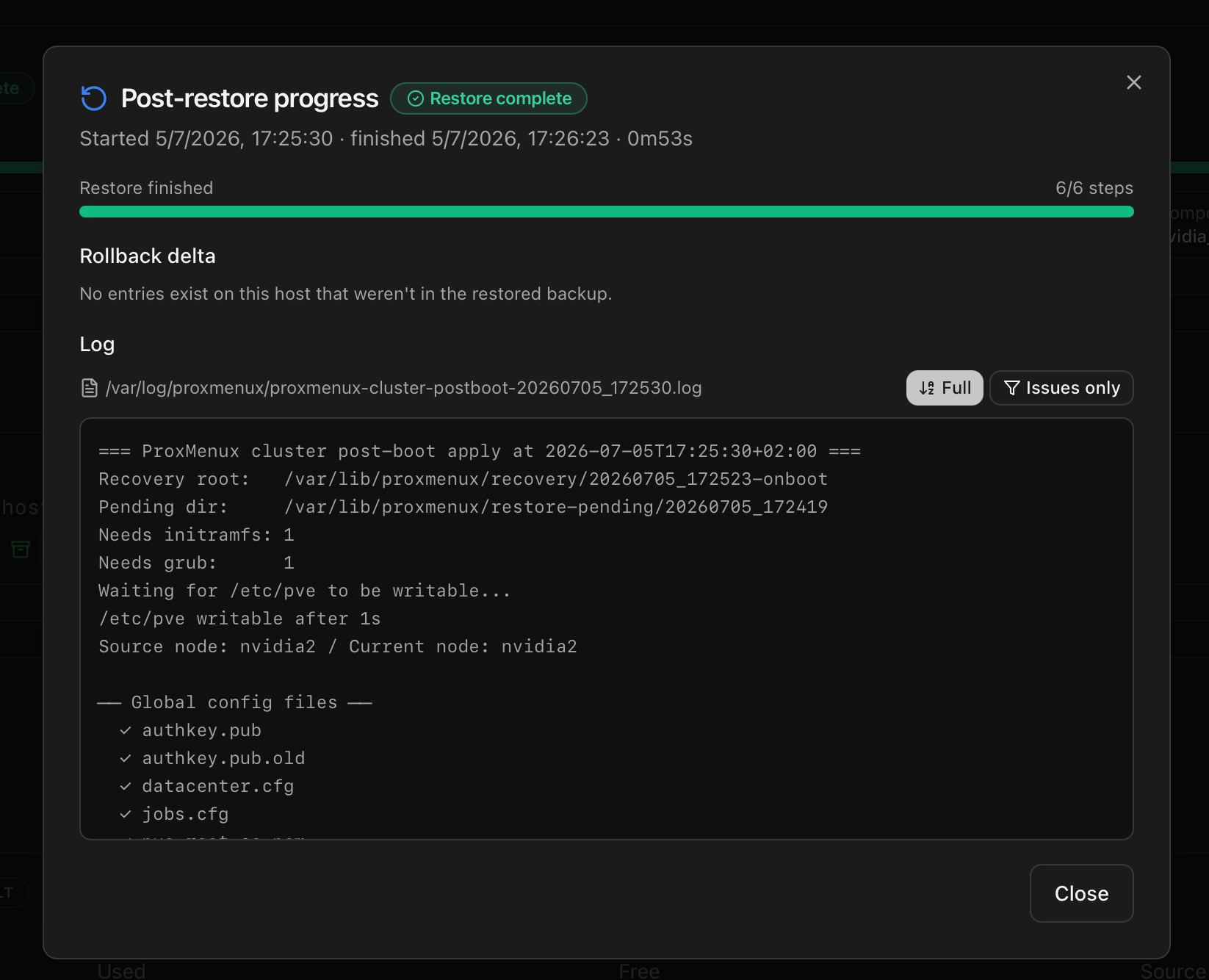
After the reboot the Backups tab of ProxMenux Monitor renders a live post-restore card that reflects the state of apply_cluster_postboot.service as it runs. The card is driven by /var/lib/proxmenux/restore-state.json, which the dispatcher updates at every milestone (apply cluster config, rebuild initramfs, update bootloader, per-component reinstall, boot sanity check, finalize).
| Card element | Detail |
|---|---|
| Status badge | One of Restore in progress, Restore complete or Restore failed. The card polls the state file every 2 seconds while running and every 30 seconds after finish. |
| Progress bar + step counter | Shows N/M steps with the label of the current step. While the restore is running an estimated time is derived from steps completed and elapsed time. |
| Component list | One row per driver being reinstalled (NVIDIA, Intel GPU tools, AMD tools, Coral TPU) with installing / ok / failed plus a link to the per-component log at /var/log/proxmenux/component-*.log. |
| Data-pool import | The data_pools_import block shows five colour-coded rows — Imported, Forced (imported with -f after a foreign hostid), Skipped partial (pools with only some disks present), Skipped missing (no disks present) and Failed. The state is persisted in /var/lib/proxmenux/restore-state.json, and the raw per-run log lives at /var/log/proxmenux/restore-datapools-<timestamp>.log. |
| Boot sanity warnings | The dispatcher checks for missing /lib/modules/<kernel>, absent ESP configuration and dangling /vmlinuz symlinks. Any warning surfaces here as a coloured banner. |
| Rollback delta | Lists VMs, LXCs and components that exist on the target but were not in the restored backup — the same entries surfaced in the pre-restore destructive rollback dialog. Each row carries the manual cleanup command. |
| Log tail | The last 600 lines of proxmenux-cluster-postboot-<ts>.log, with an Issues only filter that keeps just lines matching error, warning, failed, ✗ or traceback. |
Once the restore is complete or failed, a Dismiss button collapses the card. The state file is preserved and the History button re-opens it plus any prior restore (the last 20 runs are archived under /var/lib/proxmenux/restore-history/).
Why the last ten minutes matter
The reboot itself takes seconds, but the post-boot dispatcher spends around ten minutes finishing the restore. During this window the host is reachable and login works, but some services (mainly GPU-driver-dependent ones) are not yet available. Time breakdown for a typical Proxmox host with NVIDIA + Coral installed:
| Stage | Time | Detail |
|---|---|---|
| Boot + pve-cluster ready | ~30 s | Standard Proxmox boot. SSH, web UI and login are available at the end of this stage. |
| Apply /etc/pve to pmxcfs | ~10 s | Fast — small config files copied one by one to the live cluster filesystem. |
| Rebuild initramfs across kernels | 3–5 min | update-initramfs -u -k all rebuilds one initramfs image per installed kernel. Bulk of the wait. |
| Rebuild bootloader config | 10–30 s | update-grub or proxmox-boot-tool refresh. Fast even on ZFS. |
| NVIDIA driver reinstall (if applicable) | 5–10 min | Downloads the recorded driver version, compiles the DKMS modules against the current kernel, applies the ProxMenux patch if the source had it. Longest single task. |
| Coral / other component reinstalls | 3–5 min | DKMS compiles for Coral, apt install for intel-gpu-tools, .deb download + install for amdgpu_top. |
| Sanity check + notification | ~2 s | Cheap. The user learns the run completed the moment the notification fires. |
The window matters because the user can log in during this time and see missing tools (nvidia-smi not found, coral not detected). This is expected — the reinstall is still running in the background. The completion notification signals when everything is ready.
The optional destructive rollback
A restore is additive by default: if the target has VMs, LXCs or components that are not in the backup, they survive. This preserves work but can leave stale hostpci entries, orphan components or VMs the user no longer wants. When drift is detected between target and backup, the confirmation dialog offers a second yes/no: Execute destructive rollback?. Accepting it triggers _rs_execute_rollback, which deletes the VMs, LXCs and components that exist on the target but not in the backup. The rollback runs BEFORE the reboot so that the pending restore machinery sees a clean state. This is opt-in — the default is No, and the user sees exactly what would be removed listed by name (VMID and CTID) before deciding.
Where the logs live
| Log path | Content |
|---|---|
| /var/log/proxmenux/restore-YYYYMMDD_HHMMSS.log | Written by the interactive step. Contains: compatibility results, drift filter, hydration plan, apply hot output, prepare pending output, package install. |
| /var/log/proxmenux/apply-pending-YYYYMMDD_HHMMSS.log | Written by apply_pending_restore.sh on early boot. Contains: sourced plan.env, apply-on-boot iteration, skip-paths filtering. |
| /var/log/proxmenux/proxmenux-cluster-postboot-YYYYMMDD_HHMMSS.log | Written by apply_cluster_postboot.sh. Contains: pve-cluster apply, initramfs and bootloader output, per-component installer output, sanity check, notification payload. |
| /var/log/proxmenux/component-<name>-YYYYMMDD_HHMMSS.log | One log per component installer (nvidia, coral, etc.) that ran in the post-boot pass. Useful when a specific component's reinstall failed and the user needs the tool's own output. |
| /var/log/proxmenux/restore-datapools-YYYYMMDD_HHMMSS.log | Written by _rs_import_data_pools. Contains: enumeration of non-root pools from the manifest, per-pool outcome (imported cleanly, imported with -f for foreign hostid, skipped due to missing disks, or failed), and the raw output of each zpool import call. |
Where to go next
- Cross-kernel restore — the direction-aware safe-subset filter and the hydration pass invoked when the target kernel differs from the backup's.
- How it works — the archive layout, manifest and application inventory that the restore consumes.
- Scheduled jobs — the unattended flow that produces the archives this page consumes.