
Proxmox Backup Server
The PBS destination uploads the staging root as a single .pxar backup to a Proxmox Backup Server datastore, with optional client-side keyfile encryption and an optional passphrase-wrapped keyfile escrow uploaded next to each backup.
What Proxmox Backup Server is
Proxmox Backup Server (PBS) is Proxmox's own backup server product, developed and maintained by the same team that authors Proxmox VE. It is a dedicated backup server designed to receive backups from Proxmox VE hosts (VMs, LXCs and — via proxmox-backup-client — arbitrary host directories) with chunk-based deduplication, client-side encryption, and retention policies applied server-side. ProxMenux uses PBS as one of the three destinations for host backups; every PBS-specific mechanism described on this page (backup groups, .pxar archives, --backup-id, keyfile encryption) is standard PBS behaviour.
One backup per run, chunk-level dedup
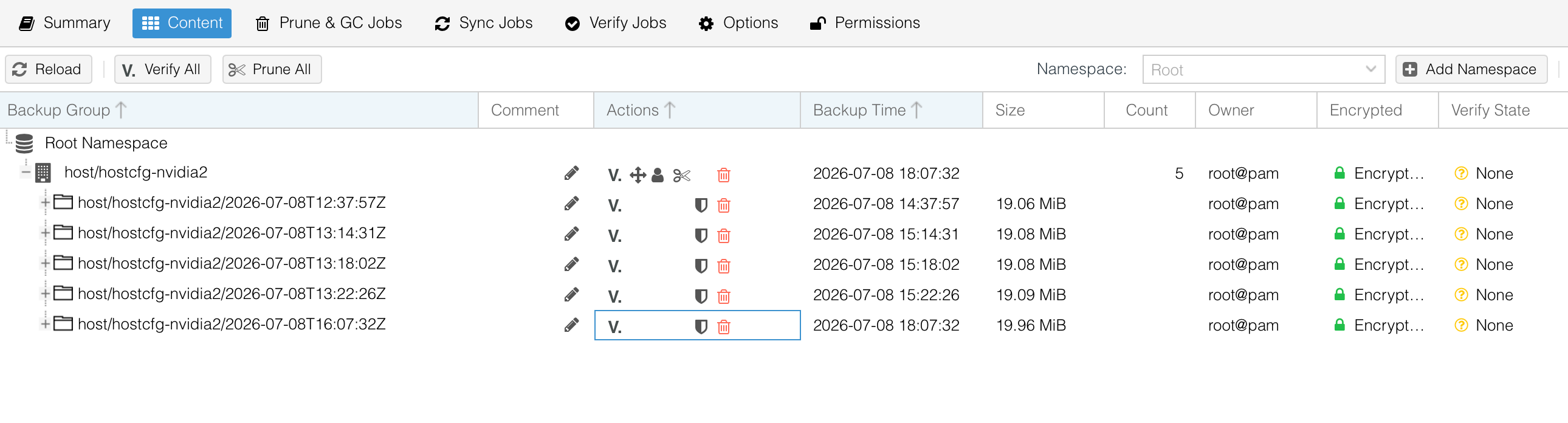
host/hostcfg-HOSTNAME/BACKUP-TIME. The payload is a .pxar archive containing the same three-block layout described in How it works. PBS deduplicates at the chunk level across all backups in the datastore, so subsequent backups of the same host transfer and store only the chunks that changed. Retention is applied by ProxMenux itself for scheduled jobs — run_scheduled_backup.sh runs proxmox-backup-client prune with --keep-last / --keep-daily / --keep-weekly after each successful run using the values configured on the job.Repository selection
ProxMenux discovers PBS repositories from two sources on every backup. The operator picks one from a unified menu; the choice determines HB_PBS_REPOSITORY, HB_PBS_SECRET and HB_PBS_FINGERPRINT for the run.
| Source | On-disk state | Content |
|---|---|---|
| Proxmox storage.cfg (auto-discovered) | /etc/pve/storage.cfg + /etc/pve/priv/storage/NAME.pw | Any pbs: stanza in Proxmox's own storage config is picked up automatically. Server, datastore, username and fingerprint come from the stanza. The password is read from Proxmox's own credentials directory. No re-entry needed on the ProxMenux side — the repository is available as soon as it is configured in Proxmox. |
| ProxMenux manual config | /usr/local/share/proxmenux/pbs-manual-configs.txt + pbs-pass-NAME.txt + pbs-fingerprint-NAME.txt | Added from Configure backup destinations → PBS destinations → Add PBS. Prompts for a name, username (root@pam or user@pbs!token), host or IP, datastore and password. The password re-prompts on empty input — an empty save would otherwise persist silently and every subsequent backup would fail with an opaque authentication error. This path is used when the target PBS is not registered as Proxmox storage. |
Selection menu
Both sources are shown in a single menu, each row tagged with its origin ([proxmox] or [manual]). Entries whose password could not be resolved are tagged with a ⚠ no password warning — selecting one triggers a password re-entry before the backup starts. The fingerprint is passed to proxmox-backup-client via the PBS_FINGERPRINT environment variable; when absent, the client asks the operator to accept the server certificate interactively on the first backup.
The backup command
The upload is a single invocation of proxmox-backup-client backup. ProxMenux runs it inside an env wrapper so credentials never appear in the process argument list.
env \
    PBS_PASSWORD="$HB_PBS_SECRET" \
    PBS_ENCRYPTION_PASSWORD="$HB_PBS_ENC_PASS" \
    PBS_FINGERPRINT="$HB_PBS_FINGERPRINT" \
    proxmox-backup-client backup \
        hostcfg.pxar:$staging_root \
        --repository USER@REALM@HOST:DATASTORE \
        --backup-type host \
        --backup-id  hostcfg-HOSTNAME \
        --backup-time BACKUP-EPOCH \
        [--keyfile /usr/local/share/proxmenux/pbs-key.conf]
Backup ID naming
The default backup ID is hostcfg-HOSTNAME. The operator is asked to confirm or edit it before the upload; any characters outside [A-Za-z0-9_-] are stripped and trailing dashes are trimmed. Reusing the same ID across runs is intentional — PBS treats the ID as a group, and every subsequent backup appears as a new backup inside that group, sharing dedup with prior runs.
Why the source is the full staging root
The .pxar source is the entire staging_root — rootfs/, metadata/ and manifest.json together. Earlier versions passed $staging_root/rootfs as the source; that left metadata/ out of the archive and the restore's compatibility check had nothing to read, degrading to cross-host warnings even on same-host restores. Old backups created with the rootfs-only source still restore correctly via _rs_check_layout's case-3 branch, which wraps a flat etc/var/root/usr tree back into a rootfs/ hierarchy.
Client-side encryption
This section uses the terms keyfile, passphrase and recovery envelope. The glossary summarises the differences in one sentence per term.
PBS client-side keyfile encryption encrypts chunks on the source host before upload. In ProxMenux encryption is optional; when enabled, whether to also upload a passphrase-wrapped copy of the keyfile to PBS as a recovery escrow is an explicit yes/no choice the operator makes at setup time (and can revisit later from the Monitor). The keyfile itself always lives at one canonical path on the host — /usr/local/share/proxmenux/pbs-key.conf — and is reused silently by every subsequent encrypted backup.
Setting up the keyfile
The encryption prompt runs at the first encrypted backup on the host. Step one asks whether to encrypt the backup: No continues without encryption; Yes moves to step two. Step two depends on whether a keyfile is already installed at /usr/local/share/proxmenux/pbs-key.conf. If it is, the installed keyfile is reused silently and the backup proceeds — subsequent backups never re-ask. If it is not, a two-option menu asks how to set one up. Generate a new keyfile runs proxmox-backup-client key create --kdf none. Use an existing keyfile auto-detects a PVE-managed keyfile: when the selected PBS repository is registered in Proxmox with an encryption key at /etc/pve/priv/storage/<NAME>.enc, that file is copied to the ProxMenux canonical path silently and the flow continues. When no PVE-managed keyfile matches the repository, an input prompts for the absolute path where the operator has already placed the keyfile on this host. Either way, the file lands at the canonical path with chmod 600.
Per-host or shared keyfile
Both operating models are supported and neither is enforced — the choice belongs to the operator based on how their fleet is organised.
Per-host keyfile (default)
Each host generates its own keyfile the first time it enables PBS encryption. Isolation is maximum: compromising the keyfile of one host does not expose the backups of any other. Recommended for production fleets and for environments where hosts have different owners or compliance boundaries.
Shared keyfile (import on every host)
One master keyfile generated once and installed on every host via the Use an existing keyfile option. Management is simpler: a single secret to safeguard, and any host can decrypt the archives of any other (useful for consolidation, cross-host restore drills or centralised backup verification). The trade-off is that a leak of the shared keyfile exposes every host at once. Recommended for homelabs and for fleets where all hosts have the same owner and trust boundary.
Upload key to PBS — the operator decides
Right after the keyfile is chosen, ProxMenux asks a single explicit question — Upload key to PBS? — with two answers. Nothing gets uploaded to PBS until the operator answers Yes. The default is No, keep local only: the keyfile stays only at the canonical local path, ProxMenux never touches PBS with any recovery artefact, and the operator handles the offsite copy themselves (the Monitor's Download keyfile button in the PBS destination row provides one on demand). Choosing Yes, upload prompts for a recovery passphrase — twice, with match validation — and ProxMenux wraps the keyfile with that passphrase using AES-256-CBC and PBKDF2 (600 000 iterations, random salt) to produce pbs-key.recovery.enc. Every subsequent encrypted backup uploads that envelope to PBS as a paired backup group. Neither the passphrase nor a plaintext copy of the keyfile ever leaves the host. The choice can be changed later from the Monitor at any time — the escrow toggle inline in the PBS destination row flips Yes/No and applies immediately (Start uploading, Stop uploading, or Update passphrase, matching the current state).
Paired backup group on PBS
When the escrow mode is Yes, upload, ProxMenux uploads the recovery envelope to PBS after every encrypted backup as a second, paired backup group with the same name as the host group but ending in -keyrecovery. The two groups sit next to each other in the datastore listing — one for host backups, one for recovery envelopes. The envelope never leaves the host in plaintext: encryption happens on the host itself with AES-256-CBC and PBKDF2 before any bytes go on the wire (openssl enc -aes-256-cbc -pbkdf2 -iter 600000 -salt). PBS receives only the already-encrypted envelope.
Is uploading the keyrecovery file to PBS a security risk?
The keyrecovery file is encrypted in transit and at rest. The recovery passphrase never leaves the host: encryption happens locally before the upload, and PBS only ever sees the already-encrypted result. A PBS administrator — or anyone with access to the datastore — can download the keyrecovery file, but without the recovery passphrase they cannot read the keyfile inside: it is opaque ciphertext. Reconstructing the keyfile requires both pieces at once, the keyrecovery file and the passphrase, and only the operator holds both.
Why two groups instead of a single encrypted one
A single proxmox-backup-client backup invocation encrypts every one of its archives with the same keyfile, or none at all — there is no in-between. The host backup has to be encrypted with the host keyfile, but the recovery envelope cannot ride along in that same upload, because it would end up encrypted with the very keyfile it contains: on a freshly reinstalled host there would be no way to open it (you would need the keyfile to decrypt the keyfile). That is why the two artefacts are uploaded independently and appear as two separate groups: the host backup is encrypted by PBS with the keyfile, and the recovery envelope is encrypted by ProxMenux with the passphrase before upload. Two different encryption layers protecting two different assets.
Recovery on a fresh host
When the local keyfile is missing at the canonical path — on a freshly reinstalled host, or after an explicit removal — the restore flow tries three sources in order and stops at the first one that produces a usable keyfile. First, when the selected PBS repository has a matching PVE-managed keyfile at /etc/pve/priv/storage/<NAME>.enc, that file is copied to the canonical path silently. Second, when a -keyrecovery group is available on PBS, the newest snapshot is downloaded and the operator is asked for the recovery passphrase to decrypt it. Third, when neither of the above works or the operator declines them, an input prompts for the absolute path where the keyfile lives on this host and copies it to the canonical path. The Monitor exposes the same import flow inline in the backup detail modal — an amber panel appears at the top of the modal when Restore, Download or View contents would need a keyfile that is not installed. When a keyfile is installed but does not match the one that encrypted the backup, PBS returns a wrong key — manifest's key XX does not match provided key YY error; the same three actions display a structured amber panel with the required manifest fingerprint prominently rendered, so the operator can identify which keyfile to import to open that specific backup.
Managing the keyfile from the Monitor
The Monitor exposes the keyfile controls inline in each PBS destination row of the backup configuration page. The row shows three actions: Download exports the current keyfile to the operator's browser, Upload replaces the installed keyfile with one supplied by the operator (the previous file is overwritten only after the new one lands successfully at the canonical path), and Delete removes the keyfile from the host. The recovery-escrow toggle is a single inline control next to those actions: a Yes/No radio for Upload key to PBS?, a passphrase field when Yes is selected, and a contextual Apply button that reads Start uploading, Stop uploading or Update passphrase depending on the current state. Every action goes through the same Flask endpoints that the shell TUI uses, so the on-disk effect and the state on PBS are identical whichever surface the operator picks.
Retrieval on the restore side
The restore flow discovers ProxMenux host backups on PBS by listing backup groups under the configured repository and filtering by backup ID pattern. The Monitor's Backups tab renders the same list. Selecting a backup triggers proxmox-backup-client restore with the same repository + password + fingerprint (and --keyfile when the backup was encrypted), extracting the .pxar into a staging directory that _rs_check_layout then feeds to the standard restore pipeline. For manual retrieval outside ProxMenux, the same command extracts the archive to any path — the resulting tree can be inspected or fed to a hand-driven restore.
References
Official Proxmox Backup Server documentation for the components ProxMenux relies on.
- Proxmox Backup Server documentation — main entry point covering installation, administration, storage, users and roles.
- proxmox-backup-client — the command-line tool ProxMenux invokes for every backup and restore. Covers backup IDs, backup types, archives, repository syntax and environment variables.
- Client-side encryption — keyfile creation, --kdf modes, the encryption model that ProxMenux extends with a passphrase escrow.
- Datastore management — creating and managing the datastores that receive host backups, including chunk-store layout and permissions.
- Pruning and garbage collection — the retention model behind --keep-last / --keep-daily / --keep-weekly that ProxMenux applies per scheduled job, plus how PBS reclaims chunks after prune.