
Install an image that is not in the catalog
An image of your own is translated from its Compose file, a docker run command or its reference alone, and the result is shown for review before any LXC is created.
Same converter, same installer
How the image is described
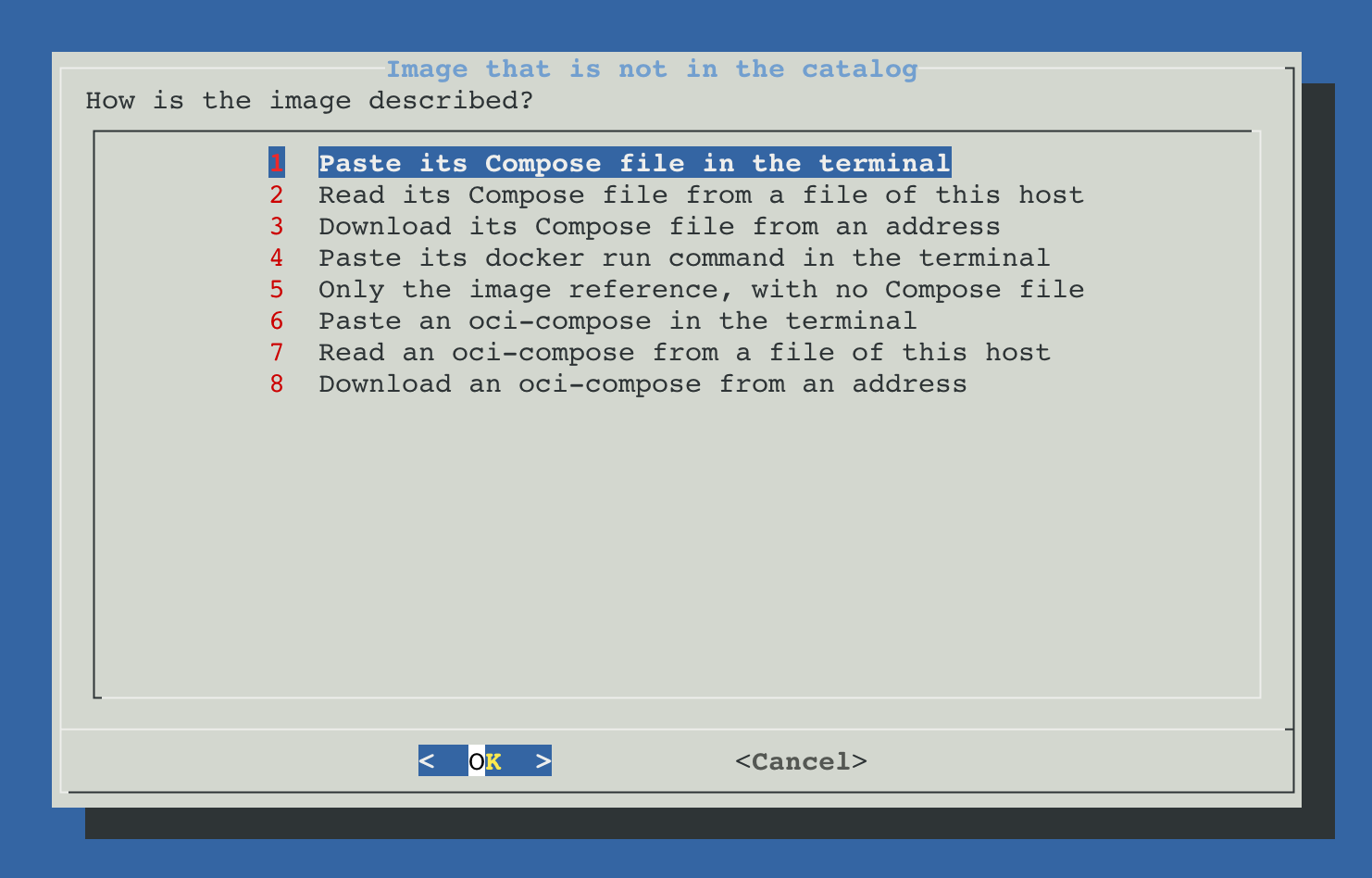
The first screen asks how the image is described. Four ways give a definition that is translated, a fifth uses only the image name, and three take an oci-compose that is already written.
| Option | What it reads |
|---|---|
| Paste its Compose file in the terminal | The YAML is pasted in the terminal and ends with Ctrl+D. |
| Read its Compose file from a file of this host | A path on the node, /root/docker-compose.yml by default. The file must exist and be at most 256 KiB. |
| Download its Compose file from an address | An http:// or https:// address that serves the raw YAML. At most 256 KiB are downloaded. |
| Paste its docker run command in the terminal | The command published by the project. Ports, environment, volumes, devices, capabilities, user, shared memory and the other supported options are translated. |
| Only the image reference, with no Compose file | A reference such as ghcr.io/user/application:latest. The registry is queried and the OCI metadata of the image is kept. |
| Paste an oci-compose in the terminal | The JSON is pasted in the terminal and ends with Ctrl+D. It is not translated: it is checked and installed as it is written. |
| Read an oci-compose from a file of this host | A JSON file on the node, /root/oci-compose.json by default, of at most 2 MiB. |
| Download an oci-compose from an address | An http:// or https:// address that serves the JSON file. At most 2 MiB are downloaded. |
What an image reference alone provides
An image carries its process metadata, but not everything a Compose file usually adds around it.
| Read from the image | Not in the image | Consequence |
|---|---|---|
Entrypoint, Cmd, User, WorkingDir and embedded environment | Variables that only appear in the documentation | They are added during the installation or with Modify |
| Volumes declared by the image | Host directories that only a Compose file names | Additional paths are added before installing |
EXPOSE ports | The URL, protocol or functional healthcheck | The port and the way the service is checked are confirmed |
| Architectures and digest in the registry | Devices, privileges or external dependencies | None of them is enabled without a definition that asks for it |
Review before installing
After translating the definition, ProxMenux shows what it understood before asking for VMID, resources or storage.
- 1
Analyse
Services, image, ports, paths, environment, devices, security and healthcheck are read.
- 2
Query the registry
The image must exist in its registry, and its published architectures are listed. A private registry is read with the account saved for it.
- 3
List what is not applied
Labels, Docker networks, Swarm settings and other keys that have no effect on an LXC are listed.
- 4
Block what cannot be translated
A key with no safe equivalent is shown under What cannot be translated and the installation does not continue. Nothing is dropped silently.
- 5
Ask for secrets
Variables whose names read as a password, token or key become sensitive questions of the installation.
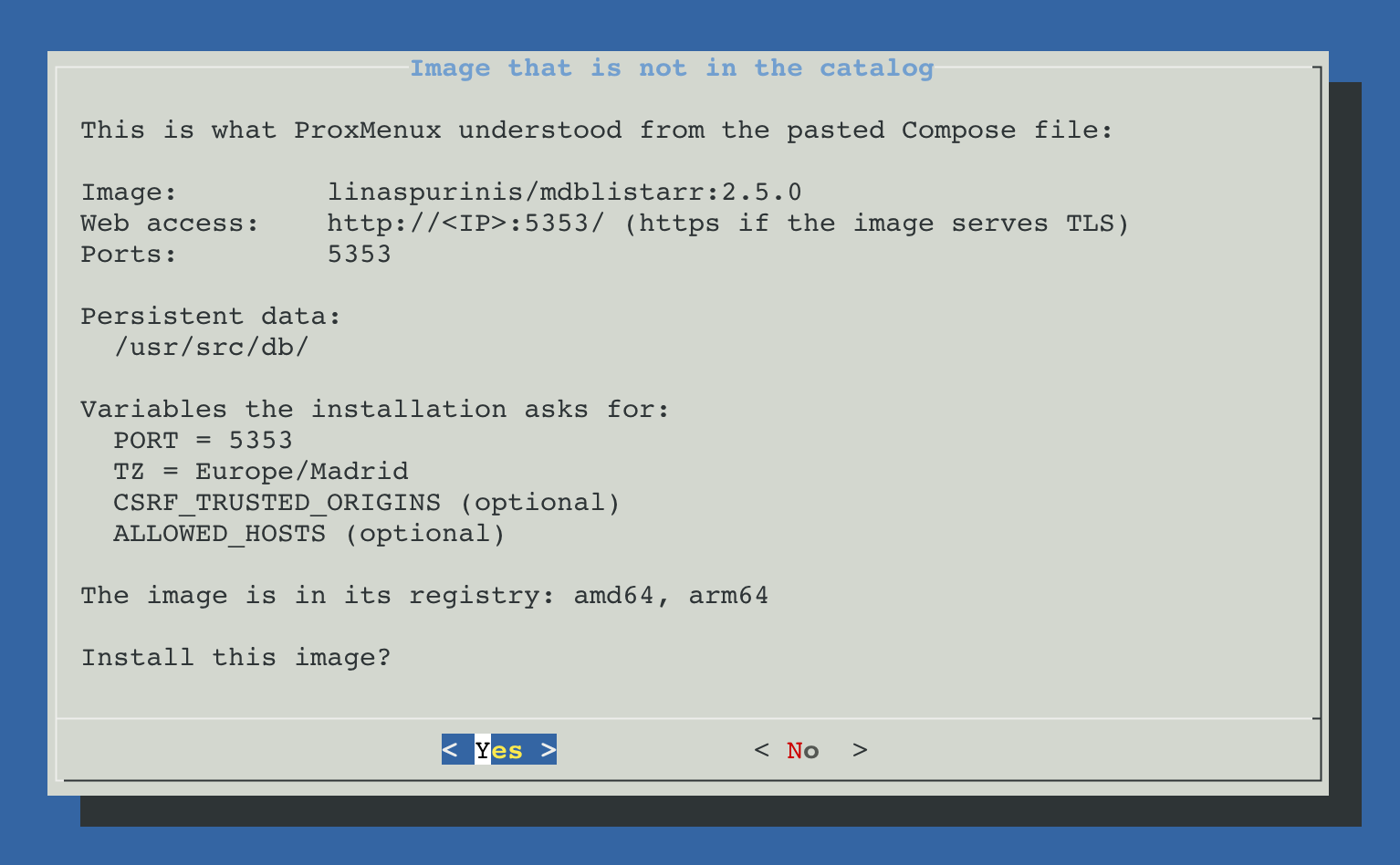
After accepting the summary, the flow is the one of the catalog: name, default or advanced mode, VMID, CPU, memory, network, start with the node, persistent paths, additional paths, compatible devices and a final summary.
Input examples
services:
  app:
    image: ghcr.io/example/app:latest
    ports:
      - "8080:8080"
    volumes:
      - ./config:/config
      - /srv/media:/media
    environment:
      TZ: Europe/Madrid
docker run -d \ --name app \ -p 8080:8080 \ -e TZ=Europe/Madrid \ -v app-config:/config \ -v /srv/media:/media \ ghcr.io/example/app:latest
An oci-compose written by hand
An oci-compose is the JSON file an application is installed from. The catalog keeps one for each of its applications, and the same format can be written by hand and installed with this option.
One written by hand states what its author decides: the image, its ports, variables and volumes, and what the installation asks. ProxMenux completes the rest when it reads the file. It can say what a Compose file cannot: the text of a question, a password generated during the installation, a GPU profile, the owner of each volume, the check of the first start or the credentials shown at the end.
- 1
Check
A file with errors is not installed. Each error names the field it is in, and a file that is not valid JSON reports the line and the column.
- 2
Review
A valid file shows what it installs: image, web address, ports, persistent paths, the variables the installation asks for and the files it writes.
- 3
Install
The installation is the one of any application of the catalog, with default or advanced settings.
A file that decides privileges
The format is described block by block, with two complete examples, in the README of the OCI engine. The record of an installation can be read the same way: only the template it was installed from is used, and none of the answers of that installation.
Images in private registries
An image in a private registry, such as a private package on GitHub or a private repository on Docker Hub, is read with an account saved in ProxMenux.
- 1
The registry refuses the image
When the registry answers that the image needs an account, the review offers to sign in to that registry and reads the image again.
- 2
Sign in
A user and a password or access token that can pull the image. The registry checks them, and they are saved only if it accepts them.
- 3
Install and keep up to date
The installation downloads the image with that account, and so do updates, Modify, Recreate, the watchdog and the update check of the Monitor, on any node of the cluster.
Registry accounts, in the main menu of OCI manager Apps, lists the saved accounts by registry and user, never their secret. From each account an image can be checked, downloaded or installed, and the account updated or removed.
- GitHub (
ghcr.io): the user is the GitHub account, and the password a personal access token with theread:packagespermission. - Docker Hub (
docker.io): the user is the Docker Hub account, and the password an access token with read permission. - Other registries, including one with its own port such as
registry.example.com:5000: the user and password or token that registry gives.
Where the accounts are kept
/etc/pve/priv/proxmenux/registry-auth.json, readable only by root, in the same folder where Proxmox keeps its storage passwords. /etc/pve is shared by every node of the cluster, so an account added on one node is used on all of them. The host backup includes it, and uninstalling ProxMenux removes it from every node.Definitions that are not installed
- A Dockerfile without a published image: the image has to be built and published in an OCI registry first.
- A Compose file with several services is blocked: this option installs one service in one container at a time, even when several services use the same image.
configs, external secrets or device formats that cannot be translated unambiguously.- Shell substitutions such as
$(command): the resulting value has to be written instead. docker runoptions that are not recognised, and--env-file: an explicit Compose file is read instead.