
Install, update and modify
Each instance keeps a reproducible contract, so its rootfs can be replaced without losing configuration or persistent data.
The instance contract
After an installation, the effective configuration is stored in /usr/local/share/proxmenux/oci/instances/VMID/oci-compose.json. It is not a copy of the original Compose file: it is the reproducible contract of the LXC that exists on this host.
instances/
└── 105/
    └── oci-compose.json
        ├── image and resolved digest
        ├── resources and network
        ├── environment (secrets protected)
        ├── container disks and host directories
        ├── hardware profile and devices
        ├── console log and terminal mode
        └── stack membership and lifecycle
A copy of the contract travels inside the container, in /.proxmenux/oci-record.json, readable only by root of the container, so a backup of the container always carries the contract it had at that moment. A second copy is kept in /etc/pve/priv/proxmenux/oci, which every node of a cluster shares and only root of the host reads. Both are written after every installation, update and change.
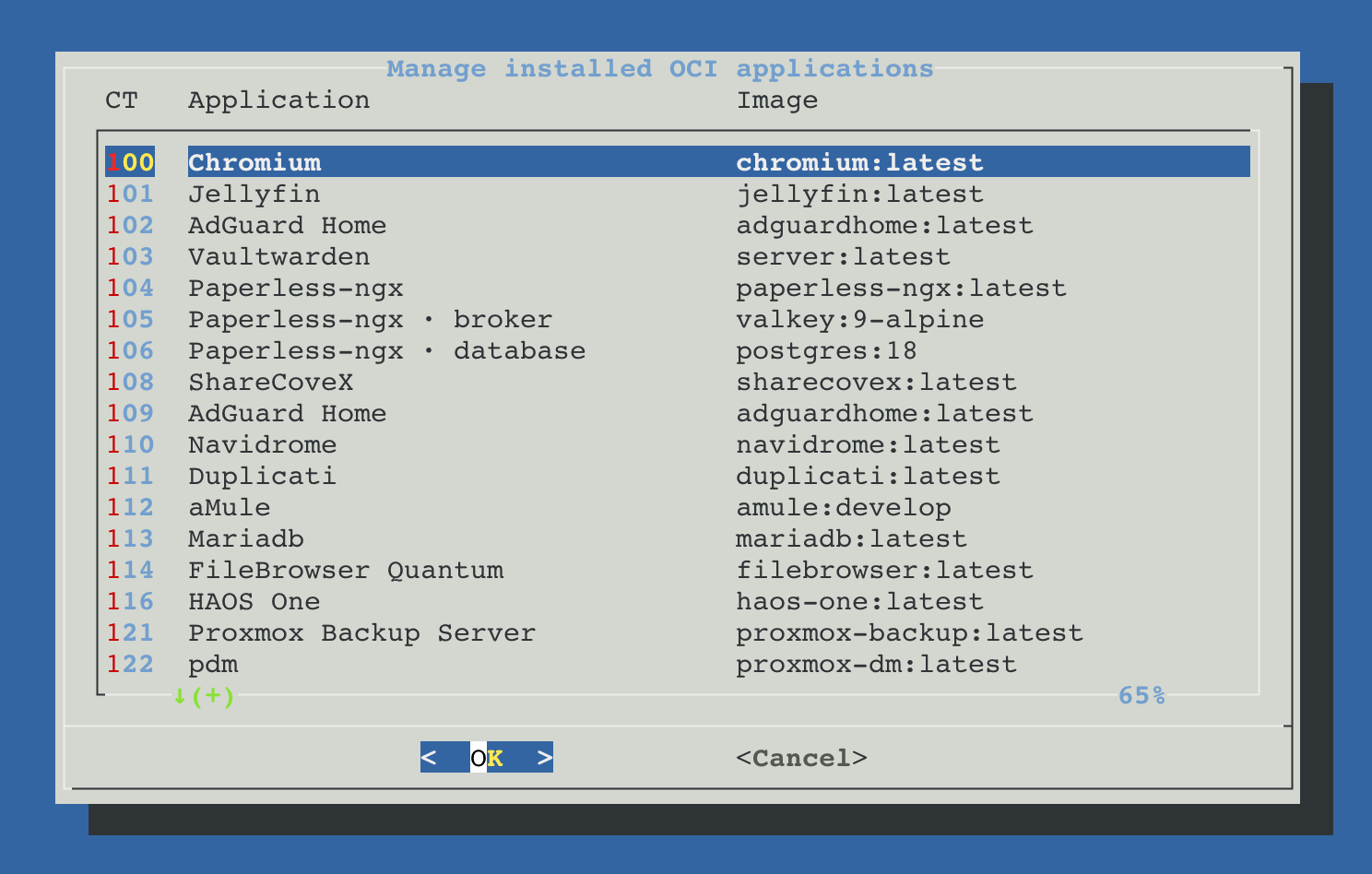
Manage installed OCI applications
This option of the main screen lists the registered instances with their application and image. Each one is checked against its contract before any action; a CT that no longer matches its record is neither modified nor deleted. The same update and the same editor are offered in the Updates tab of ProxMenux Monitor.
| Option | What changes | What is kept |
|---|---|---|
| Update the image with the saved configuration | The rootfs is replaced by the image the saved channel publishes today | Contract, container disks, host directories, network and devices |
| Modify: edit resources, network, paths and GPU | The editor opens with the current contract; the CT is rebuilt with the changes | The data of container disks and host directories |
| Watchdog: restart the application when it crashes | Whether the application is started again when it stops on its own. Nothing is rebuilt | The whole installation; only the choice is saved in the contract |
| Remove: delete the application and its containers | The LXC, or every member of a stack, and their contracts are deleted | Host directories, with their content |
For a multi-container application the menu offers Update every container of the application, Modify extra paths and devices, Recreate every container with its saved configuration, the watchdog and the removal. Modify adds or removes the extra paths and devices of the application container without rebuilding anything and, in Immich, changes what runs recognition. Recreate rebuilds every container from the image it was installed with, without looking for a newer one.
How an update works and what happens if it fails
An update is transactional: the new image is prepared and verified first; a backup is then created and the application's filesystem is replaced. The new version is only committed after it passes its health check. If something fails after the container has been changed, recovery from the previous backup is attempted and its result is verified.
If preparation or preflight checks fail, the update stops before stopping the container. Files in shared host directories are not reverted by restoring the container backup.
- When the registry still serves the installed digest, nothing is downloaded and the instance is not touched.
- The new image is verified layer by layer before the CT stops. A download that arrives damaged is fetched a second time; an image already cached that fails the check is downloaded again.
- Settings changed in Proxmox VE after the installation (memory, swap, cores, CPU limit, CPU priority, start with the node) are kept and carried into the new contract.
- The LAN interface that the Arr suite and multi-container applications add (
net1) and the start order (startup) are given back to the new container as they are. - A host directory is recognised by its path and by the filesystem it is on, not by the device name the host gives its disk, so a USB or network disk that comes back under another name is still the same directory. When its disk is not connected, the update stops before the CT is stopped and names the directory that is missing.
- Any other difference between the CT and its contract stops the update before the CT is stopped.
Before anything is stopped, the operation checks that the backup fits: the data in use on the volumes that are backed up, plus a margin. It is written next to the record of the application, on the system disk of the host. When it does not fit there, the menu asks for another storage of the host that accepts backups: the backup is made there, it is deleted when the operation ends, and the choice is remembered for that application, scheduled updates included. With no storage that has room, the operation is refused and the application stays as it was. The new image is checked the same way before it is downloaded.
Recovering an interrupted operation
An update and a change use a persistent transaction. If the process, the terminal or the node is interrupted after the CT stops, the operation is not taken as finished.
- 1
Pending marker
When Manage installed OCI applications opens, the saved state shows that the replacement was never published.
- 2
View status
Shows the phase that was reached without changing containers or data.
- 3
Recover the previous installation
Restores the verified native backup taken before the replacement and the previous contract.
- 4
Stacks as a unit
For a multi-container application, every member is recovered from the same transaction point, not only the selected one.
Host directories are outside the rollback
Watchdog: restarting an application that stops
Proxmox has no restart policy: when the process of an application container ends, the container stays stopped. With the watchdog on, an application that stops on its own is started again. It does for an OCI application what restart: unless-stopped does in a Compose file.
| What happens | With the watchdog on |
|---|---|
| The application crashes or its process ends | The container is started again within seconds |
It is stopped or shut down from Proxmox, from the Monitor or with pct | It stays stopped until somebody starts it |
| A backup, a migration or a ProxMenux operation is working on it | Nothing is done until that ends |
| It was already stopped when the host started | It stays stopped; Start with Proxmox decides that |
| It keeps stopping right after starting | An application that stops again within seconds of starting, or that does not start, is tried five times, waiting 30 seconds, 1, 2 and 5 minutes between them. Then it is left stopped and a notification is sent |
The installer asks it in both installation modes and proposes what the recipe of the application declares. It is changed later from Manage installed OCI applications or with the Watchdog switch of the container in ProxMenux Monitor, and it applies to every container of a multi-container application. One service of the host, proxmenux-oci-watchdog.service, watches every application that asked for it; its installation is listed in the Changes tab of Audit & Report.
What the host cannot tell
always and unless-stopped do in Docker. A stop asked outside Proxmox, with lxc-stop or systemctl, leaves no stop task and is taken as a stop of its own.Backup, restore and another host
A backup made with vzdump or Proxmox Backup Server includes the container, the container disks selected for backup and the copy of its contract. What the installation keeps on the host is not part of it. Manage installed OCI applications detects the containers restored on a host that has no contract for them, a new Proxmox installation or another host, and offers to register them again.
- 1
Restore the containers in Proxmox
From the backup storage, with the original ID or with any free one. A multi-container application needs every one of its containers.
- 2
Open Manage installed OCI applications
The restored containers are listed and the recovery is offered. The Recover button of the Updates tab of ProxMenux Monitor opens the same recovery.
- 3
Check before changing
The recovery checks that the host has everything each application needs. An application that cannot be recovered whole is left as it was found, with the reason.
- 4
Register and start
The contract is registered on this host and what the installation kept on it is written again. Starting the applications is a separate question, answered with No when the original containers are still running on another host.
| What the host kept | After the recovery |
|---|---|
| Instance contract | Registered from the copy the container carries, checked against the configuration Proxmox restored |
| Private network of a multi-container application | Created again with the same bridge and subnet; the fixed addresses of the containers do not change |
| Start order of a multi-container application | The dependency hookscript and its contract are installed again; snippets are enabled on the local storage when no storage accepts them |
| Network sysctls and host-monitor file | Written again in /etc/pve/proxmenux |
| NVIDIA runtime | The hook of an unprivileged container is installed again. A privileged container gets the driver files of this host instead of those of the host it comes from |
| Rclone mount | The hookscript and the programs that publish the mount are written again, with the same views on the host |
| Host firewall rule of a host monitor | Asked again, for its web port and the subnet of the bridge on this host |
lost+found of each restored disk | Removed when empty; a restore creates it and some applications cannot start with it in their data |
| Disks restored on another storage | The contract is updated to the storage they are on now |
A container restored with another ID keeps its application. The contract, its console log, its network sysctls, the hookscript of an Rclone mount and the start order of a multi-container application are registered with the IDs the containers have on this host.
| What stops a recovery | What to do |
|---|---|
| A container of a multi-container application is missing | Restore it too; the application is recovered whole |
| The private subnet is already used on this host | The recovery is cancelled and nothing is changed: the addresses of the containers are fixed and are not moved to another subnet |
| A host directory does not exist | Mount or create it with its data; a backup of the container does not include host directories |
| A device does not exist on this host | Connect it, or remove it from the container in Proxmox |
| An application with NVIDIA on a host without the driver | Install the NVIDIA driver and the Container Toolkit |
| The backup was made before the copy of the contract existed | The container stays as an ordinary LXC and is not offered again |
A container that comes back
Removing an OCI application
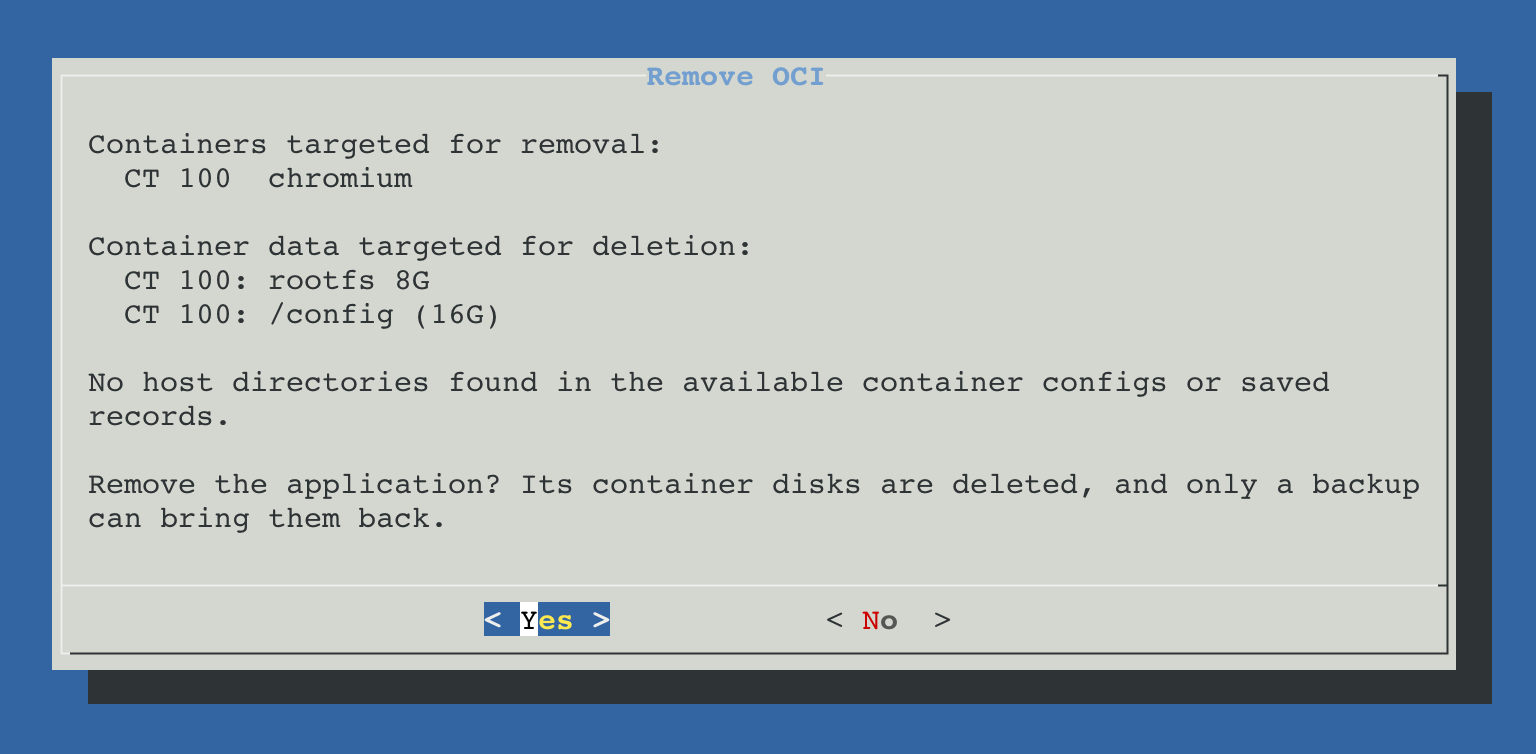
Before the confirmation, a summary is built from the real configuration: the containers that are removed, the data deleted with them, the private network that is released and the host directories that are kept. The confirmation defaults to No, since the data of the deleted disks cannot be recovered afterwards.
| Resource | On removal | Reason |
|---|---|---|
| rootfs and container disks | Deleted | They belong only to the container |
| Host directory | Kept, with its content | Other applications may use it |
| Host files of the container | Deleted | Its console log, network sysctls, Rclone mount hookscript and its registration in the App tab of ProxMenux Monitor serve no other container |
| Files several installations share | Deleted with the last installation that uses them | The host-monitor file and the dependency hookscript of multi-container applications |
| Instance contract | Deleted after a successful removal | No CT is associated with it any more |
| Private bridge of a stack | Released with the stack | It has no members left to connect |
| Network shared by the Arr suite | Released with the last application of the suite | Each application of the suite is independent and is removed on its own |
| A single member of a stack | Not removed on its own | The whole application is removed, so no stack is left incomplete |
| A container on another node of the cluster | Not removed | Its record and host files are on the node where it was installed: it is removed there, after migrating it back |
Downloaded images and host space
The OCI archive is used to build the rootfs; the running CT does not read it. After an installation or an update, the downloaded archives of that operation are listed with their size and their deletion is offered. Deleting them frees the space without affecting the container or its data.
Updates do not need the archive
Registry and cleanup
When Manage installed OCI applications opens, what is left of containers that exist on no node of the cluster is removed first: the saved record of a container deleted from the Proxmox interface, which is kept as history, and the host files a removal left behind. A record with an operation left halfway is kept, because its backup may still be needed. Volumes and host directories are never deleted by inference.
In a cluster: migration and high availability
An OCI container is an ordinary Proxmox LXC: it can be migrated or managed by HA like any other, within the same limits. What it needs to start is kept where every node of the cluster finds it.
| Part | On another node of the cluster |
|---|---|
| Console log | The container creates /var/log/proxmenux/oci before it starts, on whichever node runs it. Each node keeps the log of the starts it ran. |
| Network sysctls and host monitor | Kept in /etc/pve/proxmenux, which every node of the cluster shares, so a migrated container finds them. |
| Container disks | Proxmox moves them with the container. HA needs their data available on the target node, through shared storage or a supported replication setup. |
| Host directories and devices | The same rules as any LXC: a host directory must exist on the target node and be marked as shared, and a GPU, Coral or NPU must be present there. |
| ProxMenux record | The contract stays on the node where the application was installed, and every node reads the copy kept in /etc/pve/priv/proxmenux/oci. A single-container application that migrates is registered on the node it arrives at when Manage installed OCI applications opens or an operation is launched for it. A multi-container application is offered for recovery there, since its private network has to be created on that node. |
Not for high availability
A backup restored outside the cluster gets the files of /etc/pve/proxmenux the container uses when the application is recovered.
A rolling tag is not an unattended update
The catalog installs the rolling tag its maintainer publishes, but the effective digest is resolved, recorded and changed only through an explicit update with preflight and rollback. ProxMenux Monitor compares the installed digest with the one the registry publishes and shows, and notifies, when a new image is available.