
Uninstall Optimizations
Restore reversible changes made by the Automated or Customizable post-install scripts. ProxMenux registers each supported optimization with its dedicated restoration function; package upgrades are intentionally excluded.
Why this exists
/usr/local/share/proxmenux/installed_tools.json. That registry powers the uninstall flow: it lists the active optimizations and dispatches the matching restoration function. Actions without a safe rollback, such as a full package upgrade, are not added.How to open it
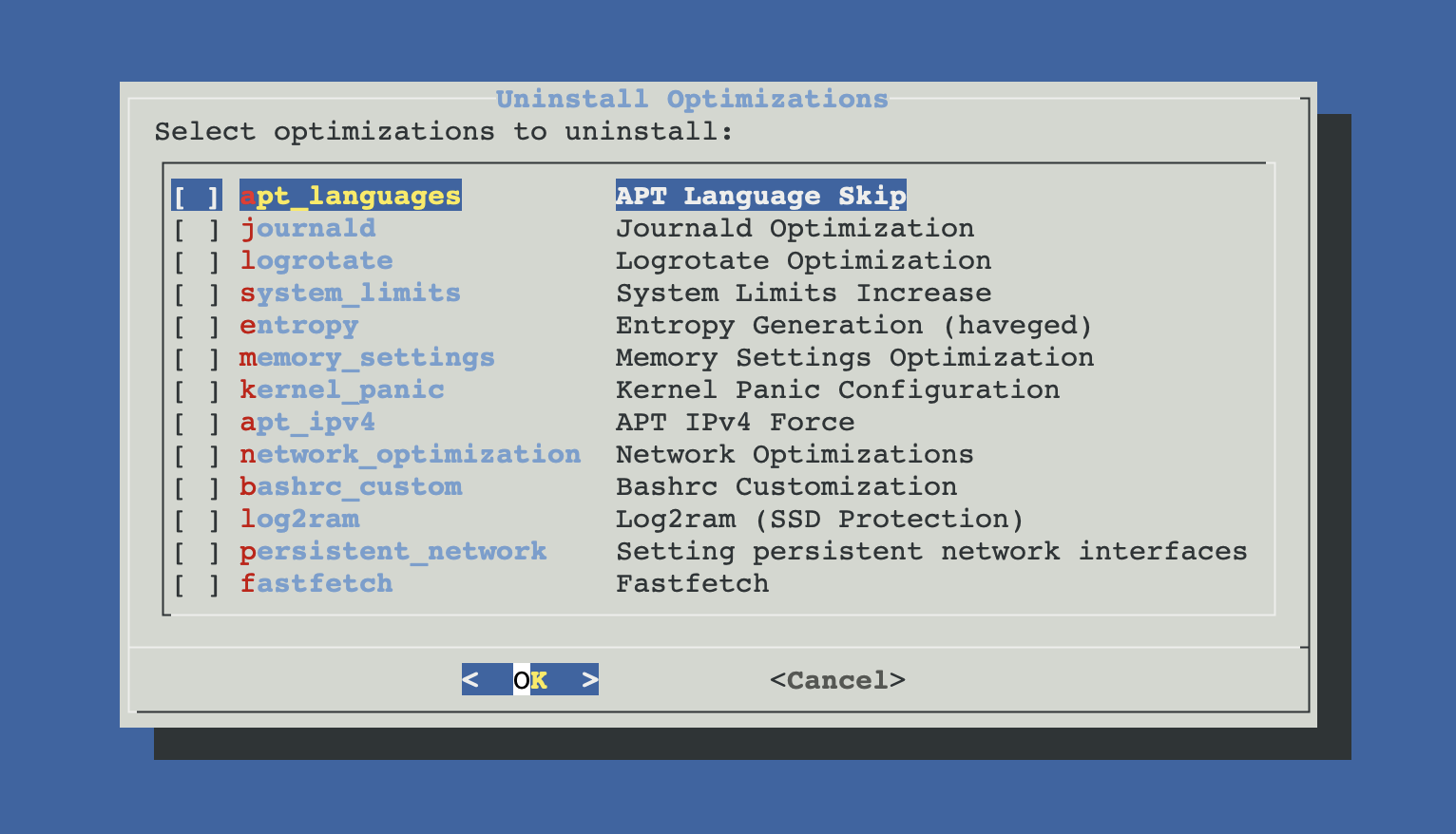
From ProxMenux's main menu, Settings post-install Proxmox → Uninstall optimizations. You will see a checklist of currently applied optimizations — items you have not applied don't show up.
How the reversal works
Registry and auto-detection
On first run, ProxMenux walks the host looking for fingerprint files (e.g. /etc/sysctl.d/99-memory.conf, /etc/apt/apt.conf.d/99-force-ipv4, haveged package installed, Log2RAM service active…). Anything found is added to the registry as reversible, even if it was applied by an older ProxMenux version that predates the registry.
This migration only runs once. After that, every apply/revert updates the registry directly.
Pick what to revert
The checklist shows a human-readable label per item (e.g. Memory Settings Optimization, IOMMU/VFIO PCI Passthrough, Log2RAM (SSD Protection)). Tick the ones you want to reverse. Nothing you don't tick will be touched.
Reversal runs
For each selected item, ProxMenux calls its matching uninstall function. Most reversals follow one of three patterns:
- Backup-based — restore a
.bakcaptured at apply time (bashrc, logrotate.conf, journald.conf, GRUB/kernel cmdline). - Delete-the-config — remove ProxMenux's
/etc/sysctl.d/99-*.conf,/etc/apt/apt.conf.d/99-*, or systemd unit, then reload. - Package reinstall — for UI changes like the subscription banner, reinstall the upstream packages with
--force-confnewto restore shipped configuration.
Each reversal logs its progress. Items that require a reboot (VFIO, persistent interface names) set a flag that triggers the reboot prompt at the end.
Reboot prompt at the end
After the reversal finishes the menu shows a reboot prompt. Items that changed kernel parameters, kernel modules or network naming (VFIO, persistent interface names) do need the reboot to take effect; other items do not, and the prompt is a safety default rather than a per-item check.
What is reversible
Registered reversible optimizations and their matching uninstallers are grouped here by area:
Repositories & APT
- Subscription Banner Removal
- First tries to restore the UI files from ProxMenux's own backups (/usr/local/share/proxmenux/backups/proxmoxlib.js.backup.* and, when the mobile UI is patched, index.html.tpl.backup.*). Only if a backup is missing or corrupt, falls back to reinstalling pve-manager, proxmox-widget-toolkit, libjs-extjs and libpve-http-server-perl with force-confnew. Also clears cached .js / .gz copies.
- APT Language Skip
- Removes /etc/apt/apt.conf.d/99-disable-translations. APT will download language packages again.
- APT IPv4 Force
- Removes /etc/apt/apt.conf.d/99-force-ipv4.
- System Utilities
- Purges only the selected utility packages that ProxMenux recorded as newly installed. Packages already present before the action are never added to this list and are left untouched.
Kernel, memory and system limits
- Memory Settings
- Removes /etc/sysctl.d/99-memory.conf and reloads sysctl.
- Kernel Panic Configuration
- Removes /etc/sysctl.d/99-kernelpanic.conf.
- System Limits Increase
- Removes /etc/sysctl.d/99-maxwatches.conf, 99-maxkeys.conf, 99-swap.conf, 99-fs.conf and /etc/security/limits.d/99-limits.conf. Reverts PAM limits and systemd DefaultLimitNOFILE, and strips the ulimit -n 256000 line from /root/.profile.
Networking
- Network Optimizations
- Removes /etc/sysctl.d/99-network.conf, 97-proxmenux-fwbr.conf and 98-proxmenux-rpf.conf together with the proxmenux-fwbr-tune.service unit, the /usr/local/sbin/proxmenux-fwbr-tune helper and the /etc/udev/rules.d/99-zz-proxmenux-fwbr-tune.rules udev rule. Also strips the source /etc/network/interfaces.d/* line from /etc/network/interfaces. Reloads sysctl, systemd and the udev ruleset.
- Open vSwitch
- Runs apt purge on openvswitch-switch and openvswitch-common. Migrate any OVS bridges back to Linux bridges before running this uninstall — otherwise the VMs on those bridges lose networking on next boot.
- TCP BBR + TCP Fast Open
- Removes /etc/sysctl.d/99-tcp-bbr.conf and 99-tcp-fastopen.conf and reloads sysctl so the kernel returns to the cubic congestion control and to tcp_fastopen=1.
- Persistent Interface Names
- Removes only the 10-proxmenux-*.link files carrying the ProxMenux header from /etc/systemd/network/. Any .link file provided by another package or written by the user is left in place. Interface names return to systemd's default behaviour on next reboot.
Logging
- Journald Optimization
- Rewrites /etc/systemd/journald.conf with vanilla defaults and restarts systemd-journald.
- Logrotate Optimization
- Restores /etc/logrotate.conf from the .bak file captured before the change.
- Log2RAM
- Stops and disables the service and timer. Purges cron jobs, systemd units, binaries, config files and the /var/log.hdd directory. Also uninstalls the apt package if it was installed that way.
- ZFS autotrim
- Reads /usr/local/share/proxmenux/zfs_autotrim_pools (the list of pools ProxMenux actually changed) and runs zpool set autotrim=off on each one. Pools you set autotrim on manually before ProxMenux ran are not touched.
Shell & appearance
- Bashrc Customization
- Restores /root/.bashrc from the .bak backup. If no backup exists, removes the PMX_CORE_BASHRC block by markers.
- Custom MOTD Banner
- Restores the exact original /etc/motd content kept under /usr/local/share/proxmenux, removes the file when it did not exist before, or safely removes the legacy marker when migrating an older installation.
- Fastfetch
- Removes the binary, config directory, update-motd hook and the fenced BEGIN FASTFETCH / END FASTFETCH block from /root/.bashrc, ~/.profile, /etc/profile and /etc/profile.d/fastfetch.sh. Purges the apt package if installed.
- Figurine
- Removes the binary, profile.d entry and the alias block in bashrc/profile.
Hardware & virtualization
- IOMMU / VFIO
- Removes vfio modules from /etc/modules, the nouveau / radeon / nvidia blacklist entries, and intel_iommu=on / amd_iommu=on / iommu=pt / pcie_acs_override parameters from /etc/kernel/cmdline (ZFS) or GRUB. Rebuilds initramfs.
- AMD CPU fixes (Ryzen/EPYC)
- Removes idle=nomwait from kernel cmdline (ZFS) or GRUB, and the ignore_msrs / report_ignored_msrs options from /etc/modprobe.d/kvm.conf.
- QEMU Guest Agent (templates)
- Reads /usr/local/share/proxmenux/guest_agent.pkg (recorded at install time) and apt purges whichever package was installed (qemu-guest-agent for standard hosts, spice-vdagent when Spice mode is used).
Storage
- ZFS ARC sizing
- Removes /etc/modprobe.d/99-zfsarc.conf, restores any conflicting external *.conf that was staged aside in /usr/local/share/proxmenux/backups/zfs_arc/, rebuilds initramfs and runs proxmox-boot-tool refresh on systemd-boot hosts.
- ZFS auto-snapshot
- Removes the cron entries the script wrote and offers to apt purge zfs-auto-snapshot. Existing snapshot datasets on the pools are left intact — remove them separately if you want them gone.
- vzdump speed limits
- Restores /etc/vzdump.conf from the .bak the install created, bringing back bwlimit and ionice to their pre-ProxMenux values.
Services & extras
- Time Synchronization
- Sets timezone back to UTC (safe default) via timedatectl.
- Entropy Generation (haveged)
- Stops, disables and purges the haveged package.
- kexec (fast reboots)
- Disables kexec-pve.service, removes the unit file and the reboot-quick alias from /root/.bash_profile, purges kexec-tools.
- RPC / rpcbind Disable
- Restores rpcbind.service and rpcbind.socket independently to the enabled/disabled and active/inactive states recorded before ProxMenux changed them.
- pigz (parallel gzip)
- Puts /bin/gzip.original back in place, removes the /bin/pigzwrapper, reverts the pigz and bwlimit lines in /etc/vzdump.conf and apt purges pigz.
- High Availability services
- Stops and disables pve-ha-lrm, pve-ha-crm and corosync. Existing HA groups and resource definitions are not deleted — remove them from the web UI if you no longer need them.
- Ceph repository
- Purges the Ceph packages installed by this option, removes the deb822 /etc/apt/sources.list.d/ceph.sources on PVE 9 (or the legacy Ceph list on PVE 8), and refreshes the APT cache.
- OVH RTM (monitoring)
- apt purges any ovh-* packages the RTM installer added and deletes the puppet manifests it dropped under /etc/puppet/. On non-OVH hosts nothing was ever installed, so nothing is removed.
Edge cases and caveats
Package reinstall touches live Proxmox packages
pve-manager, proxmox-widget-toolkit, libjs-extjs and libpve-http-server-perl with --force-confnew. This is generally safe but does touch the running web UI — refresh your browser afterwards, and expect a few seconds of reconnection. Don't run this in the middle of a migration or clone operation.Persistent names and VFIO need a reboot
10-proxmenux-*.link files (Persistent Interface Names) and reverting IOMMU/VFIO do not affect the running system — they only matter after a reboot. ProxMenux sets the reboot flag automatically for these.You can revert one thing and keep the rest
Inspecting the registry manually
If you want to see what's tracked without opening the menu:
cat /usr/local/share/proxmenux/installed_tools.json | jqEach "tool": true entry corresponds to something ProxMenux applied and can reverse. Removing an entry manually is not recommended — always use the menu, which also runs the reversal function instead of just forgetting the change.
Reinstall after uninstall
Related
- Automated Post-Install — re-apply the sane-defaults baseline.
- Customizable Post-Install — pick a different subset.
- Uninstall ProxMenux — different operation: removes ProxMenux itself, not its applied optimizations.
- Post-Install overview.