
Install NVIDIA Drivers on the Host
Install the NVIDIA proprietary driver on a Proxmox VE host using ProxMenux. The installer filters maintained branches by GPU PCI ID, validates the selected release through DKMS, manages nouveau, installs the persistence service and can propagate the driver to LXC containers with NVIDIA passthrough.
What this does
nouveau, downloads and runs the official NVIDIA .run installer with DKMS, installs the nvidia-persistenced service and udev rules, and offers to apply the optional NVENC patch. The DKMS build is the final compatibility check against the running kernel. If you already have LXC containers with NVIDIA passthrough, it can update their userspace libraries to match the host.Who is this for?
If you have an NVIDIA GPU and you want to use it for hardware-accelerated transcoding in Plex, Jellyfin, Frigate, Immich, Stable Diffusion or any other app running inside an LXC container, you need to install the driver on the Proxmox host first. This page covers that host-side install. Passing the GPU to a virtual machine (VM) uses a different flow (VFIO passthrough) and is documented separately.
Before you start
- An NVIDIA GPU physically installed in the host. The script auto-detects it; AMD and Intel GPUs are not handled here.
lspci | grep -i nvidia - The GPU is not currently assigned to a VM via VFIO passthrough. If it is, the script will refuse to install the host driver to avoid breaking the passthrough config.
- Internet access on the host. The installer downloads the driver from
download.nvidia.comand, optionally, clonesnvidia-persistencedandnvidia-patchfrom GitHub. - Some free space in
/opt/nvidiafor the.runinstaller plus the RAM used during the build. When propagating to LXCs on non-Arch distros, each container needs at least 1.5 GB free; ProxMenux temporarily raises container RAM to 2 GB and restores it after. A reboot is required at the end of the host install.
GPU assigned to a VM? Stop here
vfio-pci (i.e. it is being passed through to a VM), installing the host driver can break the passthrough and destabilise the system. ProxMenux detects this and aborts. Remove the GPU from the VM passthrough configuration and reboot before running this script.Running the installer
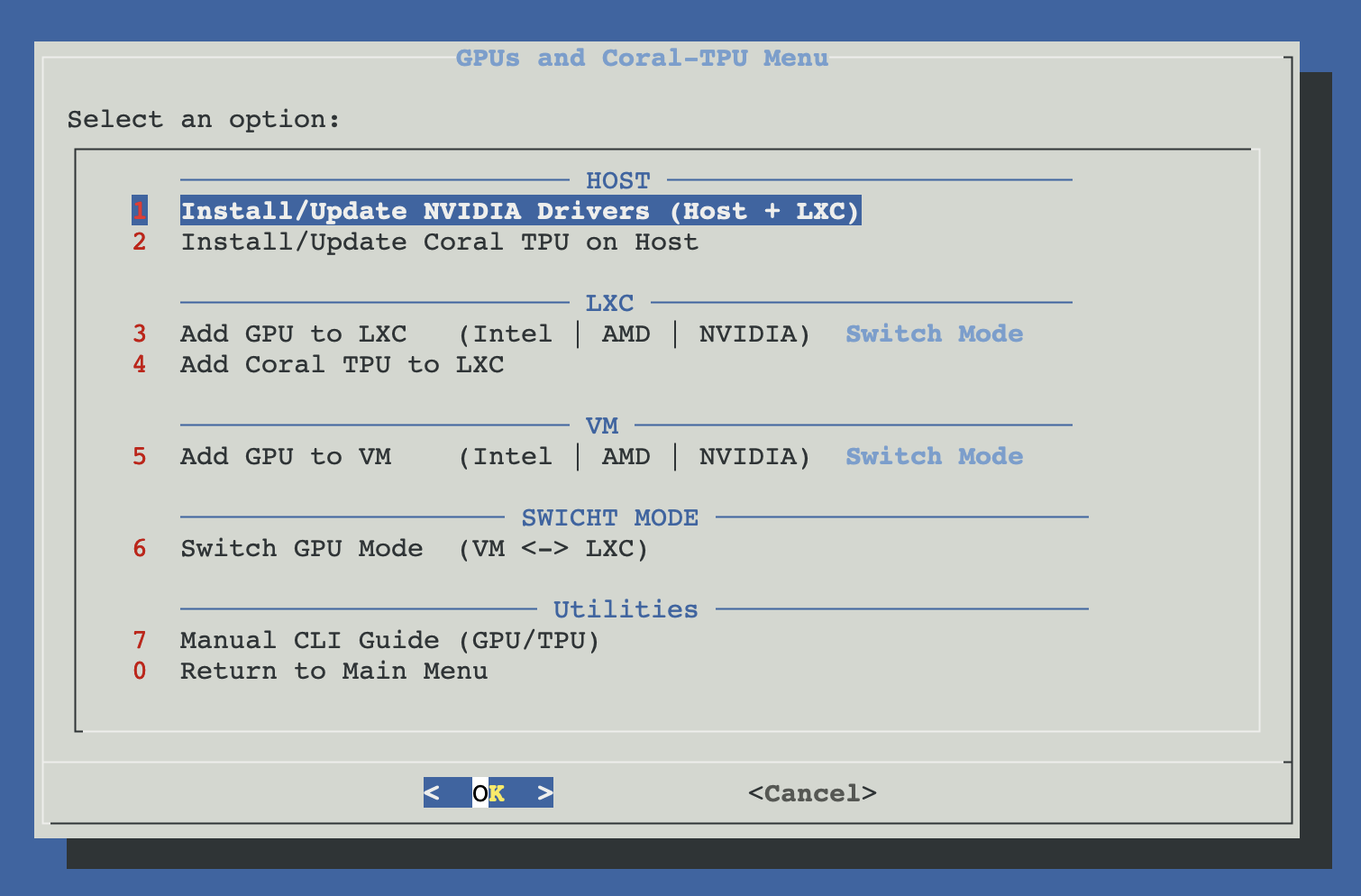
Open ProxMenux on the host, go to Hardware Graphics → NVIDIA GPU Driver Installer. What you see depends on whether a driver is already present.
How the script runs
The installer goes through three phases with clear separation between "collecting information and validating" and "actually touching the host". Until the final confirmation, nothing has been changed.
┌─────────────────────────────────────────────┐
│  PHASE 1 — Detect, validate, pick version   │
│  (nothing touched yet)                      │
└──────────────────┬──────────────────────────┘
                   ▼
      ┌────────────┴────────────┐
      ▼                         ▼
  lspci detects             GPU bound to
  NVIDIA GPU(s)             vfio-pci? ──→ Abort
      │                         │        (remove VM
      │                         No        passthrough first)
      ▼
  nvidia-smi: driver already installed?
      │
      ├─ No  → continue (fresh install)
      └─ Yes → ask: Reinstall/Update  OR  Remove
                     │
                     ├─ Remove    → complete uninstall
                     │               + reboot prompt
                     └─ Reinstall → continue
      │
      ▼
  Show install overview
  (GPU list + current driver +
   LXC containers with NVIDIA passthrough)
      │
      ▼
  Kernel-compat filter:
  ├─ Kernel 6.17+   → driver 580.82.07+
  ├─ Kernel 6.8–16  → driver 550+
  ├─ Kernel 6.2–7   → driver 535+
  └─ Kernel 5.15+   → driver 470+
      │
      ▼
  User picks version (or "Latest")
                   │
     ┌─────── Cancel   OR   Confirm ────┐
     ▼                                  ▼
 Exit, nothing            ┌─────────────┴──────────────┐
 was changed              │  PHASE 2 — Install driver  │
                          └─────────────┬──────────────┘
                                        ▼
                          Prepare host:
                          ├─ Install pve-headers-$(uname -r)
                          ├─ Install build-essential + dkms
                          ├─ Blacklist nouveau + unload
                          │  └ /etc/modprobe.d/nouveau-blacklist.conf
                          ├─ Write modules-load config
                          │  └ /etc/modules-load.d/nvidia-vfio.conf
                          ├─ Stop/disable nvidia services
                          └─ Unload residual nvidia modules

                          If different version already present:
                          └─ clean uninstall first (apt purge,
                             remove DKMS entries)
                                        │
                                        ▼
                          Download NVIDIA .run installer
                          to /opt/nvidia (validate size +
                          executable signature)
                                        │
                                        ▼
                          Run installer with --dkms
                          --disable-nouveau --no-nouveau-check
                                        │
                                        ▼
                          Install udev rules
                          └─ /etc/udev/rules.d/70-nvidia.rules
                          + clone NVIDIA/nvidia-persistenced
                                        │
                                        ▼
                          update-initramfs -u -k all
                                        │
                                        ▼
                          nvidia-smi — verify driver loaded
                                        │
                        ┌───────────────┴───────────────┐
                        │  PHASE 3 — Optional extras    │
                        └───────────────┬───────────────┘
                                        ▼
                          LXC containers with NVIDIA?
                          ├─ Yes → offer driver propagation
                          │        (Alpine: apk · Arch: pacman ·
                          │         Debian/others: extract .run)
                          └─ No  → skip
                                        │
                                        ▼
                          keylase/nvidia-patch (NVENC limit)?
                          ├─ Yes → clone + apply
                          └─ No  → skip
                                        │
                                        ▼
                          Reboot prompt — required to finalize
nouveau blacklist + load new moduleGPU detection and overview
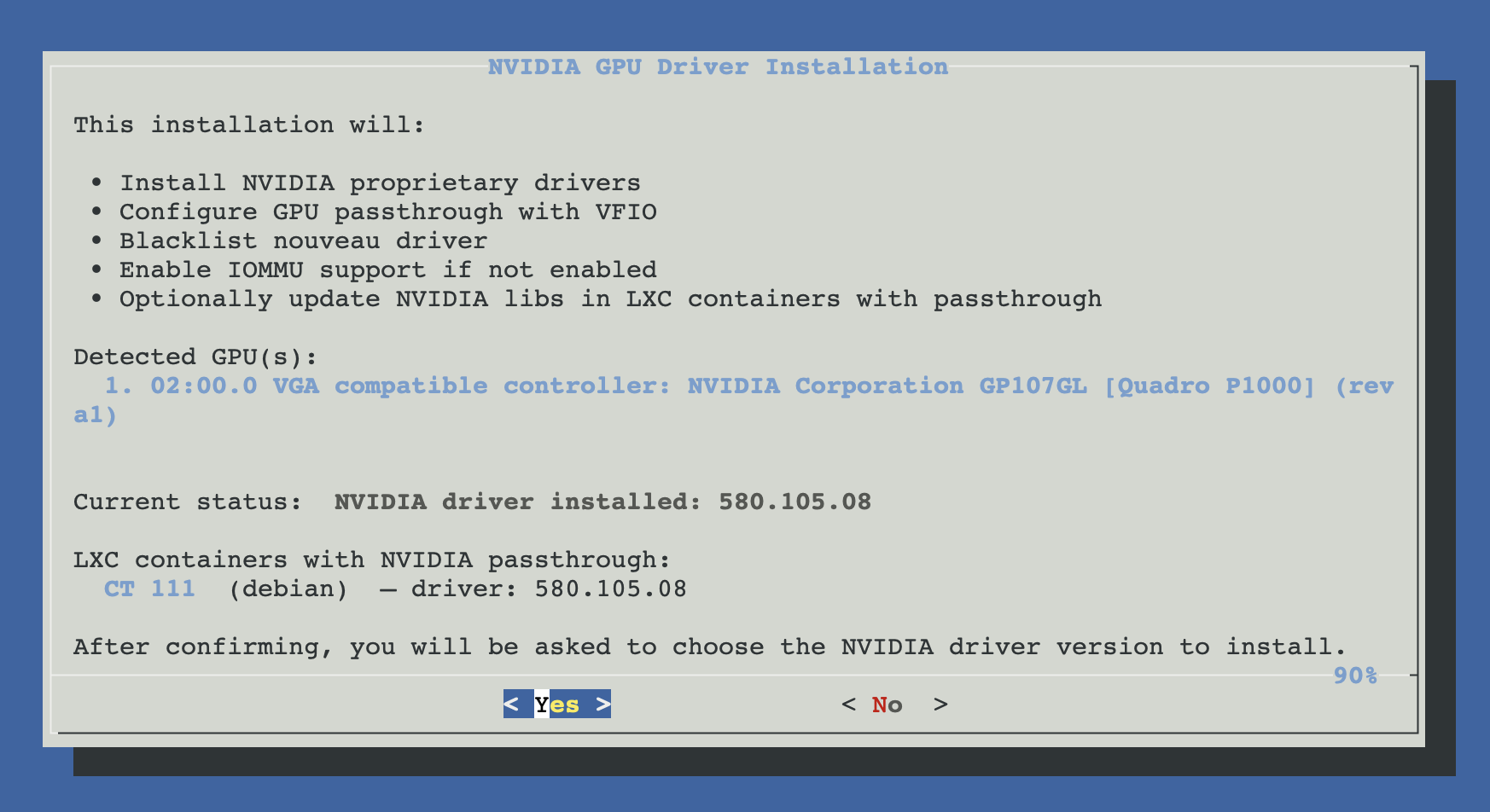
The script scans the PCI bus and shows every NVIDIA video controller it finds, the current driver status (or "No NVIDIA driver installed"), and any LXC container that already has NVIDIA passthrough configured (driver version inside each one).
Review the overview carefully. If the detected GPU is not what you expect, or if a container's version already matches the host, you can cancel here without side effects.
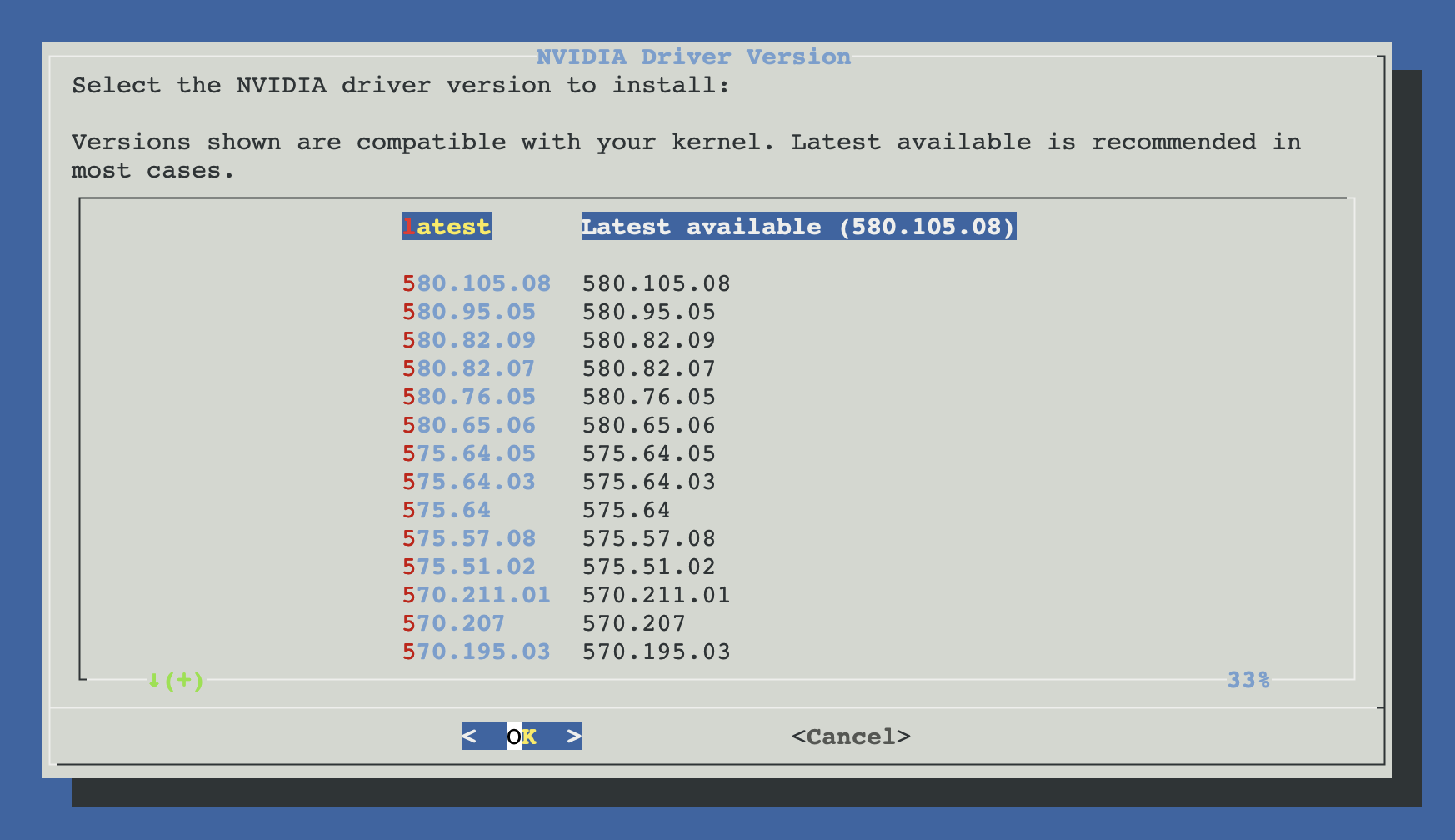
Choose the driver version
docs.hardware.nvidiaHost.walkthrough.version.body1
If the currently installed driver was patched via keylase (NVENC), the picker auto-narrows to versions still covered by the patch table, so applying <em>Reinstall / update</em> without losing the patch is one click.
How kernel compatibility is validated
Clean uninstall (only if reinstalling)
If a driver is already present and you picked a different version, ProxMenux stops the NVIDIA services, unloads the kernel modules, removes DKMS entries and purges nvidia-* / libnvidia-* / cuda-* packages before touching the new installer. This avoids the classic mixed-version mess.
Prepare the system
Behind a single confirmation, the script:
- Installs
pve-headers-$(uname -r)(orproxmox-headers-$(uname -r)),build-essentialanddkms. - Creates the ProxMenux-owned
/etc/modprobe.d/proxmenux-nouveau-blacklist.confwithblacklist nouveauandoptions nouveau modeset=0, records whether it added the companion line toblacklist.conf, and tries to unload the module immediately. - Writes
/etc/modules-load.d/nvidia-vfio.confwithnvidiaandnvidia_uvmso the modules load early at boot.
Download and run the NVIDIA installer
The installer downloads the NVIDIA-Linux-x86_64-<version>.run file into /opt/nvidia, validates it (size + executable signature, not just HTTP 200), then runs it with DKMS so the kernel module rebuilds automatically across kernel upgrades.
# What ProxMenux runs under the hood (you don't have to type this):
sh NVIDIA-Linux-x86_64-<version>.run \
  --no-questions \
  --ui=none \
  --disable-nouveau \
  --no-nouveau-check \
  --dkms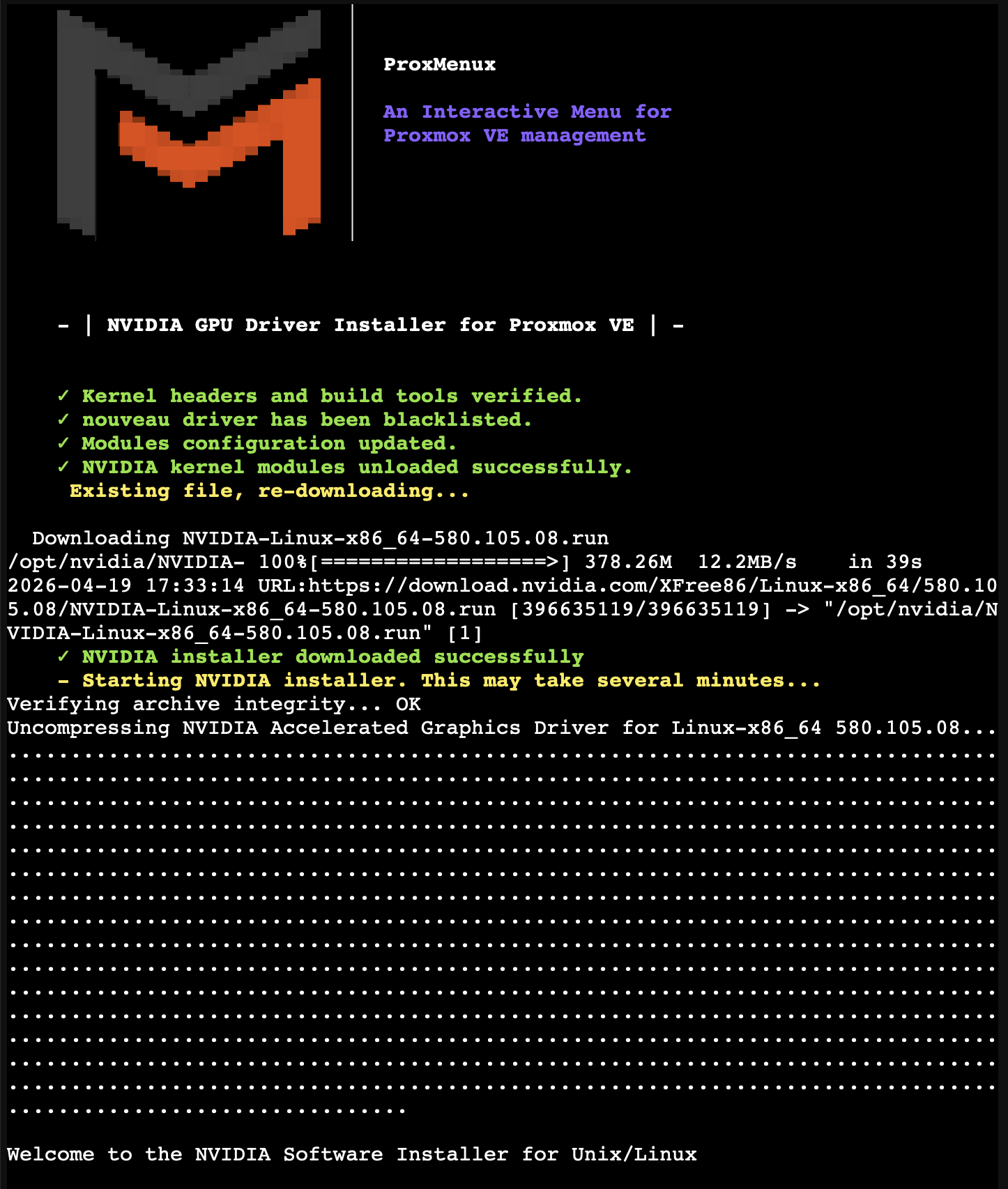
Persistence service and udev rules
ProxMenux then installs nvidia-persistenced and writes udev rules at /etc/udev/rules.d/70-nvidia.rules so /dev/nvidia* device nodes appear reliably on boot. Without these, LXC passthrough can race on container startup and end up with a container that can't see the GPU.
Optional: apply the NVENC patch
Consumer NVIDIA GPUs (GeForce line) limit the number of simultaneous NVENC encoding sessions. The community keylase/nvidia-patch removes that restriction. If you plan to use the GPU for Plex / Jellyfin / Frigate with many concurrent streams, answer Yes when prompted.
Check patch support for your driver
Optional: propagate the driver to LXC containers
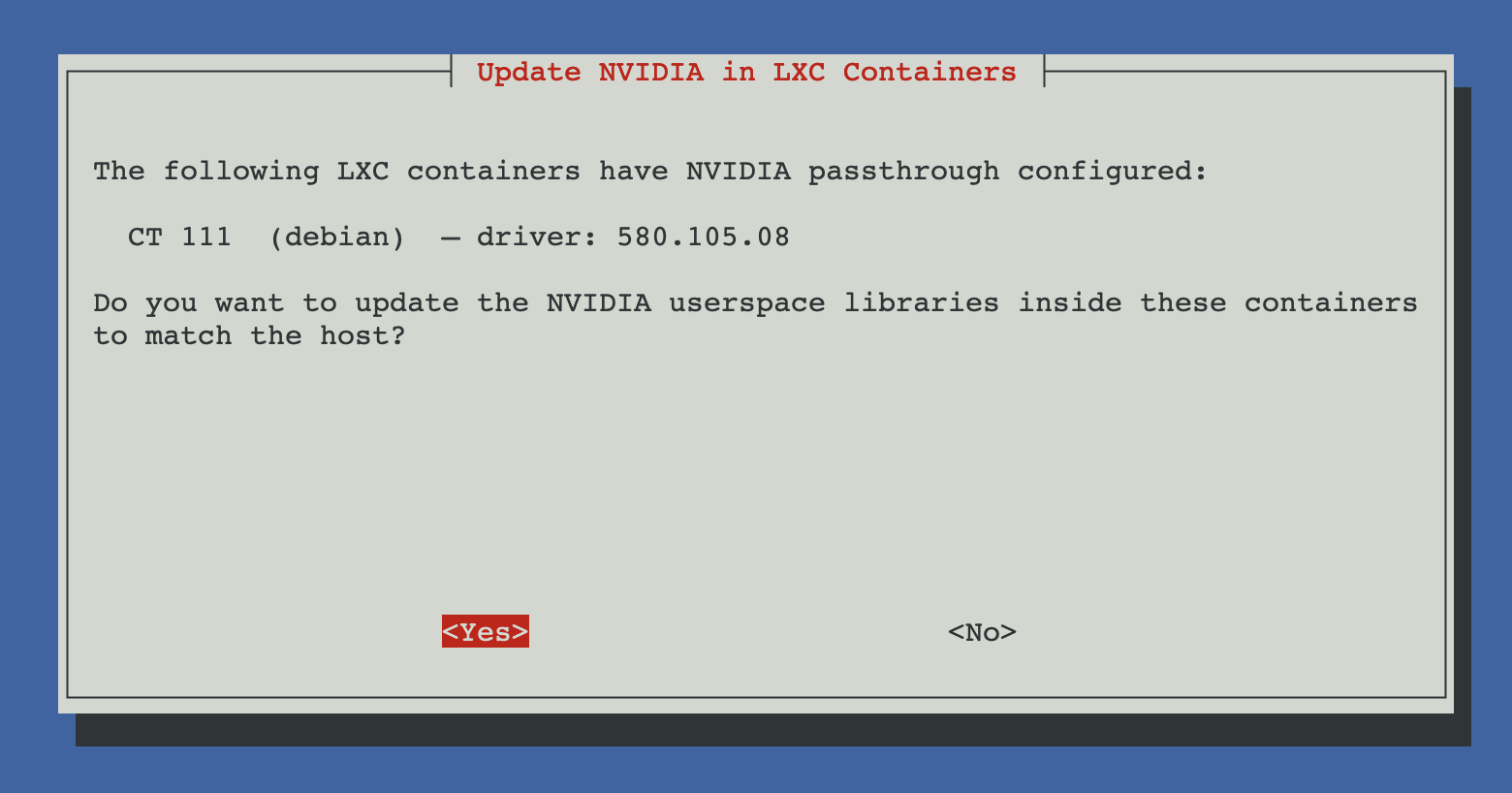
If the overview screen listed containers with NVIDIA passthrough, ProxMenux now offers to update the userspace libraries inside each one to match the host. Host kernel module and container userspace must be the exact same version — otherwise nvidia-smi inside the container will fail with a "version mismatch" error.
docs.hardware.nvidiaHost.walkthrough.propagate.body2
Reboot
Finally, the script rebuilds initramfs for all kernels and offers to reboot. A reboot is required: the nouveau blacklist and the new kernel module only take effect after restart.
Reinstall or uninstall
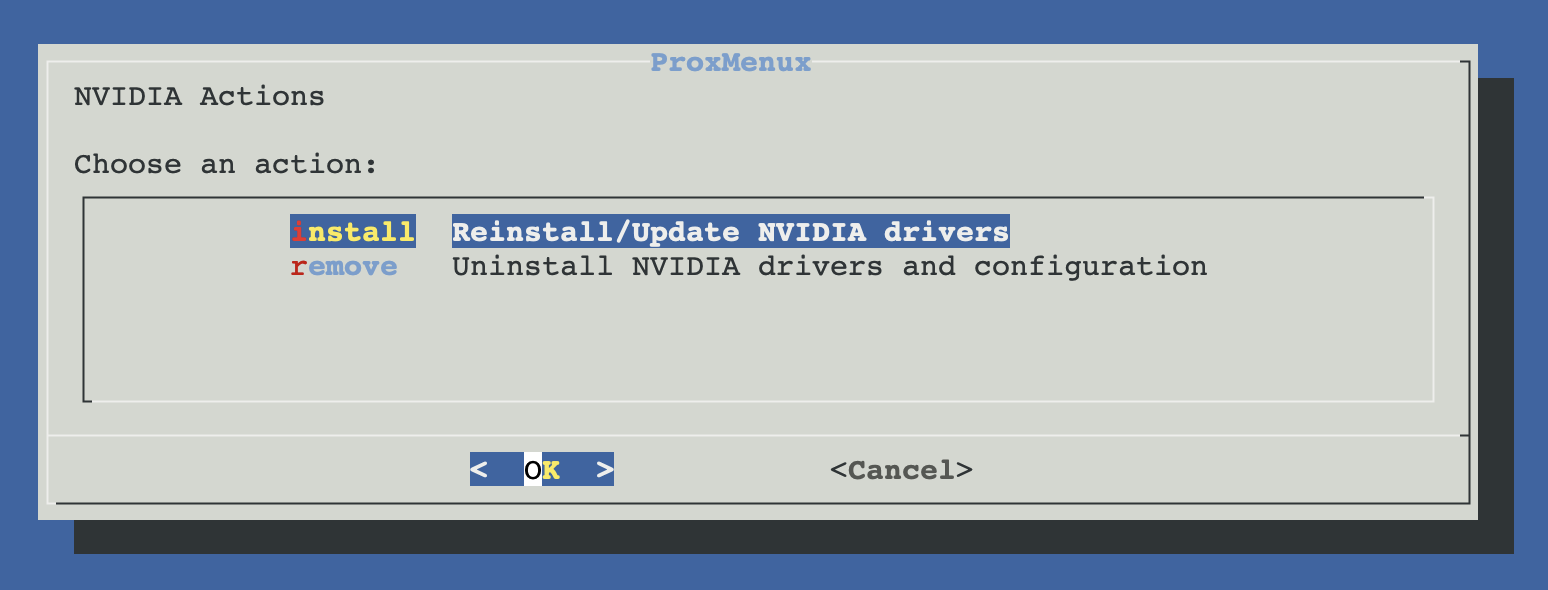
When the installer detects that the nvidia kernel module is currently loaded and nvidia-smi returns a version, it doesn't silently re-install on top. Instead it shows an action menu so you can choose what to do. (Binaries present on disk but the module not loaded do not count as installed — the module has to be live.)
Reinstall / update
Continues with the normal install flow but, before downloading anything, runs a clean removal of the current driver (apt purge + DKMS entries dropped + leftover modules unloaded). This is the safe path to apply a newer same-branch version, choose another maintained branch when needed, or recover from a half-broken state. The LXC propagation and NVENC patch prompts re-run at the end.
Uninstall — what gets removed
Confirms with a yes/no dialog first. Then performs a full, idempotent rollback:
- Runs
nvidia-uninstall --silentfirst (the counterpart to the.runinstaller), then stops and disablesnvidia-persistencedandnvidia-powerd, and unloads the kernel modules (nvidia_uvm,nvidia_drm,nvidia_modeset,nvidia) — any LXC container with NVIDIA passthrough will be cleanly cut off. - Runs
apt purgeonnvidia-*,libnvidia-*,cuda-*andlibcudnn*, removes the DKMS source tree and the/opt/nvidia.run installer cache. - Removes the modules-load config (
/etc/modules-load.d/nvidia-vfio.conf) and the nouveau blacklist entries owned by ProxMenux. Legacy two-line ProxMenux blacklist files are migrated and removed too; modified or unrelated administrator files are preserved. - docs.hardware.nvidiaHost.reinstallUninstall.uninstallItems.3
- Rebuilds
initramfsfor all kernels, runsproxmox-boot-tool refreshon systemd-boot hosts, and prompts for a reboot to finalise.
LXC containers with NVIDIA passthrough
Update notifications
The installed NVIDIA driver is tracked in ProxMenux's managed-installs registry. On startup and every 24h the Monitor checks the upstream listing at download.nvidia.com/XFree86/Linux-x86_64/ against the version nvidia-smi reports, and notifies only when a newer maintenance release exists in the installed branch.
Update message
- Same-branch maintenance. A newer release in your current driver branch (e.g. installed 580.65.06 → available 580.105.08). The Monitor does not infer cross-branch kernel compatibility.
Anti-cascade by design
Applying the update
Verifying the install
Once the host is back up, log in over SSH or the Proxmox shell and run:
nvidia-smiYou should see your GPU listed, the driver version on the top border, and no processes yet (nothing is using the GPU at this point). Then check the persistence service:
systemctl status nvidia-persistenced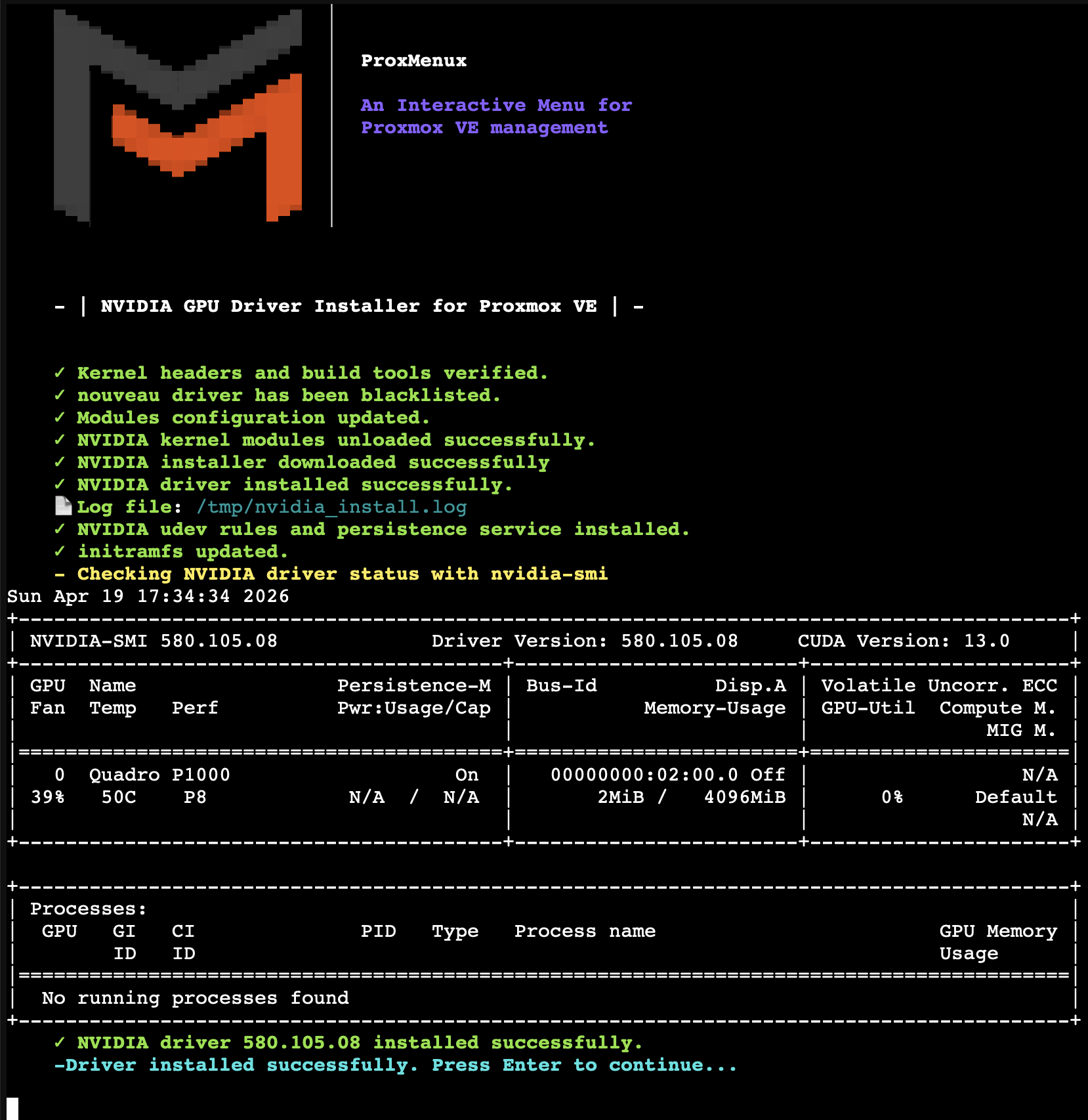
Troubleshooting
`nvidia-smi` says 'NVIDIA-SMI has failed'
lsmod | grep nouveau — if it returns anything, check /etc/modprobe.d/proxmenux-nouveau-blacklist.conf, rebuild initramfs with update-initramfs -u -k all, and reboot. If nouveau is gone, check dmesg | grep -i nvidia — DKMS build errors usually mean the headers do not match the running kernel.LXC container can't see the GPU after host update
--no-kernel-modules.Check the install log
/tmp/nvidia_install.log. If something fails silently, that file has the full output (downloads, DKMS build, service installs). Attach it when reporting issues on GitHub.Looking for the manual steps?
The original community guide — installing everything by hand with wget and ./NVIDIA-Linux-...run — is still available as a reference under Guides → NVIDIA. It's useful if you want to understand every command the ProxMenux installer runs, or if you're troubleshooting an unusual setup. For day-to-day installs, use ProxMenux — it's the path that keeps receiving fixes (kernel compatibility, LXC propagation, VFIO safety checks).
Related
- Add GPU to VM (Passthrough) — pass the NVIDIA GPU to a VM (different binding model from LXC).
- Add GPU to LXC — share the NVIDIA GPU with one or more containers.
- Switch GPU Mode (VM ↔ LXC) — toggle the same GPU between passthrough (VM) and shared (LXC) modes.
- ProxMenux Monitor — Hardware tab — the GPU modal that triggers this installer in one click, plus live monitoring once it's done.
- GPU Passthrough commands — lspci / dmesg / IOMMU / nvidia-smi reference.