
Add GPU to LXC
Share one or more GPUs with a Proxmox LXC container. The host keeps using the GPU normally — the container just gets access through device nodes. Works with Intel iGPUs (Quick Sync / VA-API), AMD cards (Mesa / ROCm), and NVIDIA (CUDA / NVENC).
What this does
dev<N> entries to the LXC config (/etc/pve/lxc/<ctid>.conf) so the container sees /dev/dri/*, /dev/kfd or /dev/nvidia* — whichever applies to your GPU. Then it boots the container, detects the distro inside, and installs the matching userspace drivers (Mesa, intel-media-driver, NVIDIA runtime…) so apps like Plex, Jellyfin or Frigate actually use the GPU for transcoding. GIDs (video, render) are aligned between host and container so permissions match.LXC sharing vs VM passthrough
LXC containers share the host kernel, so they can share the host's GPU without taking it over. That's a big difference from VMs: with VM passthrough the GPU is exclusive to one VM and the host can't use it. With LXC, multiple containers plus the host can all hit the same GPU at once.
| Feature | LXC (this page) | VM |
|---|---|---|
| Host keeps using the GPU? | Yes | No — exclusive to the VM |
| Multiple containers sharing one GPU? | Yes | No |
| Requires IOMMU / VFIO on the host? | No | Yes |
| Reboot required? | Usually no (just restart the CT) | Yes, always |
| Supports running any OS? | Only Linux (LXC is Linux-only) | Windows, macOS, any Linux |
Before you start
- A GPU on the host — Intel iGPU, AMD dGPU or APU, or an NVIDIA card. The script auto-detects all three via
lspci.lspci | grep -iE 'VGA|3D|Display' - The GPU is NOT bound to vfio-pci. If the GPU is currently assigned to a VM via passthrough, it's invisible to the host kernel driver and the LXC can't use it. The script detects this and offers to run Switch GPU Mode for you.
- For NVIDIA only: the NVIDIA host driver must already be installed — ProxMenux needs to match the container's userspace libs to the host version. If you haven't done it yet, run Install NVIDIA Drivers on the Host first.
nvidia-smi - An existing LXC container. The script operates on a container you already created — it doesn't create one. The container should ideally be privileged (unprivileged works but needs UID/GID mapping which the script does not configure).
Works on both privileged and unprivileged containers
dev<N> entries to the LXC config and, on unprivileged containers, aligns the video and render GIDs between host and container so the GPU device nodes are reachable from inside without you having to hand-edit lxc.idmap.Running the installer
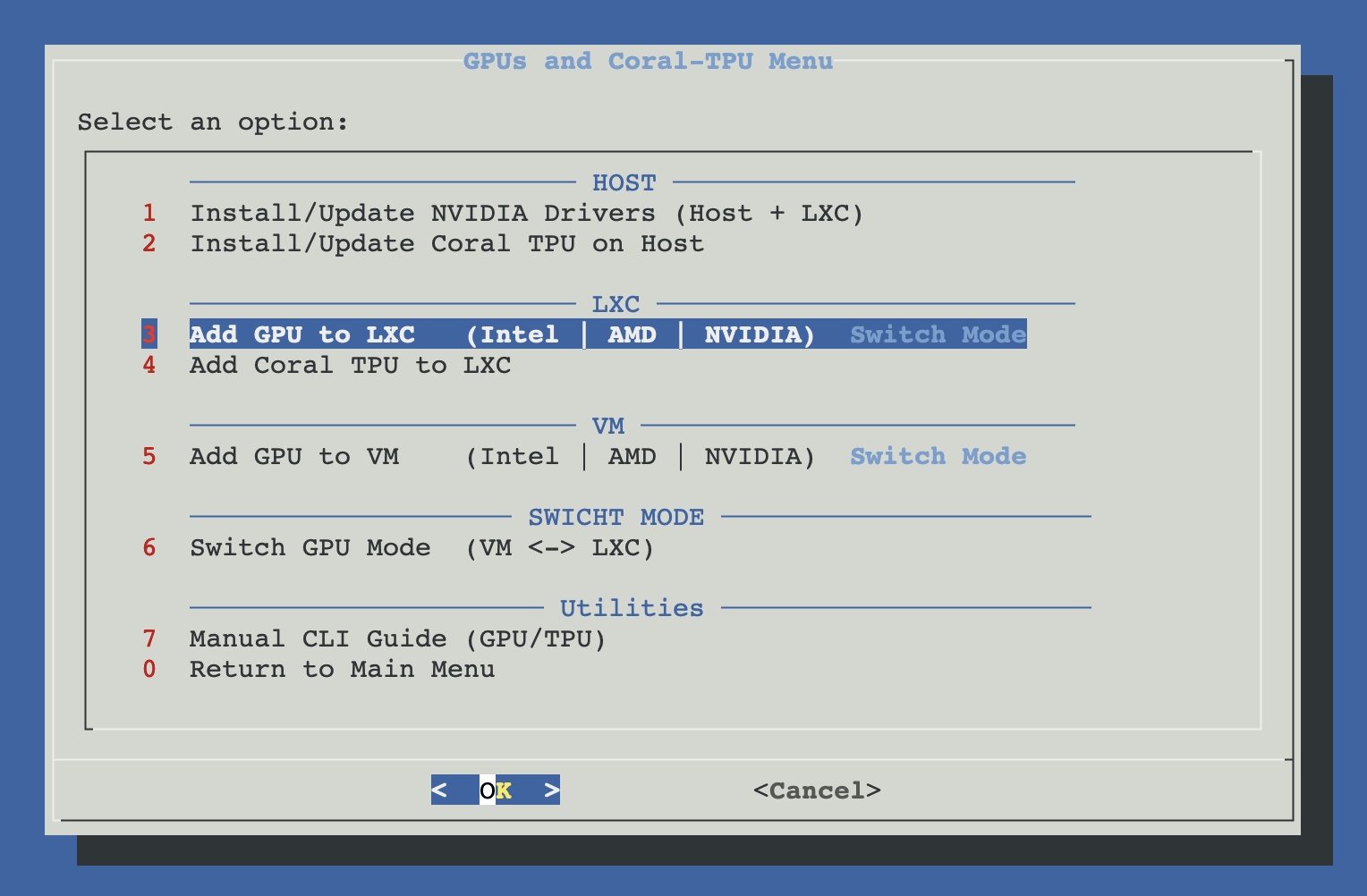
Open ProxMenux on the host, go to Hardware: GPUs and Coral-TPU → Add GPU to LXC.
How the script runs
Two phases: all the decisions upfront, then all the changes in one go. Nothing on your container is touched until you confirm.
┌─────────────────────────────────────────────┐
│  PHASE 1 — Detect, select, validate         │
│  (nothing touched yet)                      │
└──────────────────┬──────────────────────────┘
                   ▼
  lspci detects Intel / AMD / NVIDIA GPU(s)
  (NVIDIA: also check nvidia module loaded +
   nvidia-smi, capture host driver version)
                   │
                   ▼
  User picks LXC container from the list
                   │
                   ▼
  User selects which GPU(s) to add
  (checklist; auto-selects if only one)
                   │
                   ▼
  Pre-flight checks
  ├─ Not in SR-IOV (VF / active PF) → block
  ├─ Bound to vfio-pci? → offer Switch Mode, exit
  └─ Already configured in this CT? → filter out
      (skip duplicates, warn if partial)
                   │
     ┌─────── Cancel   OR   Confirm ────┐
     ▼                                  ▼
 Exit, nothing       ┌──────────────────┴──────────────────┐
 was changed         │  PHASE 2 — Configure + install      │
                     └──────────────────┬──────────────────┘
                                        ▼
                       Stop container (if running)
                                        │
                                        ▼
                       Write LXC config (/etc/pve/lxc/<ctid>.conf):
                       ├─ Intel / AMD iGPU:
                       │    dev<N>: /dev/dri/card*   gid=video
                       │    dev<N>: /dev/dri/renderD* gid=render
                       ├─ AMD with ROCm (if /dev/kfd):
                       │    dev<N>: /dev/kfd  gid=render
                       └─ NVIDIA:
                            dev<N>: /dev/nvidia0..N
                            dev<N>: /dev/nvidiactl · nvidia-uvm*
                            dev<N>: /dev/nvidia-modeset
                            dev<N>: /dev/nvidia-caps/* (if exists)
                                        │
                                        ▼
                       Install GPU guard hookscript
                       (same one used by VM passthrough, if
                        available — prevents conflicts on start/stop)
                                        │
                                        ▼
                       Start container + wait for readiness
                       (pct exec — true, up to ~30 s)
                                        │
                                        ▼
                       Install userspace drivers inside CT
                       (distro auto-detected)
                       ├─ Intel  → apk/pacman/apt
                       │           (intel-media-driver,
                       │            libva-utils, opencl-icd)
                       ├─ AMD    → Mesa VA drivers
                       │           (mesa-va-drivers, libva)
                       └─ NVIDIA →
                          ├─ Alpine:  apk add nvidia-utils
                          ├─ Arch:    pacman -S nvidia-utils
                          └─ Debian/Ubuntu/others:
                             host .run is pre-extracted, packed,
                             pct push'd into the container, run
                             with --no-kernel-modules --no-dkms
                                        │
                                        ▼
                       Align GIDs in /etc/group inside CT
                       (video=44, render=104 to match host)
                                        │
                                        ▼
                       Restore container state
                       (stop if it was stopped before)
                                        │
                                        ▼
                       Show summary + nvidia-smi output
                       (if NVIDIA) + log path
Walking through the flow
Detect host GPUs
The script scans lspci for VGA / 3D / Display controllers matching Intel, AMD or NVIDIA. For NVIDIA it also verifies the nvidia kernel module is loaded and nvidia-smi works — the host driver version it reports will be used to pick the right .run installer for the container.
NVIDIA not ready?
Pick an LXC container
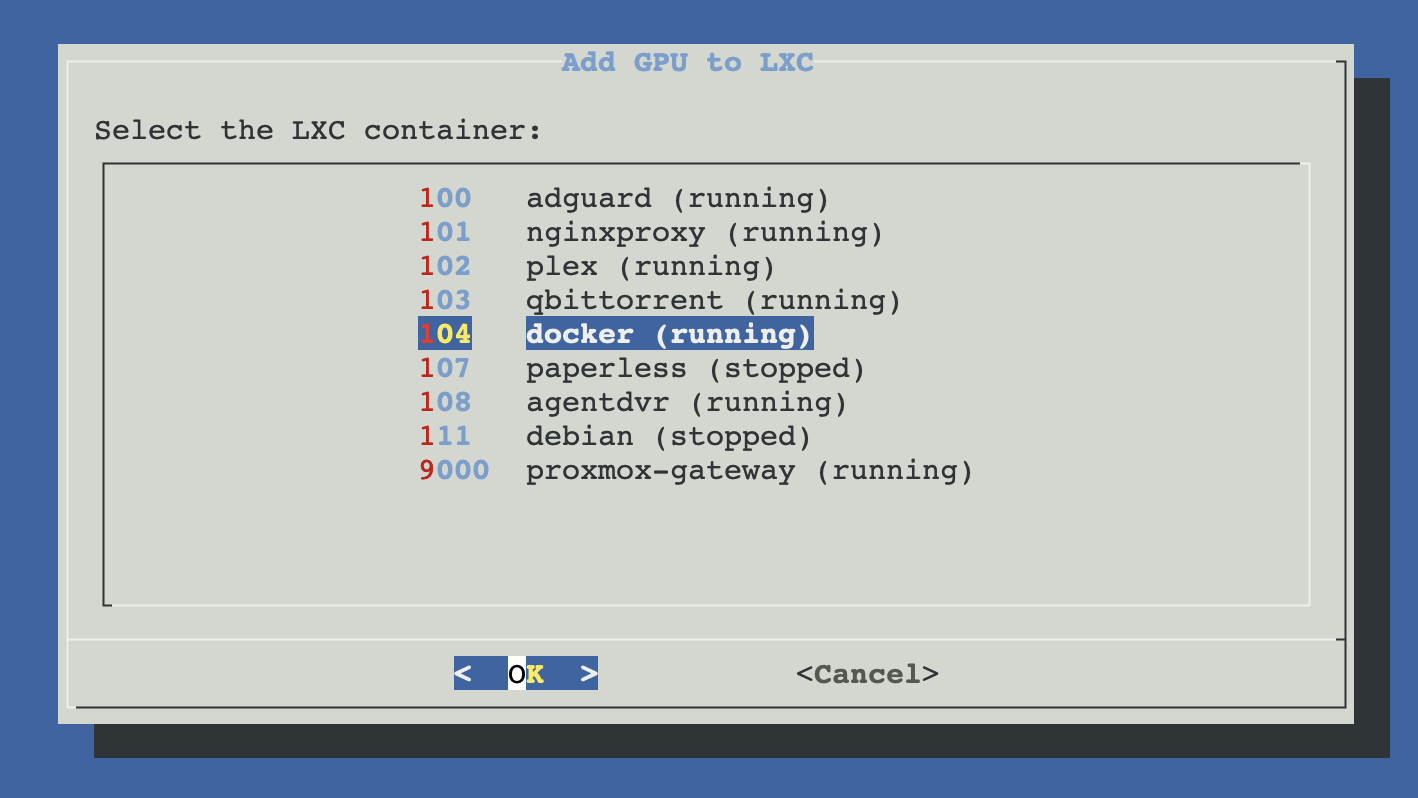
You'll see a list of every LXC on the host with its ID and name. Pick the one that should get the GPU. The container can be running or stopped — the script handles both (stops it briefly during config, restarts it, and leaves it in its original state at the end).
Select the GPU(s) to add
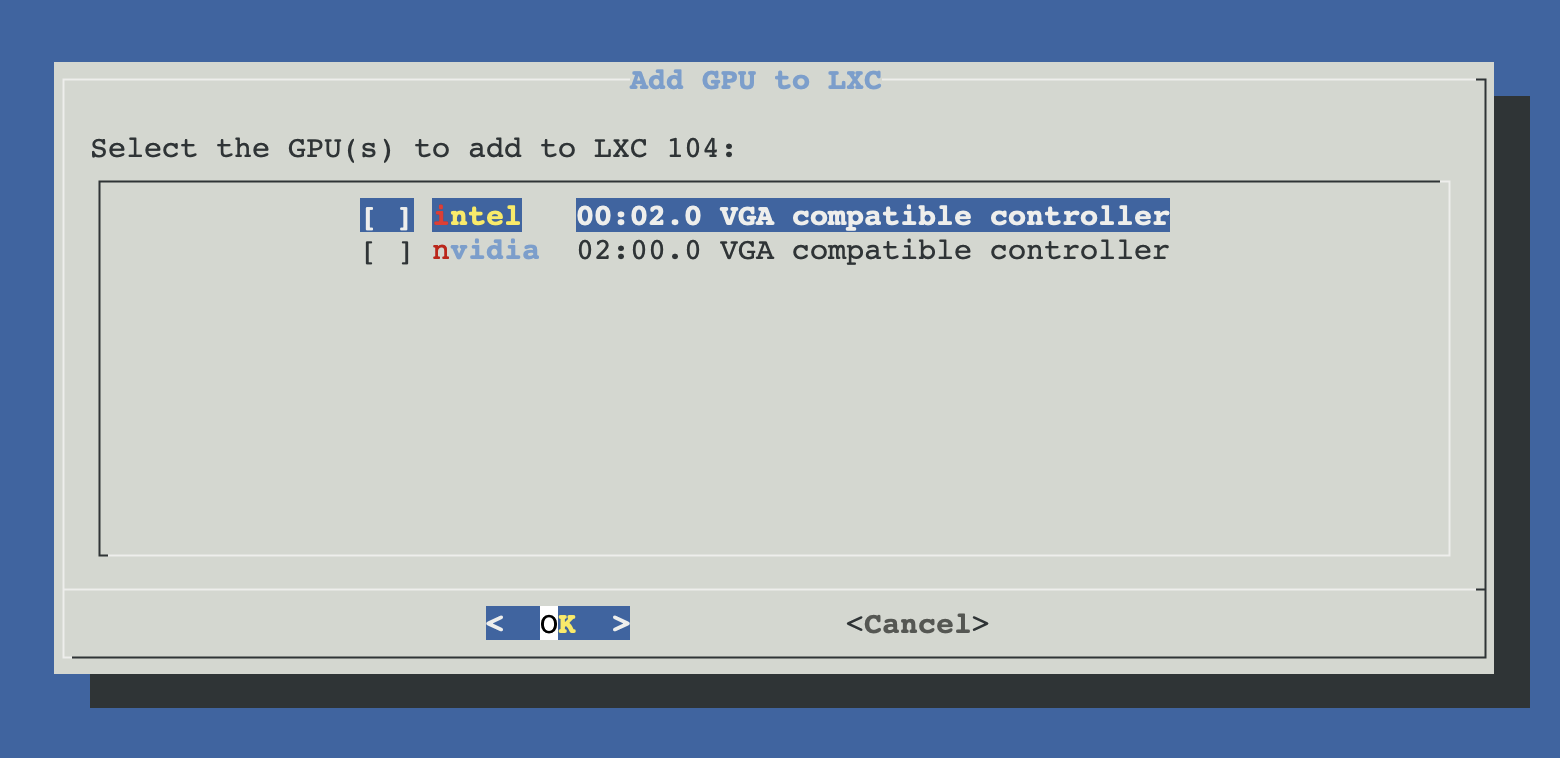
If more than one GPU is present, you get a checklist. You can add multiple to the same container (e.g. an Intel iGPU for Quick Sync + an AMD dGPU for ROCm). If only one GPU is detected, it's auto-selected.
Pre-flight checks
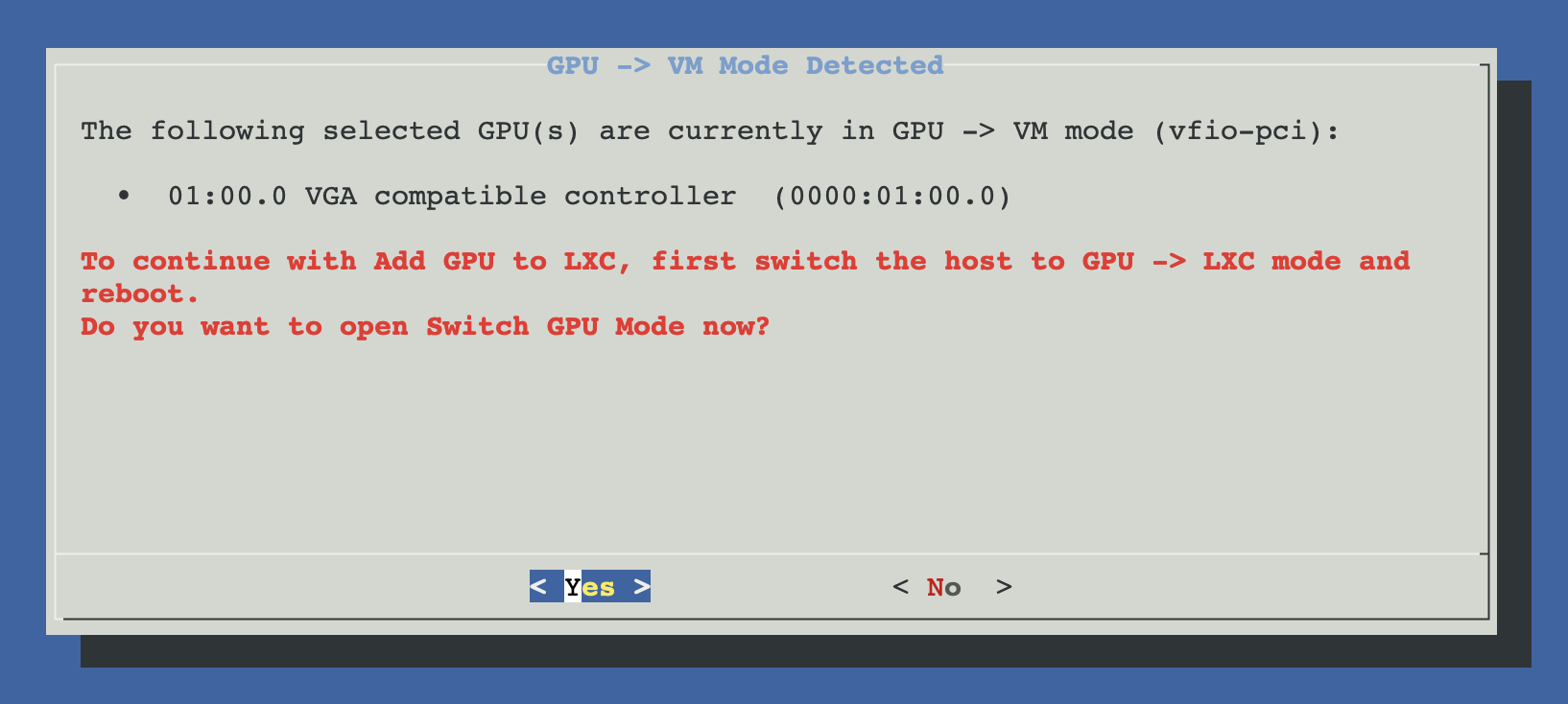
Three checks, any of which can block or redirect you:
- SR-IOV. If the selected GPU is a Virtual Function (VF) or a Physical Function with active VFs, LXC passthrough doesn't apply — the device is managed by the SR-IOV driver. Blocked.
- Bound to vfio-pci. If the GPU is currently held by VFIO for VM passthrough, the host kernel can't create
/dev/dri/*or/dev/nvidia*nodes for it. The script offers to run Switch GPU Mode which undoes the VFIO binding; you'll likely need a reboot before re-running Add GPU to LXC. - Already configured. If the container already has every dev node for the selected GPU, the script says so and exits cleanly. If it's partially configured, it continues with only the missing pieces.
Apply the LXC config changes
The script stops the container, edits /etc/pve/lxc/<ctid>.conf, and adds dev<N> entries with the right GIDs for the selected GPUs. Using dev: entries (over the older lxc.mount.entry lines) is the modern Proxmox way — group permissions are set at config parse time instead of at mount time.
Example after Intel + NVIDIA on the same container:
# in /etc/pve/lxc/<ctid>.conf
dev0: /dev/dri/card0,gid=44
dev1: /dev/dri/renderD128,gid=104
dev2: /dev/nvidia0,gid=44
dev3: /dev/nvidiactl,gid=44
dev4: /dev/nvidia-uvm,gid=44
dev5: /dev/nvidia-uvm-tools,gid=44
dev6: /dev/nvidia-modeset,gid=44Start the container and install drivers inside
Once the config is written, the script starts the container, waits up to ~30 seconds for pct exec to respond, and then detects the container's distro from /etc/os-release. Based on that, it installs the right userspace packages.
| Distro | Intel / AMD | NVIDIA |
|---|---|---|
| Alpine | apk add mesa-va-gallium intel-media-driver libva-utils | apk add nvidia-utils |
| Arch / Manjaro | pacman -Sy intel-media-driver mesa libva-utils | pacman -Sy nvidia-utils |
| Debian / Ubuntu / others | apt-get install va-driver-all intel-opencl-icd vainfo | extract host .run → pct push → run with --no-kernel-modules --no-dkms |
Why the NVIDIA .run dance on Debian
nvidia-smi fails with a version mismatch. ProxMenux solves this by using the exact same .run installer that was used for the host — extracted, tarred, pushed into the container with pct push, and run with --no-kernel-modules --no-dkms so only the userspace is touched.Align GIDs and restore state
Device files on the host are owned by group video (GID 44) or render (GID 104). The container's distro may ship different GID numbers for those groups, which would make the GPU nodes unreachable from inside. The script rewrites /etc/group in the container so video:44 and render:104 match exactly.
Finally, it restores the container to its original state — if it was stopped when you started, it gets stopped again. If it was running, it stays running.
Vendor-specific notes
Intel iGPU
Most common path — great for Plex / Jellyfin / Frigate hardware transcoding via Quick Sync. The container gets /dev/dri/card0 (legacy) and /dev/dri/renderD128 (modern render-only node — what apps actually use). No host-side changes needed; the i915 driver on the host already created the nodes.
AMD
Same DRI nodes as Intel for graphics / VA-API. If /dev/kfd exists on the host (AMD compute / ROCm kernel support), the script also adds it so containers can do OpenCL / ROCm workloads. Mesa VA drivers cover the video decode side.
NVIDIA
Adds every /dev/nvidia* node the host exposes. The critical piece is driver-version matching: host module version and container userspace lib version must be identical, otherwise nvidia-smi inside the container fails. ProxMenux captures the host version at detection time and uses the same .run file to install the container userspace. For Debian containers the install bumps container memory to 2 GB temporarily (installer needs ~1.5 GB free to extract) and restores it afterwards.
After you update the host NVIDIA driver, re-run this script
nvidia-smi inside the container breaks. ProxMenux's NVIDIA host installer detects containers with NVIDIA passthrough and offers to update them automatically — but if you skipped that prompt, just run Add GPU to LXC again on the same container and it'll refresh the userspace.Verification
After the script finishes, log into the container and check the GPU is visible:
# Enter the container
pct enter <ctid>

# Intel / AMD — check DRI nodes and VA-API
ls -l /dev/dri/
vainfo

# NVIDIA — check nvidia-smi matches the host version
nvidia-smi
nvidia-smi --query-gpu=driver_version --format=csv,noheader

# Check group alignment
getent group video render
Troubleshooting
nvidia-smi: Failed to initialize NVML: Driver/library version mismatch
.run and re-installs userspace matching.Permission denied on /dev/dri/renderD128 inside the container
render group; (2) the user inside the container isn't in the render group. Fix: add the user to render inside the container (usermod -aG render <user>), or switch to privileged mode if the workload is trusted.vainfo says: VA-API version 1.xx; failed to initialize
intel-media-driver (newer gens) or i965-va-driver (older gens). On AMD, mesa-va-drivers. Re-run the script if in doubt.Install log
/tmp/add_gpu_lxc.log on the host. Include it when asking for help on GitHub.Related
- Install NVIDIA Drivers (Host) — required prerequisite for NVIDIA GPUs before passing them to a container.
- Add GPU to VM (Passthrough) — alternative model when you need the GPU dedicated to a single VM.
- Switch GPU Mode (VM ↔ LXC) — toggle the same GPU between LXC sharing and VM passthrough.
- GPU Passthrough commands — quick reference for related shell commands.