
Switch GPU Mode (VM ↔ LXC)
Reassign a GPU that's already in use — flip it from VM passthrough to LXC sharing or the other way round. ProxMenux handles all the host-side binding changes (vfio.conf, driver blacklist, modules, initramfs) and offers a clean policy for every VM or LXC currently using the GPU, so the switch doesn't leave broken config behind.
What this does
vfio-pci (reserved for a VM) or bound to its native driver (i915 / amdgpu / nvidia) so the host + LXCs can share it. Switch GPU Mode flips between those two without you having to hand-edit vfio.conf, manage blacklists, or remember which VM / LXC lines point to the card. It also warns you cleanly if a workload still references the GPU so you don't end up with a broken VM at boot.Switch Mode
Ready for LXC containers
Native driver active
Switch Mode
Ready for VM passthrough
VFIO-PCI driver active
When should I use this?
Use this script when a GPU is already assigned and you want to move it:
| Situation | Use this page? |
|---|---|
| GPU is free — never assigned. Want to give it to a VM. | No — use Add GPU to VM |
| GPU is free — never assigned. Want to give it to an LXC. | No — use Add GPU to LXC |
GPU is in a VM via vfio-pci, I want to use it from an LXC instead. | Yes — this page. |
| GPU is shared with an LXC, I want to dedicate it to a VM. | Yes — this page. |
| I just want to completely unbind a GPU from everything. | Yes — pick the LXC-mode target and then detach manually. |
Before you start
- A GPU already assigned — either in a VM via VFIO or attached to at least one LXC. If you haven't assigned it yet, start from Add GPU to VM / LXC instead.
- docs.hardware.switchGpuMode.prereqs.iommu
dmesg | grep -i 'IOMMU enabled' | head -1 - Be OK with a reboot. Switching GPU bindings at the kernel level means the host regenerates initramfs and you reboot to apply. The script prompts at the end.
- Know which VMs / LXCs are using the GPU. The script will find them and ask what to do with each, but it's faster if you already know the list.
Not all GPUs are safe to pass to a VM
8086:5a84 / 8086:5a85). If the selected GPU matches, the script explains why and exits. Switching to LXC mode is always allowed.Running the script
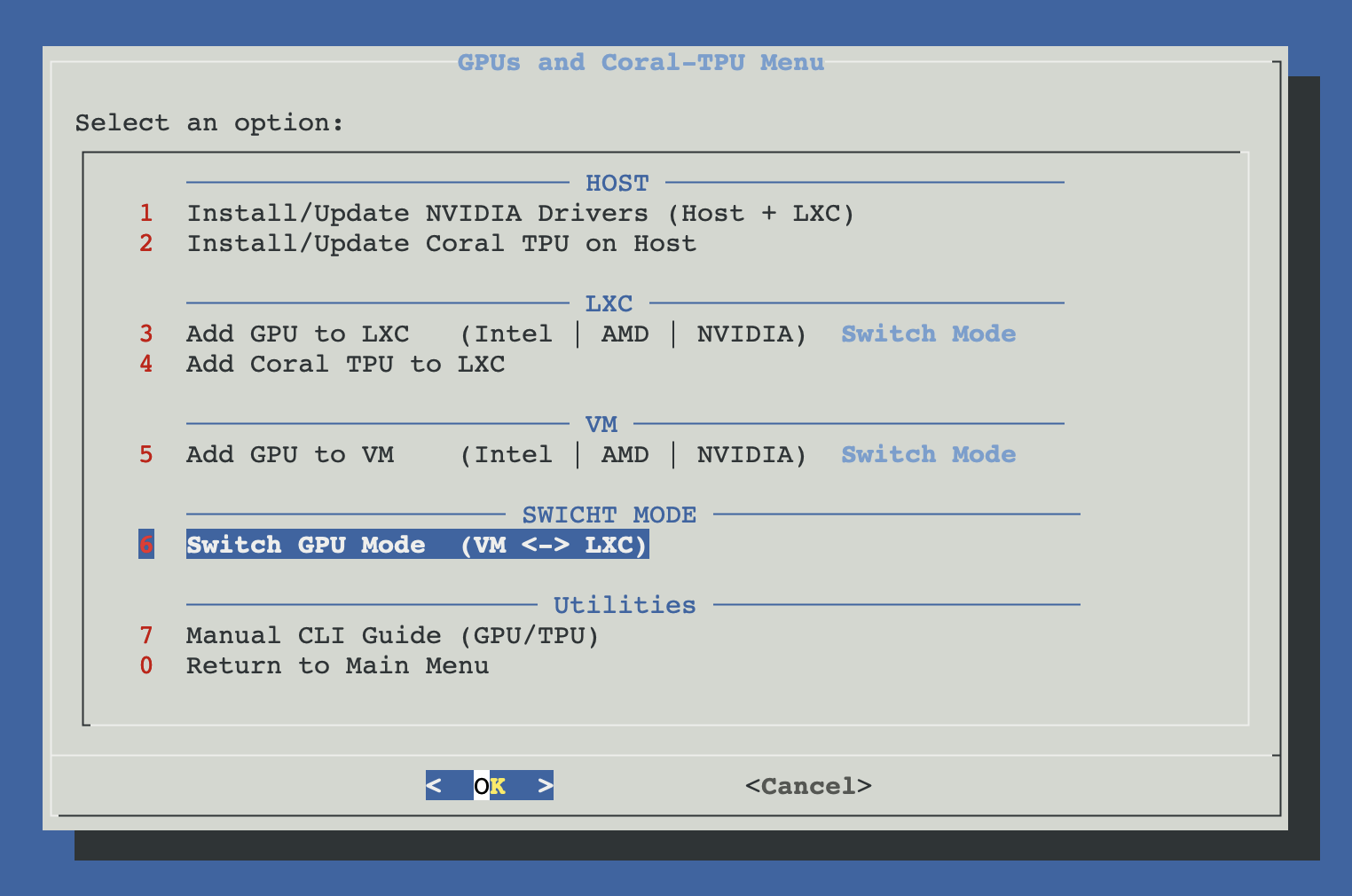
Open ProxMenux on the host, go to Hardware: GPUs and Coral-TPU → Switch GPU Mode (VM ↔ LXC).
How the script runs
Two phases as usual: everything is collected and validated first, nothing is applied until you confirm at the end.
┌─────────────────────────────────────────────┐
│  PHASE 1 — Detect, select, plan             │
│  (nothing touched yet)                      │
└──────────────────┬──────────────────────────┘
                   ▼
  lspci detects every GPU + current driver
  (vfio-pci, nvidia, amdgpu, i915, …)
                   │
                   ▼
  User selects GPU(s) to switch
  (checklist; auto-selects if only one)
                   │
                   ▼
  Uniform current mode check
  ├─ All in VM mode    → target = LXC
  ├─ All in LXC mode   → target = VM
  └─ Mixed             → reject, reselect
                   │
                   ▼
  Validations
  ├─ SR-IOV VF / active PF?       → block
  ├─ Target = VM and blocked ID?  → block
  └─ IOMMU parameter present?     → auto-add to boot
                                    cmdline if missing
                   │
                   ▼
  Find affected workloads
  ├─ LXC configs referencing the GPU
  └─ VM configs with hostpci for the GPU
      (precise BDF regex, no substring false-positives)
                   │
                   ▼
  Conflict policy per affected workload
  ┌──────────────────────────────────────┐
  │ Keep config, disable onboot          │
  │   └─ safest; workload stays defined  │
  │      but won't auto-start broken     │
  │ Remove GPU lines from config         │
  │   └─ clean; workload works without   │
  │      the GPU after the switch        │
  └──────────────────────────────────────┘
                   │
                   ▼
  If target = LXC (leaving VM mode):
  └─ Orphan audio cascade
     (offer to remove companion audio
      hostpci + clean vfio.conf if the
      audio ID isn't used by any other VM)
                   │
                   ▼
  Confirmation summary
  (target mode + affected workloads +
   host changes about to happen)
                   │
     ┌─────── Cancel   OR   Confirm ────┐
     ▼                                  ▼
 Exit, nothing       ┌──────────────────┴──────────────────┐
 was changed         │  PHASE 2 — Apply                    │
                     └──────────────────┬──────────────────┘
                                        ▼
                       Target = VM (bind to vfio-pci):
                       ├─ /etc/modprobe.d/vfio.conf
                       │    add vendor:device + disable_vga=1
                       ├─ /etc/modprobe.d/blacklist.conf
                       │    add type-specific blacklists
                       ├─ /etc/modules
                       │    add vfio-pci, vfio
                       ├─ NVIDIA: sanitize host stack
                       │    (disable udev rule, hard-blacklist)
                       └─ AMD: softdep vfio-pci

                       Target = LXC (back to native driver):
                       ├─ /etc/modprobe.d/vfio.conf
                       │    drop vendor:device IDs for this GPU
                       │    (delete line if now empty)
                       ├─ /etc/modprobe.d/blacklist.conf
                       │    drop type blacklists if no GPU of
                       │    that type remains in vfio.conf
                       ├─ /etc/modules
                       │    drop vfio-pci if no GPU in vfio.conf
                       └─ NVIDIA: restore host stack
                          (re-enable udev, drop hard-blacklist)
                                        │
                                        ▼
                       Apply workload conflict policy
                       (pct set onboot=0  OR  sed hostpci/dev
                        lines out of VM/LXC configs)
                                        │
                                        ▼
                       update-initramfs -u -k all
                       (only if host config actually changed)
                                        │
                                        ▼
                       Reboot prompt — required for the new
                       binding to take effect
Walking through the flow
Detect GPUs and their current binding
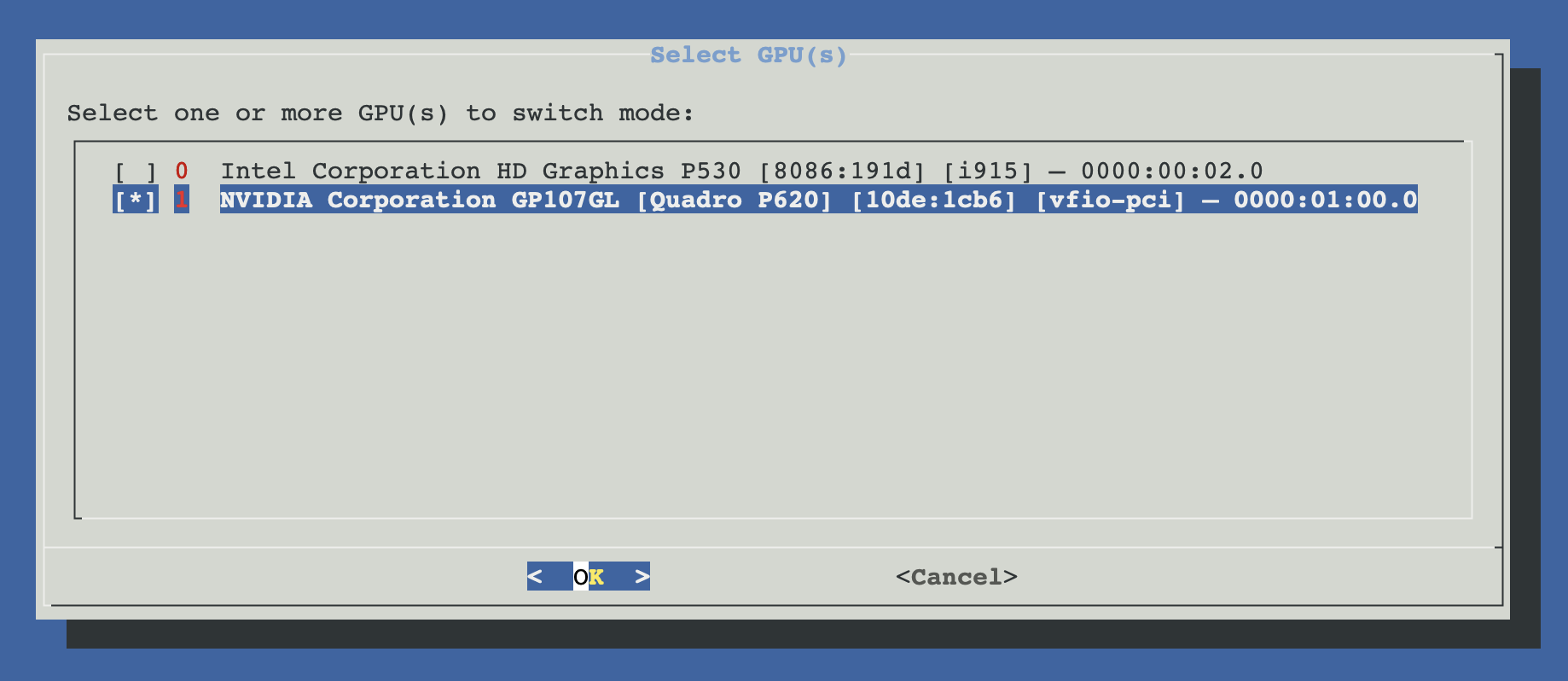
The script scans every VGA / 3D / Display controller on the host and inspects /sys/bus/pci/devices/*/driver to find the current kernel driver. You'll see each GPU labelled with its name, PCI slot and current driver binding — so you can tell at a glance which mode it's in.
Pick the GPU(s) to switch
Single GPU → auto-selected. Multiple GPUs → checklist. You can tick several, but they must all be in the same current mode — otherwise the script can't pick a target mode for the batch and you get a "mixed mode" warning asking you to narrow the selection.
Batching switches
Review the proposed direction
Based on the current mode, the script proposes the opposite as target:
- VM → LXC: unbind from
vfio-pci, let the native driver (nvidia,amdgpu,i915) reclaim the card so LXCs can share it. On NVIDIA, the per-BDF entry is removed from/etc/udev/rules.d/10-proxmenux-vfio-bind.rulesso the nvidia module reclaims the GPU after reboot. - LXC → VM: bind to
vfio-pciso the card is free for VFIO passthrough to a single VM. On AMD / Intel this means blacklisting the native driver and settingoptions vfio-pci ids=…. On NVIDIA thenvidiamodule is not blacklisted — instead a per-BDF udev rule appliesdriver_override=vfio-pcionly to the GPUs you select, so other NVIDIA GPUs on the host keep theirnvidiadriver.
Confirm the direction or cancel.
Conflict policy per affected workload
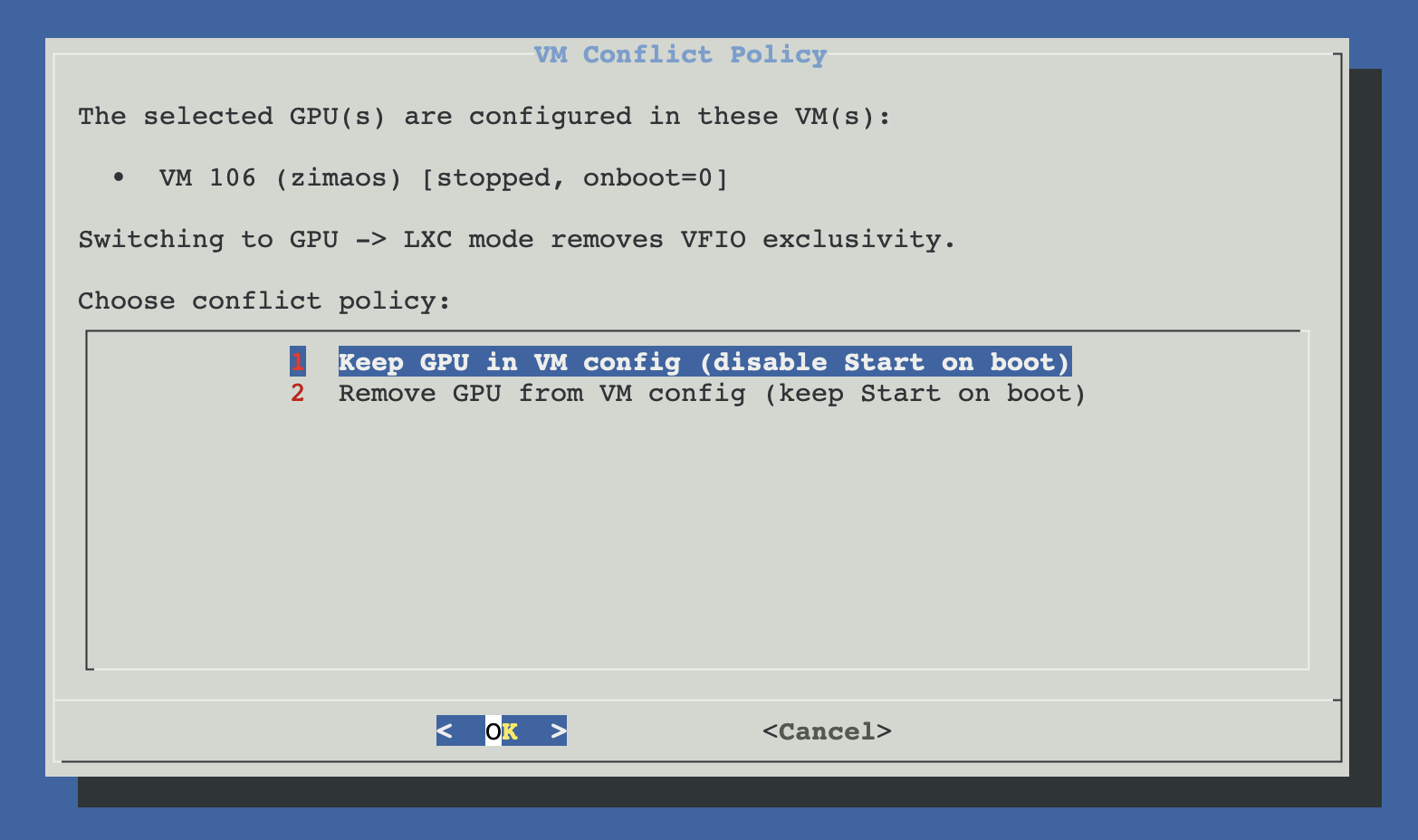
The script scans every /etc/pve/lxc/*.conf and /etc/pve/qemu-server/*.conf looking for references to the GPU's PCI slot. For each affected workload you pick a policy:
| Policy | Effect | When to pick |
|---|---|---|
| Keep config, disable onboot | pct set -onboot 0 (or qm set). GPU lines stay in the config. | You plan to come back to this VM/LXC once the GPU is back in its original mode. Safe default. |
| Remove GPU from config | hostpci / dev lines for this GPU's slot are sed'd out. | The VM/LXC will keep running without the GPU (CPU-only transcoding, etc.). Clean workflow. |
Orphan audio cleanup (only when leaving VM mode)
dGPUs (NVIDIA / AMD) ship with an HDMI audio function at .1 of the same slot, and sometimes extra audio controllers are attached alongside the GPU. When the GPU leaves the VM, those audio lines become orphans — the VM has hostpci entries pointing to audio devices that aren't going with the GPU.
The script discovers them (precise BDF match, no substring false-positives) and shows a checklist so you can remove them cleanly. It also cleans their vendor:device IDs from /etc/modprobe.d/vfio.conf — but only if no other VM still uses those audio IDs.
Apply host + workload changes
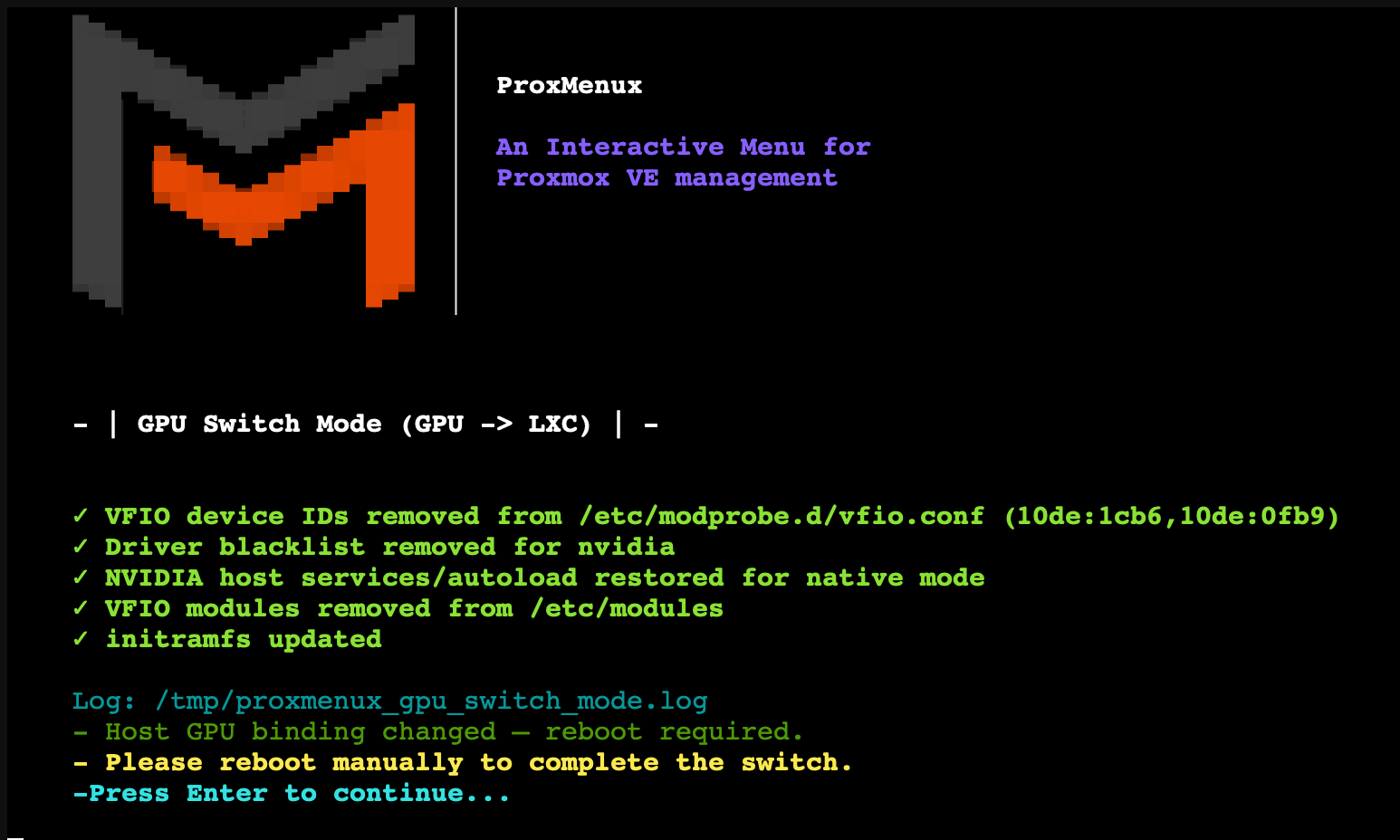
Once you confirm, the script writes the host-side changes — vfio.conf, blacklist, modules, and (for NVIDIA) the per-BDF udev rule at /etc/udev/rules.d/10-proxmenux-vfio-bind.rules plus the BDF state at /etc/proxmenux/vfio-bind.bdfs. It also applies the chosen conflict policy to each affected VM/LXC. If the host config actually changed, it runs update-initramfs -u -k all followed by proxmox-boot-tool refresh; otherwise both are skipped.
Reboot
The new GPU binding only takes effect after a reboot. The script prompts you; you can reboot now or later, but don't start the target VM/LXC until the host has rebooted — otherwise the GPU is still held by the previous driver.
Manual equivalent
If you want to understand exactly what the script does (or troubleshoot one of the steps by hand), these are the raw operations for VM → LXC on an NVIDIA card with vendor:device 10de:2204:
# Drop the vendor:device from vfio.conf — keep other GPUs intact
sed -i 's/10de:2204,//; s/,10de:2204//; s/=10de:2204 /=/' /etc/modprobe.d/vfio.conf

# Remove the NVIDIA hard-blacklist and nouveau blacklist
sed -i '/^blacklist nouveau$/d; /^blacklist nvidia$/d; /^blacklist nvidia_drm$/d; /^blacklist nvidia_modeset$/d; /^blacklist nvidia_uvm$/d; /^blacklist nvidiafb$/d' /etc/modprobe.d/blacklist.conf
rm -f /etc/modprobe.d/nvidia-blacklist.conf

# Re-enable NVIDIA udev rule + modules-load config (if disabled by VM-mode switch)
[ -f /etc/udev/rules.d/70-nvidia.rules.proxmenux-disabled-vfio ] && \
  mv /etc/udev/rules.d/70-nvidia.rules.proxmenux-disabled-vfio \
     /etc/udev/rules.d/70-nvidia.rules
[ -f /etc/modules-load.d/nvidia-vfio.conf.proxmenux-disabled-vfio ] && \
  mv /etc/modules-load.d/nvidia-vfio.conf.proxmenux-disabled-vfio \
     /etc/modules-load.d/nvidia-vfio.conf

# Clean up the VM config — precise BDF regex, no substring collisions
# (replace 0000:01:00 with your GPU's slot)
sed -E -i '/^hostpci[0-9]+:[[:space:]]*(0000:)?01:00\.[0-7]([,[:space:]]|$)/d' \
  /etc/pve/qemu-server/<vmid>.conf

# Rebuild initramfs and reboot
update-initramfs -u -k all
reboot
And for LXC → VM:
# Add the vendor:device to vfio.conf (create the line if missing)
grep -q '^options vfio-pci ids=' /etc/modprobe.d/vfio.conf && \
  sed -i '/^options vfio-pci ids=/ s/$/,10de:2204/' /etc/modprobe.d/vfio.conf || \
  echo 'options vfio-pci ids=10de:2204 disable_vga=1' >> /etc/modprobe.d/vfio.conf

# Blacklist the native driver so vfio-pci can claim the card
cat >> /etc/modprobe.d/blacklist.conf <<'EOF'
blacklist nouveau
blacklist nvidia
blacklist nvidia_drm
blacklist nvidia_modeset
blacklist nvidia_uvm
blacklist nvidiafb
options nouveau modeset=0
EOF

# Make sure vfio-pci loads at boot
grep -q '^vfio-pci$' /etc/modules || echo 'vfio-pci' >> /etc/modules

# Rebuild initramfs and reboot
update-initramfs -u -k all
reboot
Only one VM can use a given vfio-pci GPU at a time
hostpci entries with the same PCI slot in two VMs is valid config but only one of the VMs can start with the GPU — the second one will fail. The ProxMenux conflict policy step is exactly about avoiding this trap.Verification after reboot
# Confirm the GPU is bound to the driver you expect
lspci -nnk -d <vendor:device>
# Expected (LXC mode): "Kernel driver in use: nvidia" (or amdgpu, i915)
# Expected (VM  mode): "Kernel driver in use: vfio-pci"

# LXC mode — is the host tool happy?
nvidia-smi                 # if NVIDIA
intel_gpu_top              # if Intel iGPU

# VM mode — ready to be claimed by a VM start
lsmod | grep vfio
Troubleshooting
GPU still shows vfio-pci after switching to LXC mode
update-initramfs didn't run (or the reboot didn't actually happen). Check lsmod | grep vfio — if vfio-pci is loaded, rerun update-initramfs -u -k all and reboot. For AMD/Intel: verify vfio.conf no longer contains the GPU's vendor:device ID. For NVIDIA: verify the BDF is no longer in /etc/proxmenux/vfio-bind.bdfs and that /etc/udev/rules.d/10-proxmenux-vfio-bind.rules doesn't list it.A VM won't start after switching a GPU to LXC mode
hostpci entries pointing to a GPU it can't claim. Run the script again and pick the Remove GPU from config policy, or clean the config by hand:# Delete every hostpci line for the GPU slot
sed -E -i '/^hostpci[0-9]+:[[:space:]]*(0000:)?<slot>\.[0-7]([,[:space:]]|$)/d' \
/etc/pve/qemu-server/<vmid>.confnvidia-smi fails with 'Driver/library version mismatch' after going back to LXC
modprobe -r nvidia then modprobe nvidia. If that fails, reboot — a full reboot always clears residual state from the vfio binding.Install log
/tmp/proxmenux_gpu_switch_mode.log on the host. Attach it when asking for help on GitHub.Related
- Add GPU to VM (Passthrough) — first-time VM mode setup.
- Add GPU to LXC — first-time LXC mode setup.
- Install NVIDIA Drivers (Host) — required for LXC mode on NVIDIA GPUs.
- ProxMenux Monitor — Hardware tab — the Graphics Cards section where each GPU shows its current mode and exposes the inline switch control.
- GPU Passthrough commands — quick command reference.