
Storage & Share Manager
Integrate external or local storage into Proxmox VE and share folders between the host and LXC containers. Three blocks of tools: Host storage integration (register storage in Proxmox itself), the LXC Mount Manager (bind mounts with pragmatic permission handling), and LXC network sharing (NFS / Samba client and server flows for specific use cases).
What this menu is for
Opening the menu
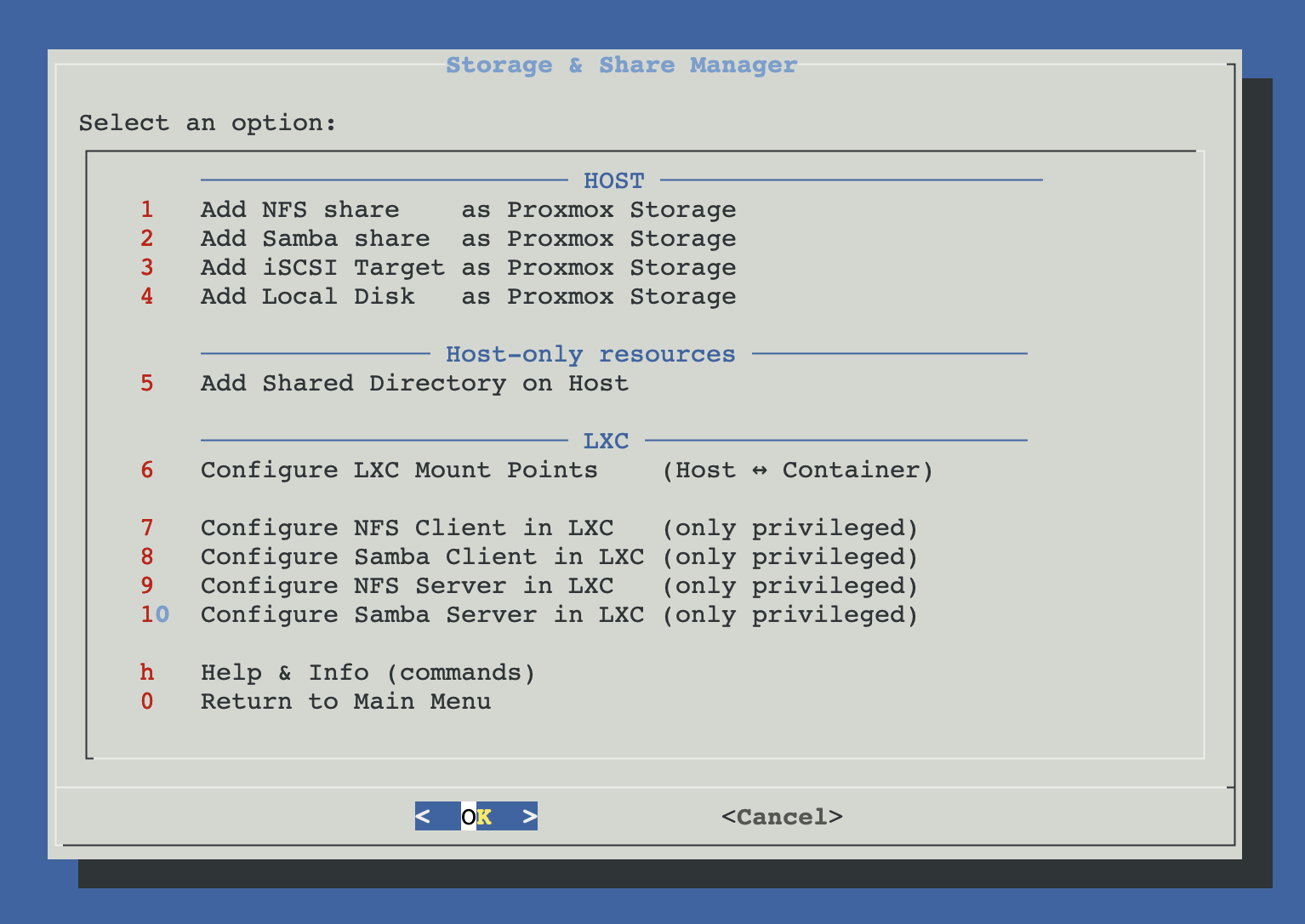
From ProxMenux's main menu, select Storage & Share Manager. You will see this:
Three tool groups
The menu is split into three blocks. Host storage integration registers external or local storage in Proxmox itself. The LXC Mount Manager is the primary tool for sharing folders with containers — a pragmatic bind-mount flow that handles unprivileged UID mapping on the host side. LXC network sharing covers four additional scenarios where a container needs to consume or expose NFS / Samba shares directly.
Host storage
Register external and local storage in Proxmox via pvesm add …. Once registered, the storage appears in the Proxmox UI and is available to the VM and CT creators.
- External NFS / Samba / iSCSI → Proxmox storage
- Local disk → Proxmox directory or ZFS storage
- Local shared directory (for cross-CT bind mounts)
LXC Mount Manager
The primary LXC sharing tool. Bind-mounts host directories into containers via pct set -mpN and handles the permission quirks of unprivileged CTs without creating any group or user inside the container.
- Works with privileged and unprivileged CTs
- Offers to set
o+rwxon the host dir for unprivileged UIDs - Fixes existing CIFS / NFS mounts if needed
LXC network sharing
Four additional flows for scenarios where a container needs to consume or expose NFS / Samba shares directly. All require a privileged container.
- NFS / Samba client (consume external shares)
- NFS / Samba server (expose CT folders)
Host storage integration
Register storage in Proxmox. Every option calls pvesm add … under the hood, so the storage shows up in Datacenter → Storage and becomes available to the VM / CT creators.
LXC Mount Manager
The primary tool for sharing folders between the Proxmox host and LXC containers. It uses pct set -mpN to bind-mount a host directory into the container, and handles the permission quirks of unprivileged CTs on the host side (no groups or users are created inside the container).
LXC network sharing
Use these flows when a container needs to be an NFS / Samba endpoint — either consuming an external share (client) or exposing its own folders (server). For most file-sharing needs (host ↔ CT bind mounts), the LXC Mount Manager is simpler and does not require privileged containers.
Privileged container requirement
nfs-kernel-server, smbd, mount.nfs, mount.cifs) need capabilities that unprivileged CTs do not expose. If you only need to share files between the host and an unprivileged CT, use the LXC Mount Manager instead — it bind-mounts from the host and adjusts permissions on the host side so the container can read and write without any kernel-module magic.How ProxMenux handles unprivileged CT permissions
chmod o+rwx (plus matching ACLs) on the host directory, so any mapped UID can read and write. For CIFS it remounts with uid=0,gid=0,file_mode=0777,dir_mode=0777; for NFS it sets a sticky world-writable directory and, if the server squashes root, guides you to the right server-side fix.Scripts involved
Each individual page links to the script that drives its flow. The file below is a shared helper that is not documented as its own page but is used by several of the LXC network-sharing flows:
- global/share-common.func — CT validation, mount point selection, privileged check and universal group setup helpers shared across the LXC client / server flows.