
Host: Mount Samba share on Host
Mount an external Samba (SMB / CIFS) share — from a NAS, a Windows box, a TrueNAS SMB export — on the Proxmox host. Pick one or both methods: register it as Proxmox storage (visible in Datacenter > Storage) and/or add a plain /etc/fstab mount at a path you choose, with open uid/gid/file_mode so unprivileged LXCs can bind-mount and write without any changes inside the container.
What this does
pvesm add cifs — visible in Datacenter > Storage, mounted at /mnt/pve/<id>, credentials stored encrypted in /etc/pve/priv/storage/<id>.pw; (2) Host fstab mount at a path you pick — persistent via /etc/fstab, mounted with uid=0,gid=0,file_mode=0777,dir_mode=0777 so unprivileged LXC bind-mounts can write, credentials stored in a root-only /etc/samba/credentials/ file (password never in fstab). You can run one method, the other, or both.Opening the tool
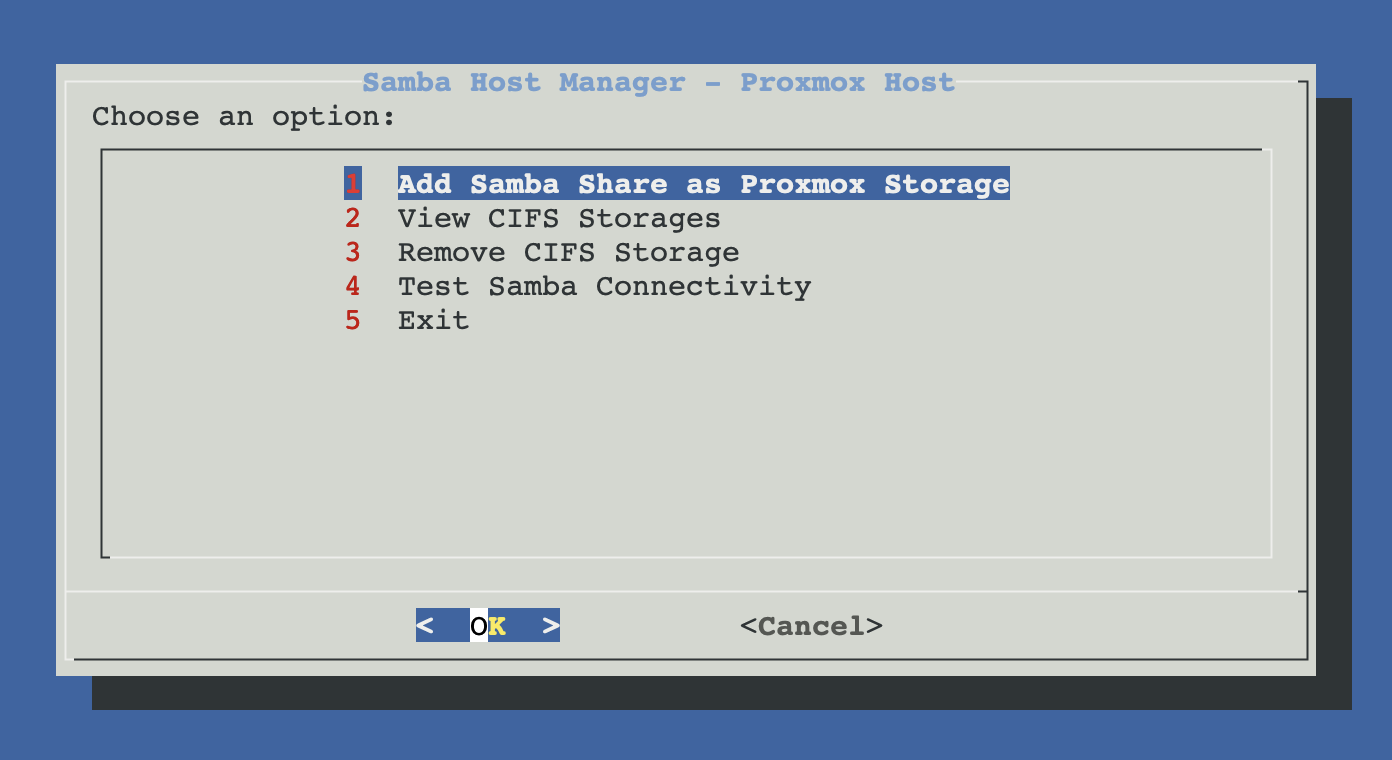
From ProxMenux's main menu, open Storage & Share Manager → Mount Samba Share on Host. You will see this sub-menu with four options:
How the script runs
The flow has two phases. Phase 1: discover server, validate credentials, pick share, then pick mount method(s) via a checklist. Phase 2: only the methods you marked are executed. Credentials are needed up-front because smbclient needs them to list shares. Until the final confirmation, neither /etc/pve/storage.cfg nor /etc/fstab are touched.
┌─────────────────────────────────────────────┐
│  PHASE 1 — Discover, validate, choose       │
│  (nothing touched yet)                      │
└──────────────────┬──────────────────────────┘
                   ▼
      Server discovery (nmap 139/445 + nmblookup)
                   │
                   ▼
      Authentication (User or Guest)
                   │
                   ▼
      Share selection (smbclient -L)
                   │
                   ▼
      ╔═════════════════════════════════════╗
      ║   MOUNT METHOD PICKER  (checklist)  ║
      ║   [ ] As Proxmox storage  (pvesm)   ║
      ║   [ ] As host fstab mount only      ║
      ║   (mark one or both — re-prompts    ║
      ║    if you press OK without marks)   ║
      ╚════════════════╤════════════════════╝
                       │
        ┌──────────────┴──────────────┐
        ▼                             ▼
   pvesm branch                  fstab branch
   ├─ storage ID                 ├─ mount path
   ├─ content types              ├─ mount options
                                 └─ (User) write
                                     /etc/samba/credentials/...cred
                                     (mode 0600)
   ▼                             ▼
   ┌─────────────────────────────────────────┐
   │  PHASE 2 — Apply (only marked methods)  │
   └──────────────────┬──────────────────────┘
                      ▼
   pvesm add cifs <id> ...    +  mkdir -p <path>
   (auto-mount at            mount -t cifs ...
    /mnt/pve/<id> with        (uid=0,gid=0,
    default options)           file_mode=0777,
                               dir_mode=0777)
                             append /etc/fstab
                             systemctl daemon-reload
                      ▼
              Summary printed
Mount method picker (two options, mark one or both)
After selecting the share and validating credentials, ProxMenux shows a checklist with the two mount methods. You can mark either, or both. If you press OK without marking anything, the dialog re-appears until you choose at least one option or press Cancel to exit the flow.
| Method | Mount path | Visible in Datacenter > Storage | Typical use case |
|---|---|---|---|
| As Proxmox storage (pvesm) | /mnt/pve/<storage-id> (managed by Proxmox) | Yes | Backups, ISOs, LXC templates — anything that needs to appear in the Proxmox UI. Live VM disks are technically supported but discouraged on CIFS (locking semantics). |
| Host fstab only | /mnt/<path> with open uid/gid/file_mode | No | Bind-mounting the share into one or more LXCs without exposing it as a Proxmox storage. Open perms guarantee unprivileged CTs can write through the bind-mount. |
| Both | Both paths above (two independent CIFS connections to the server) | Yes | You want UI integration AND a stable host-side path with open permissions for LXC bind-mounts. The pvesm mount uses Proxmox defaults; the fstab mount applies the open uid/gid/file_mode separately. |
"Both" creates two independent CIFS connections
/mnt/pve/<id> uses Proxmox defaults (no open uid/gid) — Proxmox UI is happy. The fstab mount at /mnt/<path> uses uid=0,gid=0,file_mode=0777,dir_mode=0777 — unprivileged LXC bind-mounts to it can write. Two TCP connections to the SMB server from the same Proxmox host.Method A — As Proxmox storage (pvesm)
If As Proxmox storage is marked, ProxMenux runs the original pvesm flow:
- Storage ID — default
cifs-<server-ip-with-dashes>. Only letters, digits,-and_. - Content types — CIFS exposes 6 options (same as NFS minus
rootdir, which Proxmox does not allow on CIFS because the locking semantics cannot hold a live LXC rootfs):
| Content type | What it allows |
|---|---|
| import | Disk image imports (selected by default). |
| backup | VM and CT backup files (vzdump). |
| iso | Installation ISO images. |
| vztmpl | LXC templates. |
| images | Live VM disk images — warned inline, see below. |
| snippets | Hook scripts and cloud-init snippets. |
Live VM disks on CIFS
images, ProxMenux pops up a warning before continuing. CIFS uses an advisory locking model that interacts badly with KVM disk operations (snapshots, live migration, I/O under contention). A backup or ISO store on CIFS is perfectly fine; a live-disk store is asking for trouble. Use NFS (or local storage) for images when you can.Where pvesm stores credentials
/etc/pve/storage.cfg. Proxmox keeps it in /etc/pve/priv/storage/<storage-id>.pw — mode 0600, owner root, member of the cluster sync. If you later change the password on the Samba server, use pvesm set <id> --password <new> or remove and re-add through ProxMenux.Method B — Host fstab mount only
If As host fstab mount only is marked, ProxMenux asks for a host mount path and persistent options, writes a root-only credentials file (User mode), then mounts and writes the entry to /etc/fstab:
- Host mount path — default
/mnt/<share-name>. Must be an absolute path. If something is already mounted there, or a fstab entry exists, ProxMenux offers to replace it. - Mount options — pick Read/Write (default with
rw,uid=0,gid=0,file_mode=0777,dir_mode=0777,iocharset=utf8,nofail,_netdev), Read-only (read-only variant withfile_mode=0555,dir_mode=0555), or Custom (type your own option string). Open uid/gid/file_mode are always recommended for LXC bind-mount writes.
Credentials file (User mode)
/etc/samba/credentials/<server>_<share>.cred (mode 0600) with username= and password= lines, and references it in the fstab entry via the credentials= mount option. Plain text never lands in /etc/fstab. For Guest mode, the option guest is appended instead and no credentials file is created.Once you confirm, the script:
mkdir -pthe mount path.mount -t cifs -o <opts>,credentials=<file>(orguest)//<srv>/<share> <path>.- Writes a one-line entry to
/etc/fstab://<srv>/<share> <path> cifs <opts> 0 0. - Runs
systemctl daemon-reloadso systemd picks up the new fstab entry.
Using the fstab mount from an unprivileged LXC
uid=0,gid=0,file_mode=0777,dir_mode=0777, every file in the mount is owned by host UID 0 with mode 0777. An unprivileged LXC bind-mounting the path sees "others" perms on every entry (CT root = host UID 100000 = others on the host filesystem), so reads and writes succeed. No changes are made inside the container — no chown in the CT, no group setup, nothing modified in /etc/lxc beyond the single mp bind-mount line. The script prints the exact pct set command at the end, or use the LXC Mount Manager to attach the path.The fstab mount is NOT a Proxmox storage
Manual equivalent
Method A (pvesm) maps to:
apt-get install -y cifs-utils smbclient    # one-time: SMB client tools

# with user authentication
pvesm add cifs mycifs \
  --server 10.0.0.50 \
  --share proxmox \
  --username backup_user \
  --password 's3cret' \
  --content backup,iso

# guest access (no credentials)
pvesm add cifs mycifs-guest \
  --server 10.0.0.50 \
  --share public \
  --content iso,vztmpl

pvesm status mycifs                         # verify it's active
ls -la /mnt/pve/mycifs                       # Proxmox auto-mounts here
Method B (fstab, user auth) — credentials file + mount:
# 1. credentials file (root-only)
mkdir -p /etc/samba/credentials && chmod 0700 /etc/samba/credentials
cat > /etc/samba/credentials/nas01_share.cred <<'EOF'
username=admin
password=s3cret
EOF
chmod 0600 /etc/samba/credentials/nas01_share.cred

# 2. mount with open uid/gid/file_mode (for unpriv LXC bind-mounts)
mkdir -p /mnt/data
mount -t cifs //10.0.0.50/share /mnt/data \
  -o "rw,uid=0,gid=0,file_mode=0777,dir_mode=0777,iocharset=utf8,nofail,_netdev,credentials=/etc/samba/credentials/nas01_share.cred"

# 3. persist
echo "//10.0.0.50/share /mnt/data cifs rw,uid=0,gid=0,file_mode=0777,dir_mode=0777,iocharset=utf8,nofail,_netdev,credentials=/etc/samba/credentials/nas01_share.cred 0 0" \
  >> /etc/fstab
systemctl daemon-reload

# 4. bind into an unpriv LXC (no changes inside the CT)
pct set <ctid> -mp0 /mnt/data,mp=/mnt/data,shared=1,backup=0
pct reboot <ctid>
Method B (fstab, guest auth) — no credentials file:
mkdir -p /mnt/public
mount -t cifs //10.0.0.50/public /mnt/public \
  -o "rw,uid=0,gid=0,file_mode=0777,dir_mode=0777,iocharset=utf8,nofail,_netdev,guest"

echo "//10.0.0.50/public /mnt/public cifs rw,uid=0,gid=0,file_mode=0777,dir_mode=0777,iocharset=utf8,nofail,_netdev,guest 0 0" \
  >> /etc/fstab
systemctl daemon-reload
View configured CIFS storages
Lists every CIFS entry in Proxmox (pvesm status | awk '$2 == "cifs"') with server, share, content types, username (or Guest), mount path and live status. Password is never printed. Note: this view only shows pvesm-registered storages — fstab-only mounts are not listed. Check those with findmnt -t cifs or grep cifs /etc/fstab.
Remove CIFS storage
Runs pvesm remove <storage-id> after a confirmation that shows the server / share / content. Only the Proxmox-side registration is removed — the remote Samba server is not touched. Proxmox also deletes the paired credentials file. To remove a fstab-only mount, edit /etc/fstab by hand, run umount <path>, and remove the file from /etc/samba/credentials/.
Back up dependencies first
Test Samba connectivity
Runs a diagnostic pass over every CIFS storage registered in Proxmox: checks that smbclient is available, pings each server, probes ports 445 and 139, tries a guest listing, and reports Proxmox's own view (pvesm status). "Requires authentication" on guest-list means your server only exposes shares to authenticated users — normal for most NAS setups.
Troubleshooting
"No Samba servers found on the network"
nmap -p 139,445. The server may be on a different subnet, firewalled, or only reachable by hostname (mDNS / WINS). Use the Manual option with the IP or hostname instead."No accessible shares found"
smbclient -L returned nothing for these credentials. Causes: the user has no permission to list shares (try with admin credentials once, or enter the share name manually), the server has share visibility disabled, or the credentials are wrong. The script lets you type the share name by hand in this case.Proxmox mount fails with NT_STATUS_ACCESS_DENIED
pvesm set <id> --username <u> --password <p> or remove and re-add from ProxMenux. If the server is in an AD domain, append --domain <DOMAIN> to the pvesm set call."host is down" or storage status goes inactive at night
pvestatd then sees the storage as inactive until the first access wakes the NAS. If this is cosmetic, nothing is broken. If it causes backup failures, disable SMB idle disconnect on the NAS or schedule backups outside the sleep window.Unprivileged LXC bind-mount can't write to the fstab path
findmnt /mnt/<path> should show uid=0,gid=0,file_mode=0777,dir_mode=0777. If a Custom option string omits those, an unprivileged LXC will get permission denied (CT UIDs map to host "others", which without open file_mode have no write bit). Re-mount with the default RW preset or add the four options back to your custom string.fstab mount does not come up after reboot
nofail,_netdev so a missing share at boot does not block startup. If the mount never comes up: confirm the network is reachable (ping <server>), check journalctl -u remote-fs.target, verify the credentials file still exists (ls -l /etc/samba/credentials/) and is readable, and try mount -a manually.Related
- NFS share as Proxmox storage — sibling page with the same flow pattern (Method A pvesm + Method B fstab) and side-by-side trade-offs.
- LXC Mount Manager — bind-mount the fstab-only path
/mnt/<path>into one or more containers. - Samba client in LXC — alternative: mount Samba directly from inside a privileged container (skips the host).