
Host: Add iSCSI target as Proxmox storage
Register an iSCSI target (from a SAN, TrueNAS / FreeNAS, Synology, a Windows Server target, any array that speaks iSCSI) as Proxmox storage. The exported LUNs appear as block devices and can host VM disk images at near-local performance over the network.
What this does
pvesm add iscsi with a guided flow: it installs open-iscsi if needed, asks for the iSCSI portal (IP:port), runs iscsiadm --mode discovery --type sendtargets against it, lets you pick a target IQN, and registers the iSCSI storage in Proxmox. The iscsid service then keeps the iSCSI session alive across reboots.iSCSI vocabulary (quick reference)
| Term | Meaning |
|---|---|
| Portal | The iSCSI service endpoint on the target server — an IP (or hostname) plus a TCP port. Default port is 3260; ProxMenux assumes it if you do not specify one. |
| Target | A single exported "server" inside the portal, identified by its IQN (iSCSI Qualified Name). One portal can host many targets. |
| IQN | Canonical form is iqn.YYYY-MM.reverse.domain:identifier, for example iqn.2024-08.com.truenas:proxmox-pool. Both the target and the initiator have their own IQN. |
| LUN | A block device inside a target (Logical Unit Number). A single target can expose several LUNs; each LUN appears as its own disk in Proxmox and can become a VM disk. |
| Initiator | The client that connects to a target — in this case, your Proxmox host. The initiator has its own IQN stored in /etc/iscsi/initiatorname.iscsi. Targets typically only accept sessions from pre-authorised initiator IQNs. |
Opening the tool
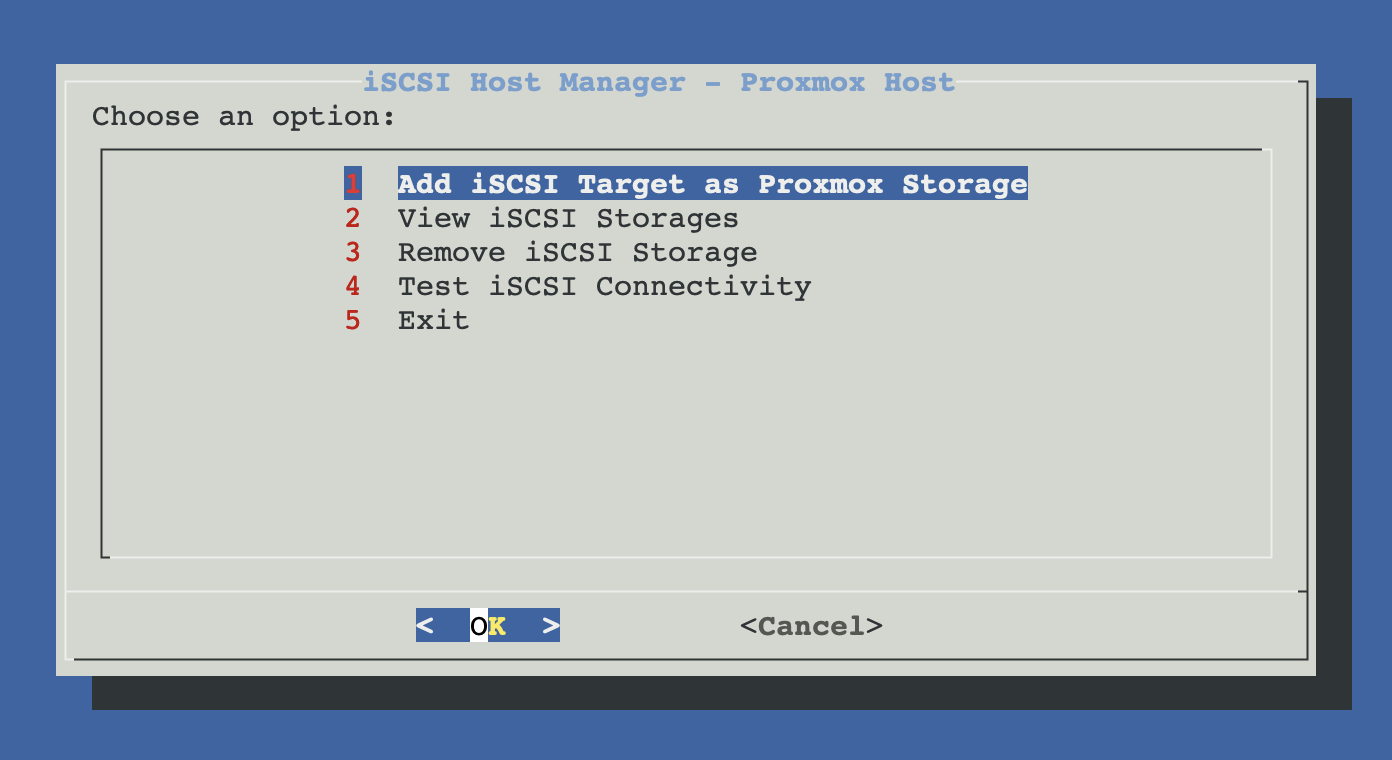
From ProxMenux's main menu, open Storage & Share Manager → Add iSCSI Target as Proxmox Storage. You will see this sub-menu with four options:
How the script runs (Add flow)
The flow has two phases with clear separation between "setting up the initiator, discovering targets" and "actually registering storage in Proxmox". Unlike NFS / Samba, there is no auto-discovery on the subnet — you must know the portal address (iSCSI is not broadcast-friendly).
┌─────────────────────────────────────────────┐
│  PHASE 1 — Prepare initiator, discover      │
│  (nothing touched yet in storage.cfg)       │
└──────────────────┬──────────────────────────┘
                   ▼
      Dependency check
      └─ iscsiadm present? (open-iscsi package)
         If missing → apt-get install open-iscsi
                     + systemctl enable --now iscsid
                   │
                   ▼
      Portal entry (manual only)
      └─ user types  <ip>  or  <ip>:<port>
         If no ':' → ProxMenux appends ":3260"
                   │
                   ▼
      Reachability validation
      ├─ ping -c 1 -W 3 <host>          ── fail → abort
      └─ nc -z -w 3 <host> <port>       ── warn but continue
         (iSCSI over alternative ports may block nc)
                   │
                   ▼
      Target discovery
      iscsiadm --mode discovery --type sendtargets \
               --portal <ip:port>
      Extracts IQNs from stdout (lines matching ^iqn\.)
                   │
                   ▼
      Target selection
      ├─ 1 target found → auto-selected
      └─ 2+ targets    → menu
                   │
                   ▼
      Storage ID
      (default derived from last ':' segment of the IQN:
         "iscsi-<suffix-up-to-20-chars>")
                   │
                   ▼
      Content type (fixed — not a checklist)
      └─ images        iSCSI exposes block devices, so
                       only 'images' makes sense. No
                       backup/iso/vztmpl/rootdir/snippets.
                   │
   ┌──────── Cancel   OR   Confirm ────┐
   ▼                                   ▼
Exit, nothing        ┌─────────────────┴─────────────────┐
was changed          │  PHASE 2 — Register in Proxmox     │
                     └─────────────────┬─────────────────┘
                                       ▼
                       If storage ID already exists:
                       └─ ask "remove and recreate?"
                          └─ yes → pvesm remove <id>
                          └─ no  → abort
                                       ▼
                       pvesm add iscsi <id> \
                           --portal <ip:port> \
                           --target <iqn> \
                           --content images
                                       │
                                       ▼
                       iscsid opens a persistent session to
                       the target; LUNs appear in /dev/disk/
                       by-path/ip-<ip>:<port>-iscsi-<iqn>-lun-N
                                       │
                                       ▼
                       Proxmox auto-connects on every boot
                       via the node.startup=automatic flag
                       written by pvesm
Add iSCSI target as Proxmox storage
- Portal entry — type the IP or hostname of the iSCSI target server. Port
3260is assumed unless you typehost:port. - Target discovery — ProxMenux calls
iscsiadm --mode discovery --type sendtargets --portal <ip:port>. The server responds with every IQN it allows this initiator to see. If discovery fails, the script shows the exact error fromiscsiadmand lists common causes (wrong IP, firewall, initiator IQN not authorised). - Target selection — single target is auto-selected; multiple targets show a menu.
- Storage ID — default is
iscsi-<last IQN segment, 20 chars max>. Only letters, digits,-and_. - Content type — unlike NFS / Samba, iSCSI content is fixed to
images. iSCSI exposes raw block devices, not a filesystem, so Proxmox only lets you host VM disks on it.
Authorise the Proxmox initiator on the target
cat /etc/iscsi/initiatorname.iscsiiscsiadm discovery returns an empty list or an authentication error.Manual equivalent
The whole flow maps to these commands:
apt-get install -y open-iscsi
systemctl enable --now iscsid

# 1. discover targets on a portal
iscsiadm --mode discovery --type sendtargets \
         --portal 10.0.0.60:3260

# 2. register it in Proxmox
pvesm add iscsi myiscsi \
  --portal 10.0.0.60:3260 \
  --target iqn.2024-08.com.truenas:proxmox-pool \
  --content images

# 3. verify + see the block devices
pvesm status myiscsi
ls -la /dev/disk/by-path/ | grep iscsi
View configured iSCSI storages
Lists every iSCSI entry in Proxmox (pvesm status | awk '$2 == "iscsi"') with portal, target IQN, content type and live status.
Remove iSCSI storage
Runs pvesm remove <storage-id> after confirming portal, target and content. Only the Proxmox registration is removed — the iSCSI target itself is not touched and existing sessions on the kernel side may linger until the next reboot.
Existing VM disks on this iSCSI first
Test iSCSI connectivity
Runs a diagnostic pass: checks that iscsiadm is installed, prints your initiator IQN, confirms iscsid is running, pings each registered portal, probes its port, and reports pvesm status plus whether an iSCSI session is currently active (iscsiadm --mode session). Active session plus reachable portal but "inactive" in Proxmox usually means a stale state — try pvesm set <id> --disable 0.
Troubleshooting
"Cannot reach portal" but the server IP responds elsewhere
"iSCSI discovery failed" from iscsiadm
- Portal IP / port wrong (double-check, default is 3260).
- iSCSI service not running on the target server.
- Firewall blocks 3260 between Proxmox and the target.
- Initiator IQN is not authorised on the target. Most frequent cause on enterprise arrays. Add your Proxmox IQN to the target's initiator ACL first.
No targets found but discovery succeeded
LUNs do not appear in /dev/disk/by-path after registering
pvesm add iscsi succeeded but the kernel is not seeing block devices. Check iscsiadm --mode session — if no session is active, start one manually with iscsiadm --mode node --login. If a session exists but no LUNs appear, force a rescan: iscsiadm --mode session --rescan. If still nothing, the target probably has no LUNs assigned to this IQN yet (configure LUN mapping on the target).CHAP authentication
pvesm add will still write the entry), then add credentials manually: pvesm set <id> --username <chap-user> and edit /etc/iscsi/iscsid.conf with the password, then systemctl restart iscsid. This is a gap in the current script — documented here so you know what to do.Related
- NFS share as Proxmox storage — file-level alternative. Simpler to set up, more flexible (backup / ISO / tmpl / images), slightly slower for live VM disks.
- Samba / CIFS as Proxmox storage — another file-level option; avoid for live VM disks due to locking semantics.
- Add local disk as Proxmox storage — when the disk is local to the Proxmox host, not on another box over the network.