
LXC Mount Points (Host ↔ Container)
The primary tool for sharing folders between the Proxmox host and LXC containers. Bind-mounts any host directory into one or more containers using Proxmox's native pct set -mpN syntax. The smart bit: it solves the permission headaches of unprivileged containers on the host side — it never modifies anything inside the container.
What this does
How it works (the big picture)
A bind mount is exactly what the name says: Proxmox tells the kernel "the host directory X should also appear at path Y inside this container". There's no copy, no sync, no network — both sides see the same files at the same time.
# What the script writes:
pct set <ctid> -mpN  /mnt/data, mp=/mnt/data, shared=1, backup=0
The host path on the left and the container path on the right can be different — for example, /mnt/nas-films on the host can become /media/films inside the container. The script adds the entry to the container config (/etc/pve/lxc/<ctid>.conf) using the next free mpN index, with two safe-defaults baked in:
shared=1— tells Proxmox the data is shared storage, so it does not try to migrate the disk when you migrate the container.backup=0— excludes the bind mount fromvzdumpbackups (the data lives on the host, you back it up separately).
Permission handling — the smart part
Bind mounts are easy in principle. The hard part is permissions: an unprivileged LXC container shifts every UID by +100000, so a file created inside the container by user 1000 appears on the host as UID 101000 — a UID nobody on the host owns. To make this work without aligning UIDs across hosts and containers, ProxMenux applies the right "open up permissions" trick on the host side, depending on what kind of directory you picked:
| Host directory type | What the script offers to do |
|---|---|
Local folder e.g. /mnt/data | chmod o+rwx + setfacl o::rwx on the host directory. Only offered if the CT is unprivileged and current permissions are insufficient. |
Mounted CIFS / SMB e.g. /mnt/pve/cifs-… | Remount with uid=0, gid=0, file_mode=0777, dir_mode=0777 so the CT (any UID) can read and write the share. /etc/fstab is updated. |
Mounted NFS e.g. /mnt/pve/nfs-… | chmod 1777 + setfacl o::rwx on the NFS mount. Cannot override server-side squashing — if even host root can't write, you are guided to fix the export on the NFS server. |
Privileged containers don't need any of this
The script never modifies anything inside the container
pct exec chowns, no groups created in the CT, no fstab inside the container. If you reuse the bind-mounted directory in a different CT later, the same permissions apply automatically — no per-container setup.What ProxMenux writes — and what it doesn't
A common confusion when bind-mounting into an unprivileged CT: people assume ProxMenux must be writing lxc.idmap entries into /etc/pve/lxc/<CTID>.conf. It does not. Only one line is appended to that file — the bind mount itself:
# /etc/pve/lxc/545.conf  — single line added by the script
mp0: /mnt/NAS/hdd_cache,mp=/mnt/NAS/hdd_cache,shared=1,backup=0
The output line you see at the end of the run, "Unprivileged container — UID offset: 100000", is purely informational — it just tells you the CT is using Proxmox's default unprivileged mapping (root in CT = UID 100000 on host). The script does not configure anything around it.
The two ways to make permissions work — and why ProxMenux picks one
| Approach | What it changes | When it fits |
|---|---|---|
Host-side perms (what this script does) | chmod o+rwx + setfacl o::rwx on the host directory. The CT's mapped UIDs (100000+) fall into the "others" bucket, so opening others is enough. | Generic shared-folder access from any CT. Multiple CTs sharing the same host directory. Simple and reusable. |
lxc.idmap(not used by this script) | Custom UID/GID mapping in /etc/pve/lxc/<CTID>.conf plus matching /etc/subuid + /etc/subgid entries on the host. CT must be restarted on every change. | You need a specific UID inside the CT to map to a specific UID on the host (e.g. media:1000 in the CT must own files as media:1000 on the host so NFS doesn't squash). A more rigid setup, normally only worth it for that exact scenario. |
When you actually need lxc.idmap
all_squash, Samba shares with strict ownership, sharing a directory with a host user that has the same name as someone inside the CT) — that is the moment to add lxc.idmap entries by hand. The Mount Manager won't fight you: the bind-mount line it wrote is independent of any idmap configuration you add later.Opening the tool
From ProxMenux's main menu, open Storage & Share Manager → Configure LXC Mount Points (Host ↔ Container). You will see this sub-menu with three options:
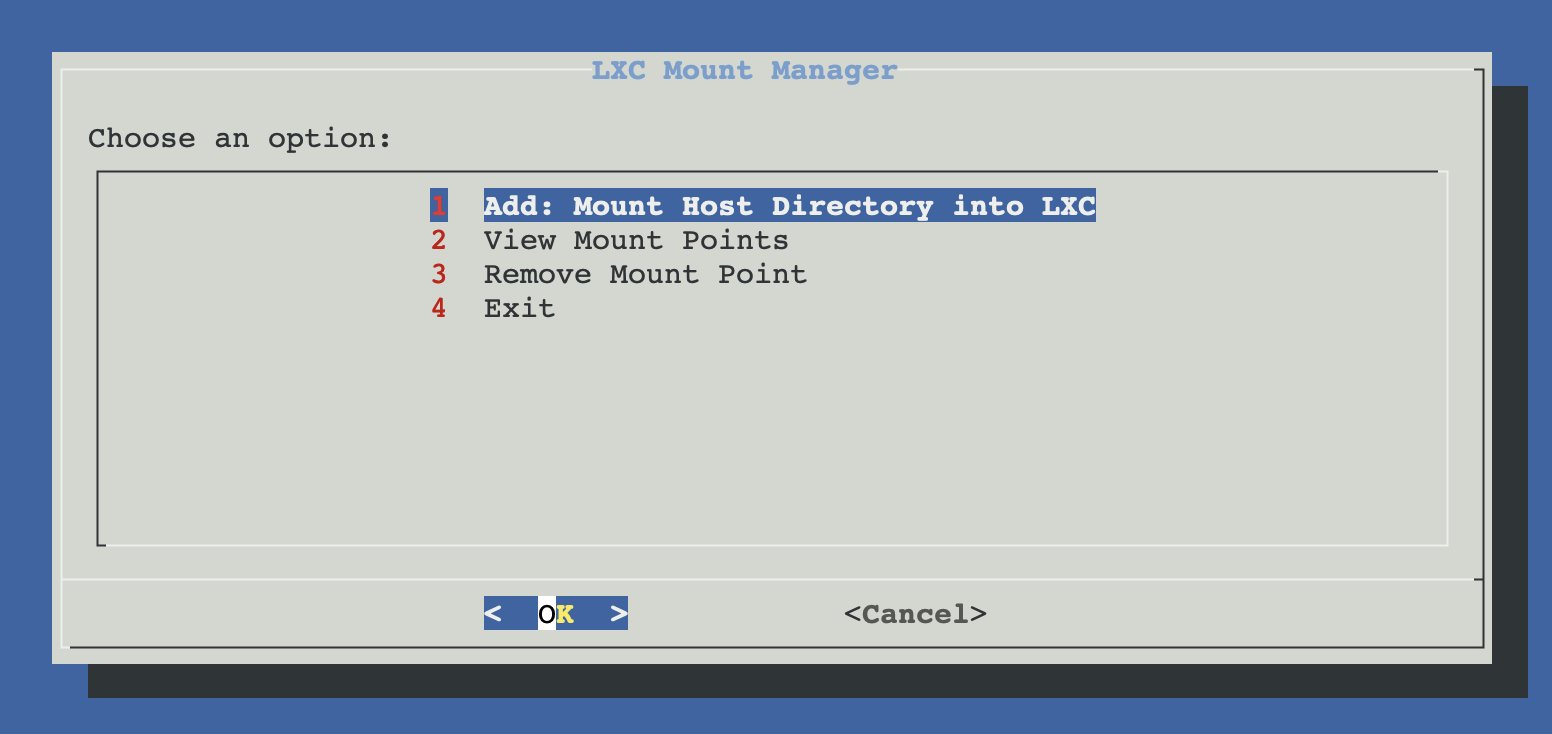
Add a mount — full flow
The technical view, for when you want to know exactly what each dialog does:
┌─────────────────────────────────────────────┐
│  PHASE 1 — Pick CT, host dir, mount point   │
│  (nothing touched yet)                      │
└──────────────────┬──────────────────────────┘
                   ▼
      pct list — pick the target container
                   │
                   ▼
      Unified host-directory picker
      Lists every candidate the script can detect:
      ├─ Mounted CIFS / NFS shares (/proc/mounts)
      ├─ fstab-inactive network mounts (defined
      │   but not currently mounted) — labelled
      │   "fstab(off)-"
      ├─ Local /mnt/* directories
      ├─ Proxmox-managed storages under /mnt/pve/*
      │   (NFS / CIFS shares registered via pvesm)
      │   — labelled "PVE-"
      └─ "Enter path manually"  for anything else
                   │
                   ▼
      Detect the host directory TYPE
      └─ local  /  cifs  /  nfs
         (drives the permission-fix branch later)
                   │
                   ▼
      Container mount point picker
      ├─ Create new directory in /mnt
      │    (auto-suggests basename of host dir)
      ├─ Enter manual path (must be absolute)
      └─ Cancel
      Validates the path is not already used as
      a mount point in this CT.
                   │
                   ▼
      Detect CT type:
      ├─ Privileged   → no UID shift
      └─ Unprivileged → +100000 (default idmap)
                   │
                   ▼
      ACTIVE FIX FOR THE HOST DIRECTORY
      (depends on the type detected earlier)
      ├─ cifs  → offer remount with open uid/gid
      ├─ nfs   → offer chmod + setfacl on share
      └─ local → handled AFTER the bind mount
                 (only if CT is unprivileged)
                   │
   ┌──────── Cancel   OR   Confirm ────┐
   ▼                                   ▼
Exit, nothing        ┌─────────────────┴─────────────────┐
was changed          │  PHASE 2 — Apply                   │
                     └─────────────────┬─────────────────┘
                                       ▼
                       Find next free mpN slot
                       (scans /etc/pve/lxc/<ctid>.conf)
                                       ▼
                       pct set <ctid> -mpN \
                            <host-dir>,
                            mp=<container-path>,
                            shared=1, backup=0
                                       ▼
                       For local + unprivileged:
                       └─ lmm_offer_host_permissions
                          (chmod o+rwx + ACL on host dir,
                           only if perms were insufficient)
                                       ▼
                       Offer to restart the container
                       └─ pct reboot <ctid>
                          (mounts only become active on
                           the next CT start)
                                       ▼
                       Verify: pct exec <ctid> -- test -d
                       <container-path>  → "accessible"
What you can pick as a host directory
The host-directory picker is the most thorough one in the Storage & Share section. It scans four sources and presents a deduplicated list:
| Source | Where it comes from | Label in the menu |
|---|---|---|
| Active network mounts | CIFS / NFS shares currently mounted, parsed from /proc/mounts. | NFS [used/size] or CIFS/SMB [used/size] |
| Inactive fstab mounts | Defined in /etc/fstab but not currently mounted. | fstab(off)-NFS / fstab(off)-CIFS/SMB |
| Local directories | Sub-directories under /mnt that are not network mounts. | Local [size] |
| Proxmox storages | Storage paths under /mnt/pve/* (NFS / CIFS registered via pvesm). | PVE-NFS / PVE-CIFS/SMB / Proxmox-Storage |
| Manual entry | Anything else — type the absolute path yourself. | Enter path manually |
Internal Proxmox paths are filtered out
/mnt/pve/local, /mnt/pve/local-lvm, /mnt/pve/backup, …) — those are reserved for Proxmox internals and you should not bind-mount them. Only user-added storages show up.Manual equivalent
For a privileged container — the simplest case, no permission tricks:
# 1. add the bind mount to the CT config
pct set 101 -mp0 /mnt/data,mp=/mnt/data,shared=1,backup=0

# 2. restart the CT to activate the mount
pct reboot 101

# 3. verify from inside
pct exec 101 -- ls -la /mnt/data
For an unprivileged container with a local host directory — open up permissions on the host first:
# host: open the directory for any mapped UID
chmod o+rwx /mnt/data
setfacl -m o::rwx /mnt/data
setfacl -m d:o::rwx /mnt/data    # default ACL = applies to new files

# add the bind mount + restart
pct set 102 -mp0 /mnt/data,mp=/mnt/data,shared=1,backup=0
pct reboot 102
For an unprivileged container with a CIFS share already mounted on the host:
# host: remount the CIFS with open uid/gid
umount /mnt/pve/cifs-nas
mount -t cifs //10.0.0.50/share /mnt/pve/cifs-nas \
  -o "username=user,password=pass,uid=0,gid=0,file_mode=0777,dir_mode=0777"

# update /etc/fstab if the mount is persistent
sed -i 's|^\(//10.0.0.50/share .*cifs \).*|\1username=user,password=pass,uid=0,gid=0,file_mode=0777,dir_mode=0777 0 0|' /etc/fstab

# bind mount + restart
pct set 102 -mp0 /mnt/pve/cifs-nas,mp=/mnt/nas,shared=1,backup=0
pct reboot 102
View mount points
Lists every mpN entry across every container on this Proxmox host, grouped by CT id and showing host path → container path plus any extra options. Read-only — useful as a sanity check before you add or remove anything.
Remove a mount point
Pick the container, pick the mpN entry, confirm. The script runs pct set --delete mpN to drop the entry from the CT config and offers to restart the container if it's running. The host directory and its contents are not touched — you can re-add the mount later (or attach the same directory to a different CT).
Live-running containers need a restart for changes to take effect
pct reboot at the end of each operation; you can decline and reboot manually later.Troubleshooting
Mount appears in pct config but not inside the container
pct reboot <ctid>). If it's already restarted and still missing, check pct config <ctid> to confirm the entry exists and the host path actually contains a directory.Container can see the directory but cannot write
chmod). For CIFS, double-check the mount options on the host: findmnt /mnt/pve/cifs-…, look for uid= / gid= / file_mode= values."This path is already used as a mount point in this container"
NFS access blocked even after applying the host fix
no_root_squash— privileged CTs can write directly.all_squash,anonuid=65534,anongid=65534— for unprivileged CTs.
Mounting "fstab(off)" entries does nothing
fstab(off)- entries when a network mount is defined in fstab but not currently mounted. The script lets you bind-mount the path, but the directory will be empty until you actually mount the share (mount <path> on the host). Mount it first, then bind it into the CT.Related
- Add Shared Directory on Host — typical first step: prepare a
/mnt/sharedon the host before bind-mounting it into one or more CTs here. - Add NFS share as Proxmox storage / Add Samba share as Proxmox storage — register an external share in Proxmox first, then bind-mount its
/mnt/pve/<id>path into the CT here. - NFS client in LXC / Samba client in LXC — the alternative when you want the CT itself to mount the share (requires a privileged container).