
Samba server in LXC
Run a Samba (SMB / CIFS) server inside a Proxmox LXC container and expose folders to Windows / macOS / Linux clients on the network. ProxMenux installs samba, creates a Samba user with smbpasswd, manages /etc/samba/smb.conf, and applies bind-mount aware permissions when the shared folder comes from the host.
Privileged container required
setgroups() on every tree connection (the moment a client opens a share). In an unprivileged LXC, the kernel rejects that syscall because the container's user namespace is created with setgroups=deny — and smbd responds by aborting the worker process with PANIC: sys_setgroups failed. The result is that smbd starts and binds ports 139/445, but every client connection fails with NT_STATUS_CONNECTION_DISCONNECTED. The script enforces a privileged CT for this reason and aborts if it is unprivileged. There is no clean fix on the server side; use a privileged CT, or run Samba inside a VM.What this does
The container becomes an SMB/CIFS server: it runs smbd, exposes a folder via /etc/samba/smb.conf and accepts client connections on ports 139 / 445. Clients see the share at \\<ct-ip>\<share-name> in Windows Explorer, smb://<ct-ip>/<share-name> in macOS Finder, or via mount.cifs on Linux.
# /etc/samba/smb.conf  —  block written by ProxMenux:
[<share-name>]
    path = /mnt/data
    valid users = <username>
    force group = sharedfiles
    read only = no
    create mask = 0664
    directory mask = 2775
Two permission paths depending on the folder type
Before adding the share to smb.conf, the script checks whether the chosen folder is a bind mount from the host or a regular local folder inside the CT — and applies different ownership / permissions accordingly:
| Folder type | What the script does |
|---|---|
Bind-mount from host detected via mount output | Creates group sharedfiles (default GID 999, dynamic if taken), adds the Samba user to it, then chown root:sharedfiles + chmod 2775 (SGID — new files inherit the group). If the user still cannot write, applies setfacl -m u:<user>:rwx. |
Local folder inside CT no bind mount detected | Standard ownership: chown -R <user>:<user> + chmod -R 755. No shared group needed because no other CT writes to this folder. Falls back to setfacl if write access is still missing. |
GID for 'sharedfiles' differs from the NFS server flow
sharedfiles, while the NFS server flow uses GID 101000. If you run both servers in the same CT and want a single shared group across both protocols, edit one of them to match the other after the install (e.g. groupmod -g 101000 sharedfiles) and re-apply ownership on the affected folders. This is a known inconsistency in the current scripts.Opening the tool
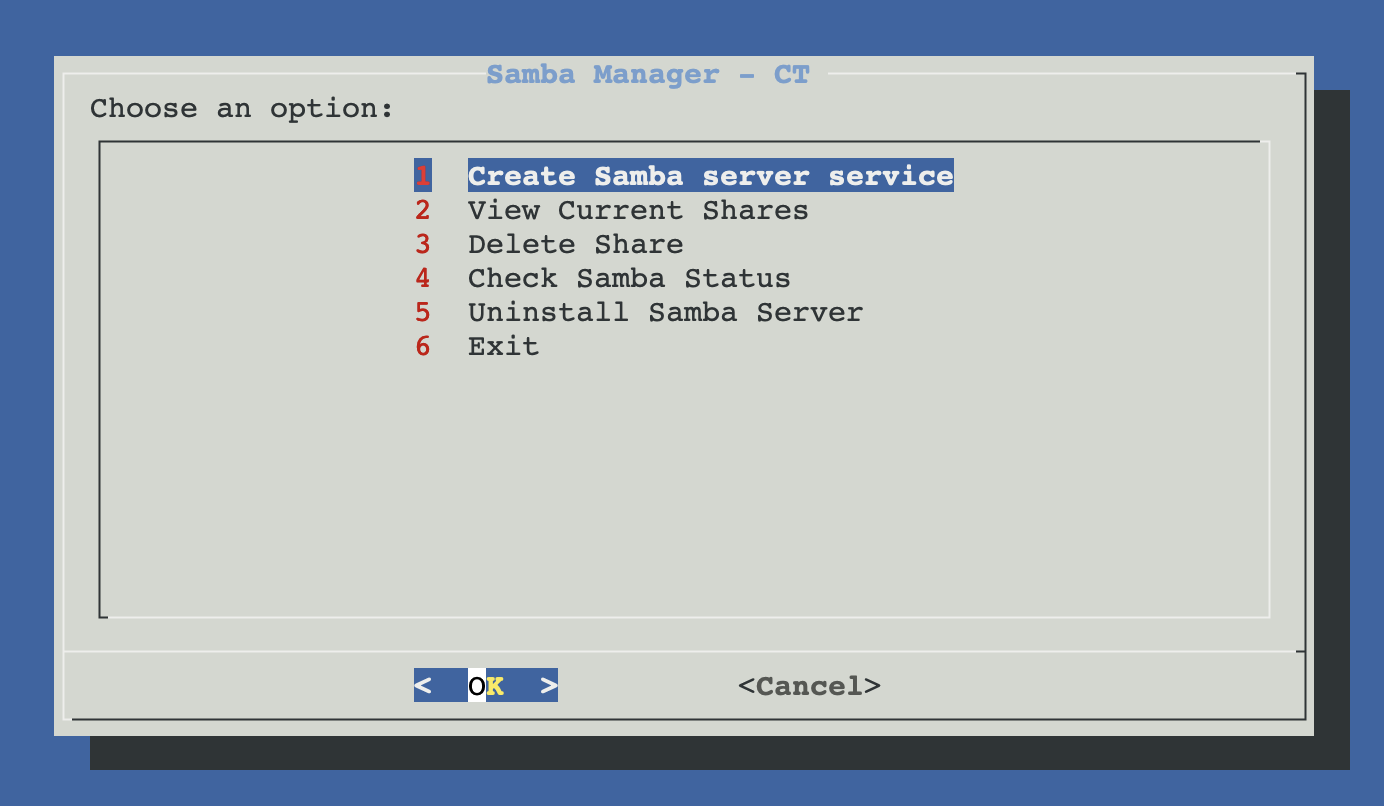
From ProxMenux's main menu, open Storage & Share Manager → Configure Samba Server in LXC (only privileged). ProxMenux first asks you to pick the target CT (and starts it if stopped); aborts if unprivileged. Once the CT is selected you see this sub-menu with five options:
How the script runs (Create flow)
┌─────────────────────────────────────────────┐
│  PHASE 1 — Pick CT, folder, user, options   │
│  (nothing touched yet)                      │
└──────────────────┬──────────────────────────┘
                   ▼
      Privileged-CT gate (share-common.func)
      ├─ pct list — pick CT
      ├─ Auto-start if stopped
      └─ Aborts if "unprivileged: 1" in CT config
                   │
                   ▼
      Folder selection (2 modes)
      ├─ Auto: choose from /mnt/* in the CT
      └─ Manual: enter any absolute path
         (offers to mkdir -p if missing)
                   │
                   ▼
      Samba install check
      ├─ Already installed?
      │    └─ Detect existing user via pdbedit -L
      └─ First time?
         ├─ apt-get install samba samba-common-bin acl
         ├─ Ask username (default: "proxmenux")
         ├─ Ask password (twice — must match)
         ├─ adduser <username> (no password)
         └─ smbpasswd -a <username>
                   │
                   ▼
      Permission setup (2 paths)
      ├─ Bind-mount detected
      │     groupadd -g 999 sharedfiles
      │     usermod -aG sharedfiles <user>
      │     chown root:sharedfiles + chmod 2775
      │     setfacl fallback if write fails
      └─ Local folder
            chown -R <user>:<user>
            chmod -R 755
            setfacl fallback if needed
                   │
                   ▼
      Share permissions (3 modes)
      ├─ rw — read-write block (default)
      ├─ ro — read-only block
      └─ custom — your own directives
                   │
   ┌──────── Cancel   OR   Confirm ────┐
   ▼                                   ▼
Exit, nothing        ┌─────────────────┴─────────────────┐
was changed          │  PHASE 2 — Write smb.conf + apply  │
                     └─────────────────┬─────────────────┘
                                       ▼
                       If [share-name] already in smb.conf:
                       └─ ask "update?", remove + replace
                          (sed deletes from [name] to next blank)
                       Else:
                       └─ append the new block
                                       ▼
                       systemctl restart smbd.service
                                       ▼
                       Print connection details:
                       • Server IP (hostname -I)
                       • Share name + path
                       • Username
                       • Sample mount commands
The three share modes
Each mode writes a different stanza to smb.conf. All three include valid users = <username> (no anonymous), force group = sharedfiles (so new files belong to the shared group) and veto files = /lost+found/ (hides it from clients).
| Mode | Block written to smb.conf |
|---|---|
| Read-Write | read only = no writable = yes browseable = yes guest ok = no create mask = 0664 directory mask = 2775 force create mode = 0664 force directory mode = 2775 |
| Read-Only | read only = yes writable = no browseable = yes guest ok = no |
| Custom | You type your own directives in a free-text box. ProxMenux still wraps them in a [share] block with the standard path, valid users, force group and veto files. |
Manual equivalent
Replicate the whole flow by hand — every command runs inside the CT via pct exec <ctid> -- or pct enter <ctid>:
# 1. install Samba (one-time)
apt-get update
apt-get install -y samba samba-common-bin acl
# 2. create a Samba user (system + smbpasswd)
adduser --disabled-password --gecos "" proxmenux
echo -e "P4ssw0rd\nP4ssw0rd" | smbpasswd -a proxmenux
# 3. for a bind-mounted folder: shared group + SGID
mkdir -p /mnt/data
groupadd -g 999 sharedfiles 2>/dev/null || true
usermod -aG sharedfiles proxmenux
chown root:sharedfiles /mnt/data
chmod 2775 /mnt/data
# fallback if user can't write:
# setfacl -R -m u:proxmenux:rwx /mnt/data
# 4. write the share block
cat >> /etc/samba/smb.conf <<'EOF'
[data]
path = /mnt/data
valid users = proxmenux
force group = sharedfiles
read only = no
writable = yes
browseable = yes
guest ok = no
create mask = 0664
directory mask = 2775
force create mode = 0664
force directory mode = 2775
veto files = /lost+found/
EOF
# 5. apply
systemctl restart smbd
testparm -s | grep -A6 '^\[data\]'Connecting from clients
| Client OS | How to connect |
|---|---|
| Windows | File Explorer → address bar: \\<ct-ip>\<share-name>. Or Map Network Drive → check "Connect using different credentials". |
| macOS | Finder → Go → Connect to Server… → smb://<ct-ip>/<share-name>. Or mount_smbfs //user@<ct-ip>/<share> /mountpoint. |
| Linux | mount -t cifs //<ct-ip>/<share> /mnt/x -o username=<u>,password=<p>,iocharset=utf8. Or use the Samba client in LXC page if the client is another Proxmox CT. |
View current shares
Parses /etc/samba/smb.conf inside the CT and lists every [share] block (skipping [global], [homes], [printers]) with its path. Useful as a quick inventory.
Delete a share
Lets you pick a share by name, removes the block from smb.conf (sed deletes from [share] down to the next blank line), and restarts smbd. The folder itself and its contents are left intact.
Check Samba status
Reports whether smbd and nmbd are installed and active, lists Samba users (pdbedit -L) and prints active sessions (smbstatus).
Uninstall Samba server
Full clean-up after confirmation: stops + disables smbd and nmbd, backs up smb.conf to smb.conf.backup.YYYYMMDD_HHMMSS, removes Samba users with smbpasswd -x, and apt-get purge the Samba packages. The exported folders themselves are not deleted.
Folders survive — back up data separately
rm -rf after the script finishes.Troubleshooting
Privileged container required (script aborts)
smbd cannot serve files there. If you bypass the gate and configure Samba by hand, smbd starts and the ports open, but the first client connection panics with PANIC: sys_setgroups failed in /var/log/samba/log.<client> and the client sees NT_STATUS_CONNECTION_DISCONNECTED. The cause is the unprivileged user namespace having setgroups=deny, which blocks Samba's per-connection impersonation. Neither features=keyctl=1 nor removing force user / force group changes this. The only workable options are: convert the CT to privileged, or move Samba to a VM.apt-get install fails
- Alpine:
apk add samba - Arch:
pacman -S samba - Rocky / Alma:
dnf install samba
Client connects but cannot see the share
browseable = yes is set in the share block (default for rw / ro modes; may be missing in custom). Also check the CT firewall and the Proxmox host firewall allow TCP 445 (SMB) and 139 (NetBIOS). Some Windows clients also require name resolution — try the IP directly first.Authentication fails (NT_STATUS_LOGON_FAILURE)
pdbedit -L) or the user is not in valid users for that share. Reset the password with smbpasswd <user> inside the CT.Files written by the client appear with wrong group on the server
force group = sharedfiles in the share block, so new files should be group sharedfiles. If they aren't, the SGID bit on the parent directory may have been lost (someone ran chmod by hand). Reapply: chmod 2775 /mnt/<share>.Sharing the same folder over both NFS and Samba
sharedfiles in each script (Samba: 999, NFS: 101000). If you serve the same folder via both, decide on one GID and align both. The simplest fix: after running both scripts, edit the smaller GID:groupmod -g 101000 sharedfiles chgrp -R sharedfiles /mnt/<your-share>Related
- Samba client in LXC — the inverse: mount external Samba shares from inside a CT.
- NFS server in LXC — sibling page, same pattern with NFS instead of CIFS.
- Samba / CIFS as Proxmox storage — once your CT is exposing, register that share in Proxmox so it appears under Datacenter → Storage.