
Add Coral TPU to LXC
Share a Google Coral TPU (USB Accelerator or M.2 / Mini-PCIe) with a Proxmox LXC container. ProxMenux handles the LXC config and the inside-container Edge TPU runtime install. Coral is TPU-only: for GPU / iGPU sharing (Quick Sync, VA-API, NVENC) in the same container, run Add GPU to LXC separately.
What this does
/etc/pve/lxc/<ctid>.conf — different entries depending on whether the host has a USB Accelerator, a M.2 / PCIe Coral, or both. Then it starts the container and installs Google's latest libedgetpu runtime inside it. iGPU / GPU passthrough is handled by a separate script (Add GPU to LXC) — this one focuses on the TPU.When to use this
Typical use case: running Frigate, Agent DVR, Blue Iris + CodeProject.AI, or any other object-detection app inside an LXC and wanting the Coral TPU to do the ML inference instead of the CPU. With Coral, inference latency drops from ~100 ms to ~5 ms per frame and CPU load stays near zero.
Before you start
- Coral drivers already installed on the host. This script does not install them; it only configures passthrough to the container. Run Install Coral TPU on the Host first if you haven't.
ls /dev/apex_* 2>/dev/null ; lsusb | grep -E '1a6e:089a|18d1:9302' - An existing LXC container, ideally running a Debian / Ubuntu-based distro — the in-container runtime install uses
apt-get. Non-Debian containers (Alpine, Arch, RHEL, SUSE…) are still supported in passthrough-only mode: the script detects the distro and offers a prompt to skip thelibedgetpuAPT install while still writing the device passthrough config — useful for app containers that bundle the runtime themselves (e.g. the Frigate Docker image). - Be OK with a brief downtime of the container. The script stops it to apply config changes, then starts it back up to install drivers inside. No host reboot needed.
Host must be prepared first
gasket/apex kernel module for M.2, the libedgetpu runtime for USB), the LXC config is still written but the container won't find the device at runtime. Order matters: host install → LXC passthrough → in-container app.Running the script
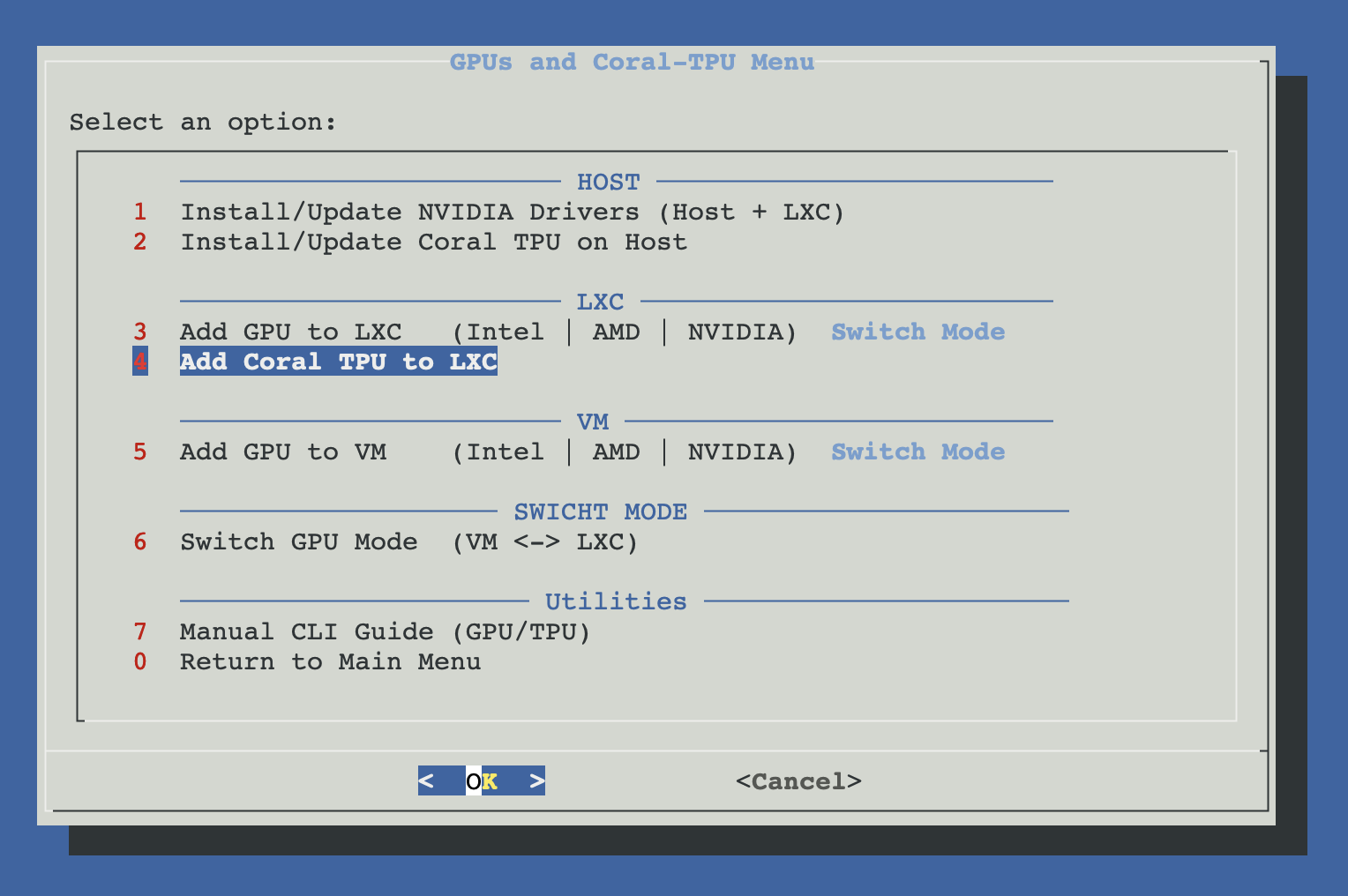
Open ProxMenux on the host, go to Hardware: GPUs and Coral-TPU → Add Coral TPU to LXC.
How the script runs
One decision upfront (which container?), then the script handles USB and PCIe paths independently based on what it finds on the host. If both are present, both get passed.
┌────────────────────────────────────────────────┐
│ 1. User picks the LXC container                │
│    (pct list → dialog → CTID)                  │
└────────────────┬───────────────────────────────┘
                 ▼
       Stop container if running
                 │
                 ▼
       ┌─────────┴──────────┐
       │                    │
       ▼                    ▼
    Coral M.2/PCIe?     Coral USB?
    lspci "Global      (udev rule creates
     Unichip"           /dev/coral symlink
       │                on the host)
       │                    │
      Yes                  Yes
       │                    │
       ▼                    ▼
  /dev/apex_0       Write udev rule
  exists?           /etc/udev/rules.d/
    │                99-coral-usb.rules
    ├─ Yes →        (ATTRS idVendor/idProduct
    │  dev<N>:       → SYMLINK /dev/coral)
    │  /dev/apex_0        │
    │  gid=apex           ▼
    │               Append to LXC config:
    └─ No  →          lxc.cgroup2.devices.allow:
       cgroup2         c 189:* rwm
       fallback        lxc.mount.entry:
       (major 245       /dev/bus/usb dev/bus/usb
        from /proc/     none bind,optional,
        devices)        create=dir
         │              (bind the WHOLE usb tree,
         ▼              not /dev/coral — survives
      cgroup2           USB replug to other port)
      + mount               │
                           │
       └──────────────┬──────┘
                      ▼
       Clean up duplicate entries in the config
                      │
                      ▼
       ┌──────────────┴──────────────┐
       │  Start container + wait     │
       │  up to 15s for readiness    │
       └──────────────┬──────────────┘
                      ▼
       pct exec inside container:
       ├─ apt-get update
       ├─ Install Coral deps (gnupg, curl, ca-certificates)
       ├─ Add Google Coral APT repo
       │  /etc/apt/keyrings/coral-edgetpu.gpg
       │  /etc/apt/sources.list.d/coral-edgetpu.list
       └─ apt install libedgetpu1-std
          (or libedgetpu1-max for M.2 if user picks)
                      │
                      ▼
       Show summary (what was enabled)
       Container stays running

       Note: iGPU passthrough (Quick Sync / VA-API
       / NVENC) is now handled exclusively by
       "Add GPU to LXC" — run it BEFORE this script
       if you also want hardware video decode.
Walking through the flow
Pick the LXC container
A dialog shows every LXC on the host (from pct list). Pick the one that should get the Coral. Running or stopped, it doesn't matter — the script handles both (stops it briefly to write config, then starts it back up to install drivers).
GPU passthrough suggestion (optional)
If the host has a GPU (Intel iGPU, AMD, NVIDIA) and the chosen container does NOT have GPU passthrough configured, the script shows a one-time dialog suggesting you run Add GPU to LXC first. Coral is most often paired with hardware video decode (Quick Sync, VA-API, NVENC) for apps like Frigate. You can say yes (exits, run the GPU script, then come back) or no (continues with TPU-only setup).
Write LXC config — USB path
If a USB Accelerator is present, the script does two things: (1) writes a udev rule on the host so the device gets a stable name /dev/coral whatever USB port it's in, and (2) bind-mounts the whole /dev/bus/usb tree into the container.
# /etc/udev/rules.d/99-coral-usb.rules  (on the host)
SUBSYSTEM=="usb", ATTRS{idVendor}=="1a6e", ATTRS{idProduct}=="089a", \
  SYMLINK+="coral", MODE="0666"
SUBSYSTEM=="usb", ATTRS{idVendor}=="18d1", ATTRS{idProduct}=="9302", \
  SYMLINK+="coral", MODE="0666"

# Appended to /etc/pve/lxc/<ctid>.conf
lxc.cgroup2.devices.allow: c 189:* rwm
lxc.mount.entry: /dev/bus/usb dev/bus/usb none bind,optional,create=dir
Why mount /dev/bus/usb instead of /dev/coral?
/dev/bus/usb/001/005) changes when you replug the accelerator into a different port. Earlier versions of the script bind-mounted the /dev/coral symlink, which pointed at an old path and broke. Mounting the whole USB tree means the container sees whatever the current path is, so a replug just works.Write LXC config — M.2 / PCIe path
If a M.2 / PCIe Coral is present on the host and /dev/apex_0 exists (the apex kernel module is loaded), the script uses the modern Proxmox dev API which handles cgroup2 permissions automatically for both privileged and unprivileged containers:
# Appended to /etc/pve/lxc/<ctid>.conf — modern path
dev0: /dev/apex_0,gid=<APEX_GID>
If the host hasn't booted yet with the apex module loaded (you just ran Install Coral on Host and haven't rebooted), /dev/apex_0 doesn't exist yet. The script falls back to classic cgroup2 + bind mount with create=file so the entries are valid even when the device hasn't materialised:
# Fallback when /dev/apex_0 isn't yet present on host
lxc.cgroup2.devices.allow: c 245:0 rwm
lxc.mount.entry: /dev/apex_0 dev/apex_0 none bind,optional,create=file
Reboot the host first if you just installed Coral drivers
apex module. If you haven't rebooted, reboot now before starting the container.Start the container + install Coral runtime inside
Config changes in Proxmox LXC take effect on the next start — so the script starts the container, waits up to 15 seconds for pct exec to respond, then drops a bash script inside that:
- Runs
apt-get update. - Installs the Coral repository prerequisites:
gnupg,curl,ca-certificates. - Imports Google's Coral GPG key to
/etc/apt/keyrings/coral-edgetpu.gpg(modern path, same as the host installer uses) and adds thecoral-edgetpu-stableAPT repository withsigned-by=. - Installs the latest
libedgetpu1-std(default). If you have a M.2 Coral, you'll be prompted to pick betweenlibedgetpu1-std(standard) andlibedgetpu1-max(max performance, runs hotter).
Summary
The script prints a checklist at the end summarising what was enabled (Coral USB, Coral M.2) with ✓ or ⚠ marks depending on whether the hardware was actually detected. The container stays running — you can jump straight into Frigate / CodeProject.AI / your app config.
Manual equivalent
If you want to see exactly what goes into the LXC config, or apply it by hand:
USB Coral
# On the HOST — persistent udev alias
cat > /etc/udev/rules.d/99-coral-usb.rules <<'EOF'
SUBSYSTEM=="usb", ATTRS{idVendor}=="1a6e", ATTRS{idProduct}=="089a", SYMLINK+="coral", MODE="0666"
SUBSYSTEM=="usb", ATTRS{idVendor}=="18d1", ATTRS{idProduct}=="9302", SYMLINK+="coral", MODE="0666"
EOF
udevadm control --reload-rules
udevadm trigger --subsystem-match=usb

# Append to /etc/pve/lxc/<ctid>.conf
# (container must be stopped to apply)
lxc.cgroup2.devices.allow: c 189:* rwm
lxc.mount.entry: /dev/bus/usb dev/bus/usb none bind,optional,create=dir
M.2 / PCIe Coral
# On the HOST — PVE dev API (works in privileged AND unprivileged CTs)
# Append to /etc/pve/lxc/<ctid>.conf
dev0: /dev/apex_0,gid=$(getent group apex | cut -d: -f3)

# ─── OPTIONAL — fallback path ────────────────────────────────────
# Only use this block if /dev/apex_0 doesn't exist yet on the host
# (apex module not loaded — reboot still pending). The PVE dev API
# above is preferred when the device is present.
# ─────────────────────────────────────────────────────────────────
# lxc.cgroup2.devices.allow: c 245:0 rwm
# lxc.mount.entry: /dev/apex_0 dev/apex_0 none bind,optional,create=file
Inside the container — Coral runtime
# Assumes Debian / Ubuntu
apt-get update
apt-get install -y gnupg curl ca-certificates

# Google Coral APT repo
curl -fsSL https://packages.cloud.google.com/apt/doc/apt-key.gpg \
  | gpg --dearmor -o /usr/share/keyrings/coral-edgetpu.gpg

echo 'deb [signed-by=/usr/share/keyrings/coral-edgetpu.gpg] https://packages.cloud.google.com/apt coral-edgetpu-stable main' \
  > /etc/apt/sources.list.d/coral-edgetpu.list

apt-get update
apt-get install -y libedgetpu1-std
# Or for M.2 + maximum performance (runs hotter):
# apt-get install -y libedgetpu1-max
Verification
Enter the container and check the Coral is visible:
pct enter <ctid>

# USB Coral
lsusb | grep -E '1a6e:089a|18d1:9302'
ls /dev/bus/usb/

# M.2 Coral
ls -l /dev/apex_0
# Expect: crw-rw---- 1 root apex ... /dev/apex_0

# Runtime installed
dpkg -l libedgetpu1-std

# Frigate-style test: run a quick Python inference
python3 -c "from pycoral.utils.edgetpu import list_edge_tpus; print(list_edge_tpus())"
# Expect a non-empty list with at least one device
Troubleshooting
Container started but /dev/apex_0 missing inside
lsmod | grep apex — if empty, run modprobe apex, or reboot if you just installed Coral drivers. Once the host has /dev/apex_0, restart the container: pct stop <ctid> && pct start <ctid>.USB Coral disappears after replug in a different port
/dev/bus/usb instead of the /dev/coral symlink. If you're hitting this, check your LXC config has lxc.mount.entry: /dev/bus/usb dev/bus/usb ... and not a reference to /dev/coral directly. Old configs from earlier script versions may need updating — re-run the script on the same container and the config gets refreshed.Alpine / Arch / RHEL / SUSE container — runtime not installed
libedgetpu runtime is not installed. That's by design: Google's APT repo only ships for Debian/Ubuntu. Install the runtime manually with your distro's package manager (Alpine: apk add; Arch: AUR; RHEL/SUSE: build from source) following Google's official guide, or run an app container that bundles the runtime — the Frigate Docker image is the canonical example: just expose the device with --device /dev/apex_0:/dev/apex_0 (M.2) or the USB bind mount the script already wrote (USB).Frigate says 'Coral EdgeTPU detected but not available'
plugdev group inside the container (for USB), and that the process can read /dev/apex_0 (for M.2). ls -l /dev/apex_0 from inside the container should show group apex — if not, add the GID alignment to /etc/group or switch the container to privileged mode.Check both host and container logs
journalctl -u pvedaemon | grep -i coral. Inside the container: check the app logs (Frigate: /config/logs/, CodeProject.AI: its own log directory). The classic error pattern is "Coral detected, runtime loaded, but inference engine can't claim it" — that's permissions 9 out of 10 times.Related
- Install Coral TPU (Host) — required prerequisite for M.2 / PCIe Coral cards before passing into a CT.
- Add GPU to LXC — same pattern for GPUs (often paired with a Coral TPU in Frigate setups).