
Lynis
Clones the latest Lynis from the official CISOfy GitHub repository, exposes it as /usr/local/bin/lynis and offers run-audit / update / reinstall / uninstall actions from the menu. Read-only auditor by design — never modifies the system, only reports.
What this does
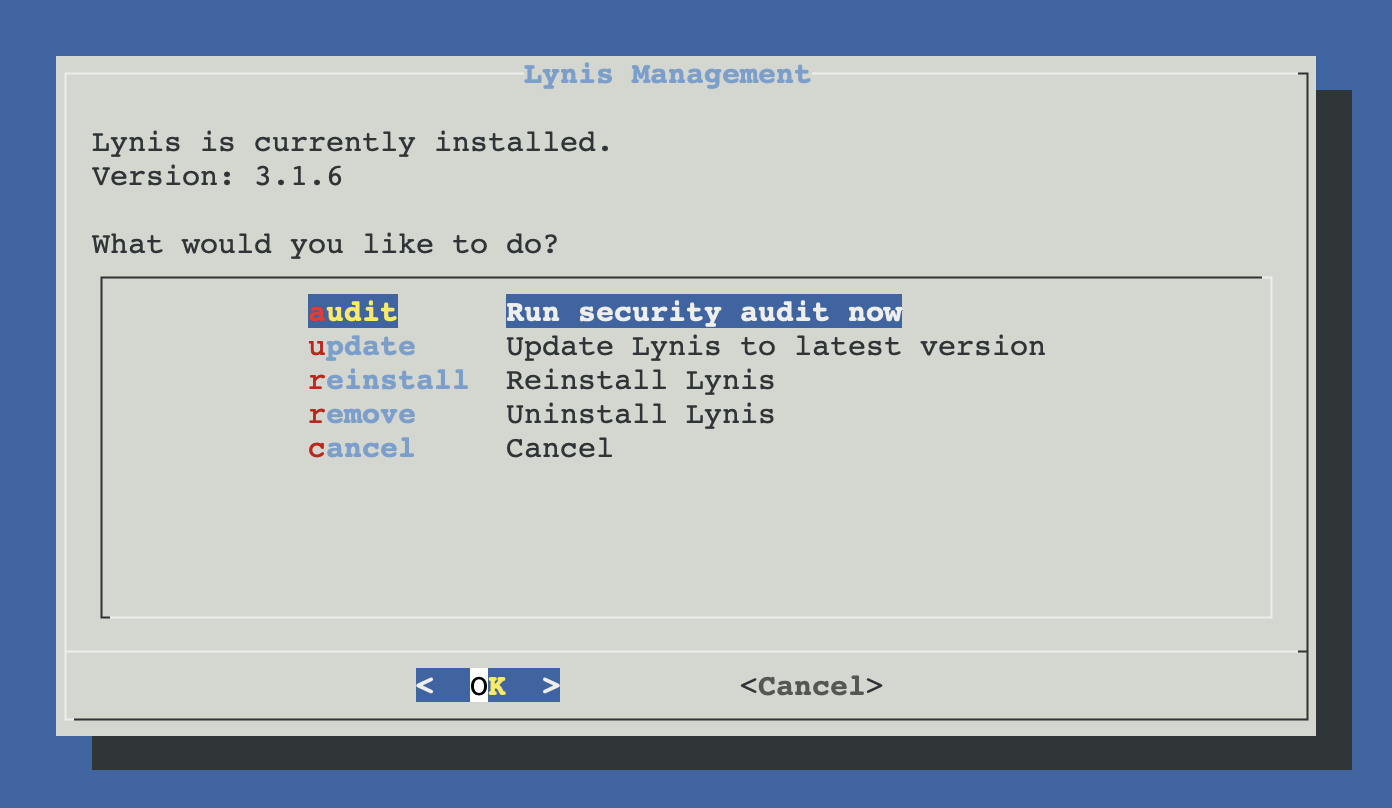
/opt/lynis and creates a wrapper at /usr/local/bin/lynis so it's in your PATH. Detects an existing install on launch and shows a manage menu (audit / update / reinstall / remove) instead.Manage menu (after install)
Once Lynis is installed, every subsequent invocation opens the management menu instead of re-running the installer. From here you launch an audit, update via git pull, reinstall or uninstall:
Why upstream GitHub, not apt
Debian ships Lynis through apt, but the package typically lags several major versions behind upstream. Newer controls, fixes for new attack vectors and refined recommendations only land in the GitHub repo. Lynis itself is a self-contained shell script — no compilation, no dependencies beyond git for the install — so cloning the repo is the canonical install method recommended by CISOfy themselves.
| Source | Install path | Update method | Version freshness |
|---|---|---|---|
| ProxMenux (this script) | /opt/lynis/ | git pull (in-menu) | Latest upstream |
| Debian apt | /usr/bin/lynis | apt upgrade | Often months / years behind |
How the install works
The wrapper is mandatory — Lynis insists on being run from its own directory because it loads relative paths for plugins and profile data. The wrapper hides that detail so lynis audit system just works from anywhere.
Detection paths
Before showing the menu, the script checks three locations to decide if Lynis is already present:
/usr/local/bin/lynis— wrapper installed by ProxMenux/opt/lynis/lynis— direct path (in case the wrapper got removed)/usr/bin/lynis— apt-installed version, if the user installed it that way previously
If any of these is found, the manage menu opens. The script does not uninstall an apt-installed Lynis — only the one it manages itself (/opt/lynis + the wrapper).
Run an audit
From the manage menu, choose Run security audit now. This is equivalent to executing:
lynis audit system --no-colors
The audit takes 30 seconds to a few minutes depending on host size. Output streams directly to the terminal — there is no spinner. Lynis prints sections for each control category, marking each test as [ OK ], [ WARNING ] or [ SUGGESTION ]. The summary at the end has the headline numbers:
================================================================================

  Lynis security scan details:

  Hardening index : 76 [############        ]
  Tests performed : 247
  Plugins enabled : 0

  Components:
  - Firewall               [V]
  - Malware scanner        [X]

  Lynis modules:
  - Compliance status      [?]
  - Security audit         [V]
  - Vulnerability scan     [V]

================================================================================
Reading the report
The two important sections are Warnings (things you should fix soon) and Suggestions (recommendations to improve hardening). Each item carries a control ID like SSH-7408 — useful when searching the Lynis docs for the rationale and the fix.
| Marker | Meaning | Action |
|---|---|---|
| OK | Test passed | Nothing |
| WARNING | Real issue, fix recommended | Read the control description, plan a fix |
| SUGGESTION | Hardening improvement available | Apply if it fits your threat model |
Full report and machine-readable data are written to /var/log/lynis.log and /var/log/lynis-report.dat by Lynis itself.
Pair with Fail2Ban
MaxAuthTries=3 as part of its SSH hardening step. Run Lynis again afterwards to confirm the warning is gone.Update Lynis
From the manage menu, Update Lynis to latest version runs git pull --quiet inside /opt/lynis. If the directory exists but isn't a Git checkout (e.g. someone copied the files in manually), the script falls back to a full reinstall.
Reinstall / uninstall
| Action | What it does |
|---|---|
| Reinstall | Removes /opt/lynis, re-clones from GitHub, recreates the wrapper. Use this if the local checkout is corrupted. |
| Remove | Deletes /opt/lynis and /usr/local/bin/lynis. Logs at /var/log/lynis* are kept (they're audit history). An apt-installed Lynis at /usr/bin/lynis is left untouched. |
Useful CLI options
Once installed, Lynis can be invoked directly from a shell with extra options not exposed by the menu:
lynis show version            # version + build date
lynis show commands           # list every available command
lynis show details TEST-ID    # explain a specific control
lynis audit system --quick    # skip slow tests (e.g. malware scan)
lynis audit system --pentest  # treat host as untrusted (more aggressive)
lynis update info             # check if a newer Lynis is available

# Filter the report log for just the warnings
grep "Warning" /var/log/lynis.log

# Same, for suggestions only
grep "Suggestion" /var/log/lynis.log
Troubleshooting
git clone fails during install
github.com. From a console: curl -sI https://github.com and git ls-remote https://github.com/CISOfy/lynis.git will reveal the actual error (DNS, TLS, proxy, repo URL). If a proxy is required, set https_proxy in the environment before re-running the menu.lynis: command not found after install
/usr/local/bin/lynis was either not created or got removed. Quickest fix: reinstall from the menu. Manual fix:cat > /usr/local/bin/lynis <<'EOF' #!/bin/bash cd /opt/lynis && ./lynis "$@" EOF chmod +x /usr/local/bin/lynis
Audit prints "Warning: Test SSH-7408 — MaxAuthTries set incorrectly"
MaxAuthTries=3 automatically) or edit /etc/ssh/sshd_config by hand:sed -i 's/^#?MaxAuthTries.*/MaxAuthTries 3/' /etc/ssh/sshd_config systemctl reload sshd
Score went down after a Proxmox upgrade
lynis update info first — a Lynis update may have added new controls that flag existing config. Update Lynis from the menu, re-audit, and address the new findings.Files written
/opt/lynis/                   # full Lynis git checkout
/usr/local/bin/lynis          # wrapper script (cd + exec)
/var/log/lynis.log            # human-readable audit log (Lynis itself)
/var/log/lynis-report.dat     # machine-readable report (Lynis itself)
Sample report
ProxMenux Monitor packages each Lynis run into a multi-page PDF available from the Security tab in the dashboard. The first page is the executive summary — hardening score, system info, security posture overview. Subsequent pages list every warning with explanation and every suggestion ranked by impact, plus the package inventory used during the audit.
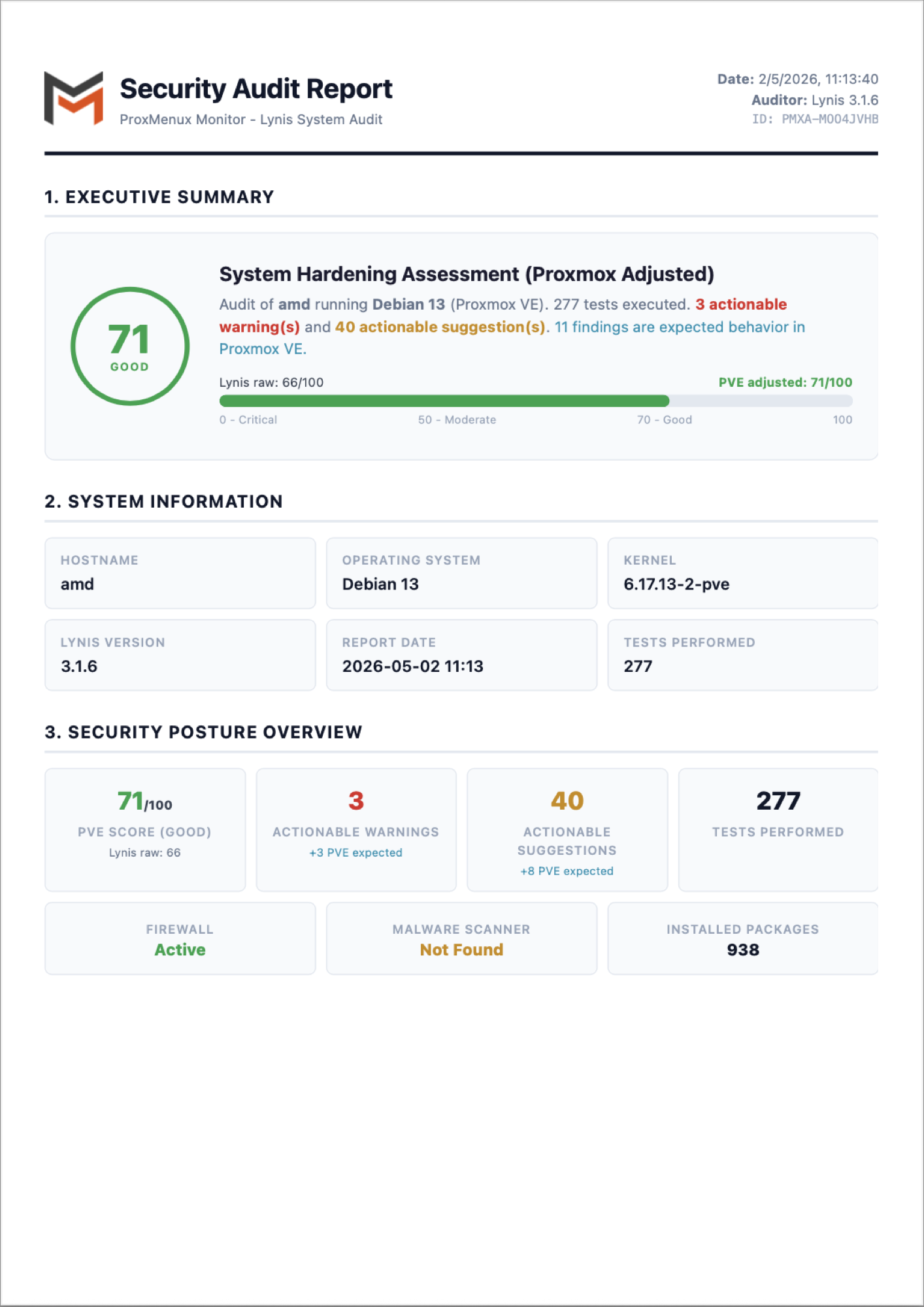
On the CLI side the same data is in /var/log/lynis-report.dat (machine-readable flat file) and /var/log/lynis.log (the human-readable run log). The PDF is generated on demand by ProxMenux Monitor — running lynis from the command line does not produce one.
Related
- ProxMenux Monitor → Security tab — run the audit, browse historical reports and download the PDF straight from the dashboard.
- Fail2Ban — implements the SSH brute-force protection that Lynis recommends.
- Security overview — back to the section overview.