
Import Disk to VM
Attach a physical disk that already exists on the Proxmox host to an existing virtual machine. ProxMenux detects free disks, lets you pick the target VM, the bus type (SATA / SCSI / VirtIO / IDE) and attaches everything using persistent /dev/disk/by-id paths so the mapping survives reboots and device-order changes.
What this does
/dev/disk/by-id/… path — not /dev/sdX — so the assignment does not break if disk controllers enumerate devices in a different order on the next boot.How the script runs
The flow has two phases with clear separation between "collecting information and decisions" and "actually attaching disks to the VM". Until the final confirmation, the VM config is untouched.
┌─────────────────────────────────────────────┐
│  PHASE 1 — Pick VM, detect disks, select    │
│  (nothing touched yet)                      │
└──────────────────┬──────────────────────────┘
                   ▼
      qm list — user picks target VM
                   │
                   ▼
      VM status check
      ├─ running → abort (power off first)
      └─ stopped → continue
                   │
                   ▼
      Detect disks on host (lsblk)
                   │
                   ▼
      Visibility filter
      ├─ Hidden: root / swap / system-mounted
      ├─ Hidden: active ZFS / LVM / RAID members
      ├─ Hidden: already in this VM's config
      ├─ Shown: free disks
      └─ Shown with ⚠ label: stale ZFS/LVM/RAID
                             signatures (not active)
                   │
                   ▼
      User selects disk(s) via checklist
      + picks bus interface:
      SATA  /  SCSI  /  VirtIO  /  IDE
                   │
                   ▼
      Per-disk cross-check
      ├─ Assigned to a RUNNING VM/CT? → skip disk
      ├─ Assigned to stopped VM/CT?   → ask
      │   "continue anyway?" yes/no
      └─ NVMe detected?                → suggest
          using "Add Controller / NVMe"
          (user can still add as disk)
                   │
                   ▼
      Summary of disks to process
                   │
   ┌──────── Cancel   OR   Confirm ────┐
   ▼                                   ▼
Exit, nothing        ┌─────────────────┴─────────────────┐
was changed          │  PHASE 2 — Attach                  │
                     └─────────────────┬─────────────────┘
                                       ▼
                       For each selected disk:
                       ├─ Resolve best persistent path
                       │   preferred order:
                       │   1. /dev/disk/by-id/ata-*
                       │   2. /dev/disk/by-id/nvme-*
                       │   3. /dev/disk/by-id/scsi-*
                       │   4. /dev/disk/by-id/wwn-*
                       │   fallback: raw /dev/sdX
                       ├─ Find next free {bus}N slot
                       │   (scans qm config output)
                       └─ qm set <VMID> -{bus}N <path>
                                       │
                                       ▼
                       Verify: qm config <VMID> shows
                       the new slot(s)
                                       │
                                       ▼
                       Guest sees each disk as a native
                       block device under its bus
                       (e.g. /dev/sda, /dev/nvme0n1)
ProxMenux filters out anything it cannot safely pass: the root disk, disks mounted on the host, members of an active ZFS/LVM/RAID pool and disks already referenced by any VM/LXC config. Disks with stale metadata (old ZFS / RAID / LVM signatures that are no longer in use) are shown with a ⚠ label but are not blocked.
Prerequisites
- At least one VM defined on the host (the script dispatches straight to
qm list). - The target VM is powered off. If it is running the script aborts with a message — live disk hot-add is outside the scope of this flow.
- At least one physical disk on the host that is not in use by the host or any other guest.
Step-by-step
Pick the target VM
ProxMenux lists every VM on the host (via qm list). Pick the one that will receive the disk. If the VM is running the script aborts and asks you to shut it down first.
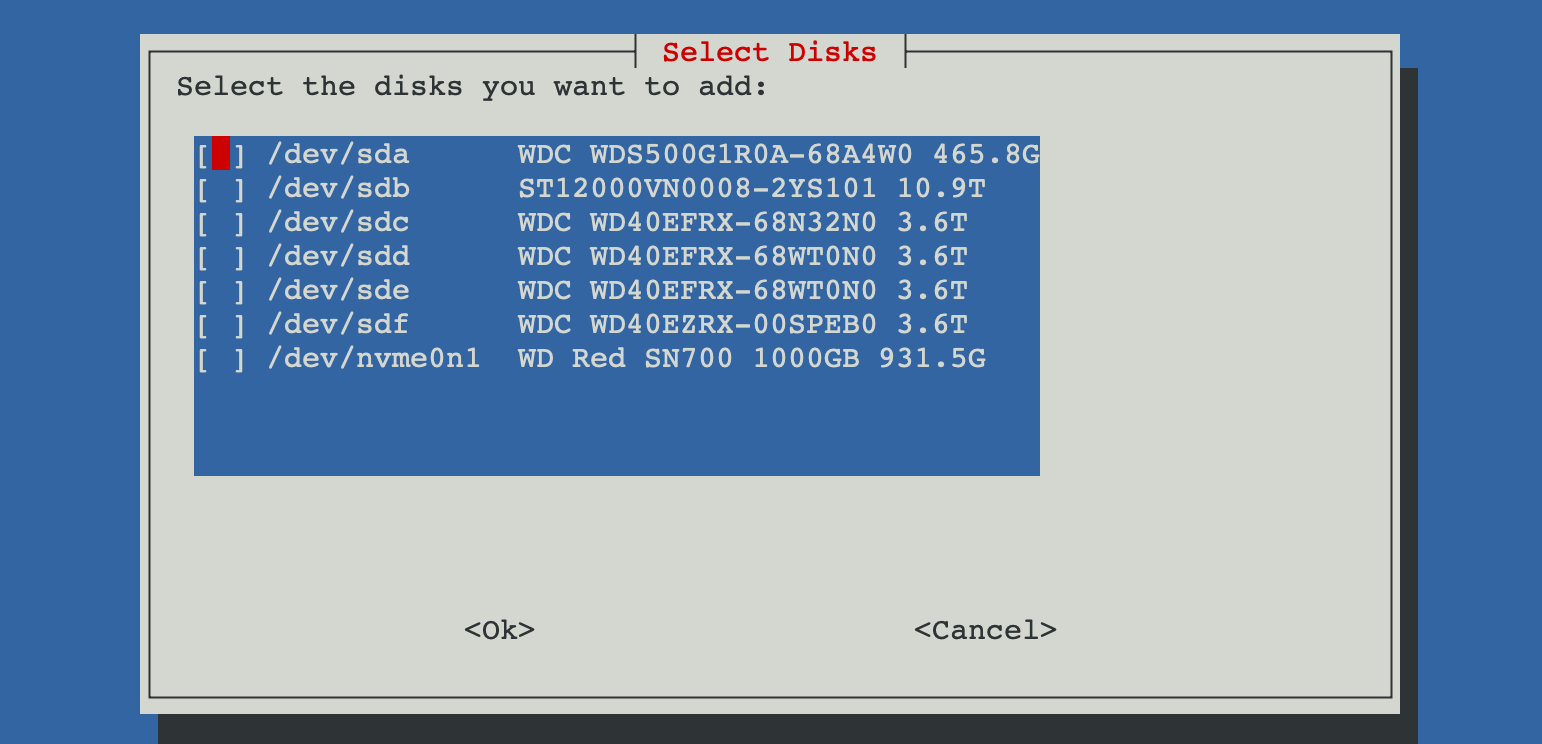
Pick the physical disk(s) to attach
The script scans every host disk and shows only the ones that are safe to attach. The checklist lets you select one or several at once. Disks with old ZFS / LVM / RAID signatures still show up, labelled with ⚠ so you know they need a wipe before the guest can format them.
Pick the bus interface
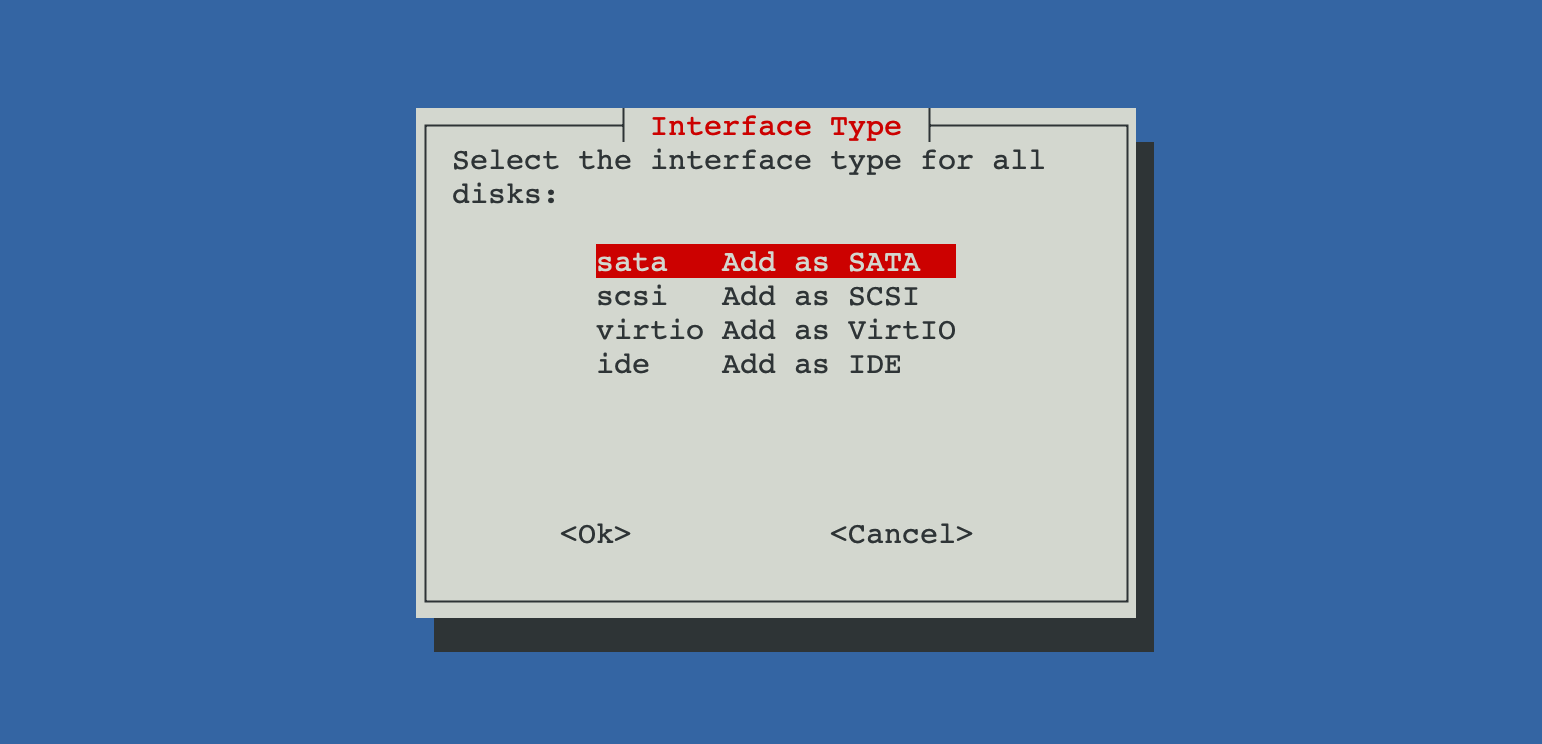
Pick how the guest should see the disk:
- SCSI — modern default for Linux and Windows with VirtIO-SCSI drivers installed.
- SATA — broad compatibility, works out of the box on virtually every guest.
- VirtIO — paravirtualised block device, fastest but requires guest drivers.
- IDE — for legacy guests that lack any of the above drivers.
Attach and verify
ProxMenux attaches every selected disk with its best /dev/disk/by-id/ path, skips slot indexes that are already in use in the VM config (scsi0, sata0, …) and re-reads the config to confirm the assignment. A summary is printed at the end.
Manual equivalent
The script is a wrapper around qm set. The exact command for a single disk looks like this:
# find the persistent path
ls -l /dev/disk/by-id | grep -v part | grep sdb

# attach to VM 101 as scsi1
qm set 101 -scsi1 /dev/disk/by-id/ata-WDC_WD40EFAX-68JH4N0_WD-WX11D1234567

# verify
qm config 101 | grep -E '^scsi[0-9]+:'
Live migration is not possible
/dev/disk/by-id/… path. Use replication or backup/restore instead, or pick virtual disks on shared storage if you need mobility.Do not share a physical disk between VMs
qm set), make sure only one guest ever mounts the disk.Troubleshooting
"No disks available for this VM"
- Every remaining disk is already referenced in the target VM's config.
- Every remaining disk is mounted on the host or is part of an active ZFS / LVM / RAID.
- The host only has the root disk installed.
lsblk -f on the host to review the state of each disk.VM does not see the disk after boot
Related
- Import Disk Image to VM — same flow but for image files (qcow2 / vmdk / raw / img).
- Import Disk to LXC — equivalent flow for LXC containers.
- Add Controller or NVMe to VM — when you need full PCIe / NVMe passthrough rather than disk attach.
- Storage and Disks commands — qm importdisk and related shell reference.
- Disk Manager overview.