
Proxmox System Update
Wrapper that delegates to a single safe worker (<code>update-pve-safe.sh</code>) which detects the running Proxmox major version by itself. Repositories are cleaned up when they overlap with the base Proxmox / Debian sources, all packages are upgraded, ProxMenux-managed DKMS drivers are rebuilt if a new kernel landed, and the reboot prompt fires only when the kernel actually changed. Also launchable from the <em>Update Now</em> button in the ProxMenux Monitor dashboard header when pending updates are detected.
What this does
The official Proxmox recommendation
Proxmox's own upgrade guidance for a running host (within the same major version) is to run:
apt update && apt full-upgrade -yThat one line is the official command on any current Proxmox release. The hard part isn't the upgrade itself; it's making sure the repositories are clean, the right ones are enabled, and the host is in a sensible state afterwards.
What ProxMenux runs on top — verified against the script
This option runs exactly the apt command above, wrapped with the repo hygiene, DKMS rebuild for ProxMenux-managed drivers and post-upgrade cleanup the official upgrade guide also recommends. Everything below maps 1:1 to scripts/utilities/proxmox_update.sh and the single safe worker scripts/global/update-pve-safe.sh — nothing implied, every step is in the code:
- Detects the PVE major version from inside the worker (
pveversion | grep -oP 'pve-manager/\K[0-9]+') and adapts the base Proxmox / Debian repo URLs (bookworm on PVE 8, trixie on PVE 9). There is no fan-out to per-version worker scripts — a single safe worker handles both. - Cleans up repositories in a conservative way.
ensure_repositoriesruns first but only when the base Proxmox / Debian sources are missing — a bare host gets them written, a configured host is a no-op.cleanup_duplicate_reposthen removes exact URL + Suite + Component duplicates only againstproxmox.sources/debian.sources; user-authored files (enterprise, Ceph, alternative NTP mirrors, customdownload.proxmox.com/*entries or hand-writtenpve-*.list) are left untouched, and every file is backed up before being edited. - Runs the upgrade non-interactively with
DEBIAN_FRONTEND=noninteractiveand--force-confdef --force-confold— if a configuration file you already modified also changed upstream, your version stays in place. No silent overwrites of custom configs. - Skips forcing optional utilities. The safe worker does not push
zfsutils-linux,chrony,ifupdown2or similar packages onto the host — a Proxmox install that opted out of any of them keeps its choice. Missing packages are surfaced by the higher-level installer flows, not by the update path. - LVM metadata sanity check against stray PV headers from passthrough disks (warn-only, no automatic fix).
- Cleans up afterwards:
apt-get autoremove -y+apt-get autoclean -y. - DKMS rebuild before the reboot prompt. When the upgrade staged a new kernel, the wrapper calls
pmx_rebuild_dkms_after_kernelto rebuild every driver that ProxMenux installed via DKMS against the incoming kernel version — so the modules are ready before the box comes back up. Reboot detection uses/var/run/reboot-requiredwhenneedrestartis present, and falls back to adpkg-querycomparison between the running kernel and the newest installedproxmox-kernel-*-pve-signed/pve-kernel-*-pvepackage when it isn't — a signal that survives the many Proxmox hosts that ship withoutneedrestart.
In one sentence
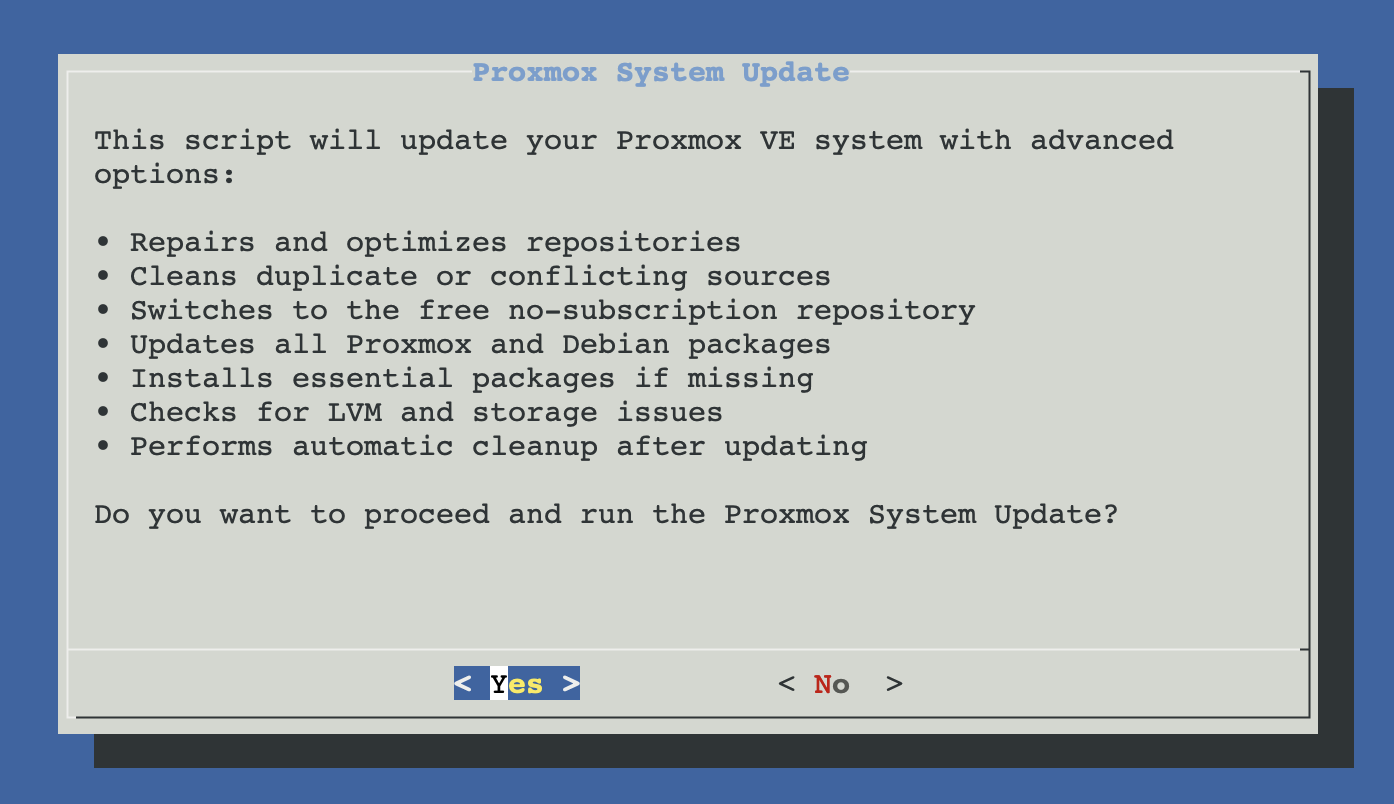
Confirmation dialog
Selecting the option opens a summary of what the worker will do, requiring an explicit confirmation:
How the wrapper routes
What the worker does
A single worker (scripts/global/update-pve-safe.sh) handles both PVE 8 and PVE 9. It detects the major version internally and uses the version-appropriate codename (bookworm or trixie) for its base sources. The stages are:
- Sanity checks. Verifies at least ~1 GB free in
/var/cache/apt/archivesand pingsdownload.proxmox.com. Aborts early with a clear message when either fails, so the run doesn't die in the middle of an apt transaction. - Repo bootstrap.
ensure_repositorieswrites the base Proxmox / Debian sources only when they are missing (a fresh or hand-cleaned host); on a configured host it does nothing. - Apt update with GPG auto-recovery. On
NO_PUBKEYfor any repo (yours or a third-party one) the worker imports the missing key and retries automatically before failing. - Conservative duplicate cleanup.
cleanup_duplicate_reposonly removes exact URL + Suite + Component matches againstproxmox.sources/debian.sources. User-authored files — enterprise, Ceph, alternative NTP mirrors, customdownload.proxmox.com/*entries, hand-writtenpve-*.list— are left intact. Every file is backed up before modification. - Pending upgrades + security count. Reports how many packages will change and how many of those come from the security suite, so the confirmation dialog has real numbers to show.
- Confirmation dialog. The wrapper asks for an explicit yes before touching apt.
- apt full-upgrade. Runs with
DEBIAN_FRONTEND=noninteractiveand--force-confdef --force-confoldso any configuration file you customised keeps its current contents when upstream also changed it. Never overwrites operator-edited configs silently. - LVM sanity check.
lvm_repair_checkrefreshes VG metadata when disks passed through to guest VMs (DSM, TrueNAS, storage appliances) come back with old PV headers. - DKMS rebuild for ProxMenux-managed drivers. When the upgrade staged a new kernel,
pmx_rebuild_dkms_after_kernelreadscomponents_status.jsonfor the drivers ProxMenux installed (currentlynvidia_driver→ modulenvidia,coral_driver→ modulegasket), installs the matching kernel headers (proxmox-headers-<newkver>when available, elsepve-headers-<newkver>) and runsdkms autoinstall -k <newkver>. Ifdkms statusthen doesn't show the modules built against the new kernel, the worker falls back to re-running each installer with--auto-reinstall. Any failure is logged but does not abort the update — you land on the reboot prompt in every case. - Post-cleanup.
apt-get autoremove+apt-get autocleanbefore returning control to the wrapper.
Post-update cleanup & reboot
After the worker exits, the wrapper runs:
apt-get autoremove -y    # drop unused dependencies pulled in by old packages
apt-get autoclean        # drop downloaded .deb files no longer in the index
Then it checks whether a reboot is needed. Two signals trigger the prompt:
/var/run/reboot-requiredexists (created by the kernel package post-install hook)- The update log contains
linux-imageentries (kernel was actually upgraded)
If either is true, a whiptail dialog asks "Some changes require a reboot to take effect. Do you want to restart now?". Decline to keep running on the old kernel until you choose to reboot manually (e.g. during a planned maintenance window).
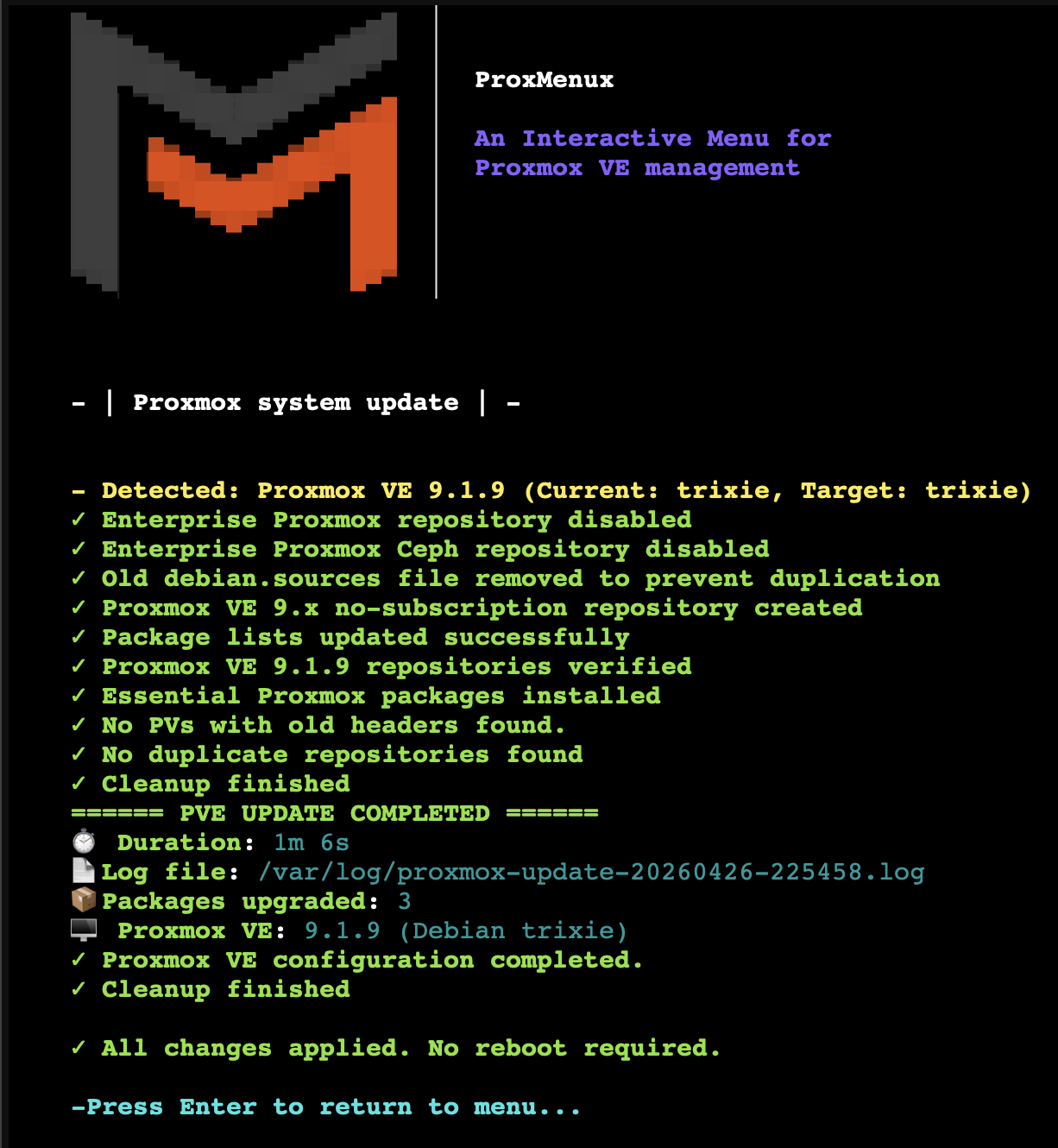
What you see at the end
When the worker finishes, the terminal shows the cleanup output and (if the kernel changed) the reboot prompt:
Decline reboot only if you know why
linux-image-* means you're on a half-upgraded system: userspace is new, kernel is old. Most of the time things work, but ZFS modules, IOMMU groups, KSMBD and any out-of-tree drivers will only match the kernel they were built for — a mismatch produces obscure failures. Reboot at the earliest sensible moment.How the safe worker treats the enterprise repo
docs.utils.systemUpdate.noSub.intro
- docs.utils.systemUpdate.noSub.items.0
- docs.utils.systemUpdate.noSub.items.1
- The enterprise
pve-enterprise.sources/ceph.sourcesfiles are never modified by the update path. The removal of the enterprise repo when it's unwanted is handled elsewhere in ProxMenux (the Automated post-install script), not here.
If you have a paid subscription, keep <code>pve-enterprise.sources</code> enabled and the safe worker will let it drive the upgrade unchanged. If you don't, either run the Automated post-install first (it does the switch and records it) or comment the enterprise source out manually — the update path will not do it for you.
Cluster considerations
On clusters: update one node at a time
What it doesn't do
- Major-version upgrade. 8 → 9 is a separate operation — see Upgrade PVE 8 to PVE 9.
- Backup. No snapshots, no rollback. Apt operations are not transactional. Combine with your normal backup discipline (PBS, vzdump, ZFS snapshots).
- Container / VM updates. Only the host is upgraded; guests are left alone.
- Firmware updates. CPU microcode, NIC firmware, BIOS — out of scope.
Troubleshooting
apt update fails with 401 Unauthorized
/etc/apt/sources.list.d/pve-enterprise.list (or set Enabled: false in the deb822 pve-enterprise.sources) and re-run.dist-upgrade hangs at "Configuring grub-pc"
--force-confold for config files but boot-loader install is a separate prompt. Use Tab + Space to select all your boot disks, then OK. Best avoided by selecting the boot disks once with dpkg-reconfigure grub-pc beforehand.Kernel upgraded but the new modules are missing for an out-of-tree driver
nvidia_driver and coral_driver) are rebuilt automatically at the end of the upgrade against the incoming kernel version, using dkms autoinstall -k <newkver> and, when needed, a fallback to each installer with --auto-reinstall. Confirm with dkms status. Third-party out-of-tree modules that aren't in ProxMenux's components_status.json registry (custom NIC drivers, hand-installed DKMS packages, …) still need a manual dkms autoinstall — the safe worker only touches what it originally installed.The reboot prompt didn't appear but I'm sure the kernel changed
/var/run/reboot-required and linux-image in the upgrade log). If the marker file was cleared but the log is being parsed wrong, reboot manually with shutdown -r now. To confirm a kernel upgrade happened: grep linux-image /var/log/apt/history.log.Files involved
scripts/utilities/proxmox_update.sh              # this script (wrapper)
scripts/global/update-pve-safe.sh                # single safe worker (PVE 8 + PVE 9)
scripts/global/common-functions.sh               # cleanup_duplicate_repos used by the worker
scripts/global/utils-install-functions.sh        # ensure_repositories + pmx_rebuild_dkms_after_kernel
/usr/local/share/proxmenux/components_status.json # ProxMenux-managed DKMS driver registry
/etc/apt/sources.list.d/proxmox.sources          # deb822 no-subscription source (bare-host bootstrap)
/etc/apt/sources.list.d/debian.sources           # deb822 Debian sources (bare-host bootstrap)
/var/run/reboot-required                         # read to decide on reboot prompt
# Reboot fallback when needrestart isn't installed:
# dpkg-query -W 'proxmox-kernel-*-pve-signed' 'pve-kernel-*-pve' vs. uname -r
Related
- Upgrade PVE 8 to PVE 9 — for the major-version upgrade (different tool, different safety model).
- System Utilities Installer — to install the CLI tools you want around updates (htop / btop / ncdu).
- Utilities overview — back to the section overview.