
Upgrade PVE 8 to PVE 9
Performs the Proxmox VE 8 to 9 major-version upgrade following the official Proxmox procedure (Debian Bookworm to Trixie + PVE 8 to 9). Three upgrade approaches available — Automatic, Interactive, or Manual step-by-step — plus a stand-alone Pre-check to verify readiness without committing to the upgrade. Refuses to run from the web terminal because losing the connection mid-upgrade leaves the host in a broken state.
A major-version upgrade is destructive and not reversible
- Verified backups of every VM and CT (PBS, vzdump, ZFS snapshots — and verify they restore).
- Console / IPMI / iKVM access to the host for when SSH drops mid-upgrade.
- The host already up-to-date on PVE 8.4.x (the script enforces this).
- Ceph (if present) on version 19.x Squid.
- At least 5 GB free on the root filesystem.
The mode menu
Launching the option opens a 4-way menu. The first three are different ways to perform the upgrade (pick the one that matches your comfort level); the fourth is a diagnostic that verifies the host is ready without changing anything:
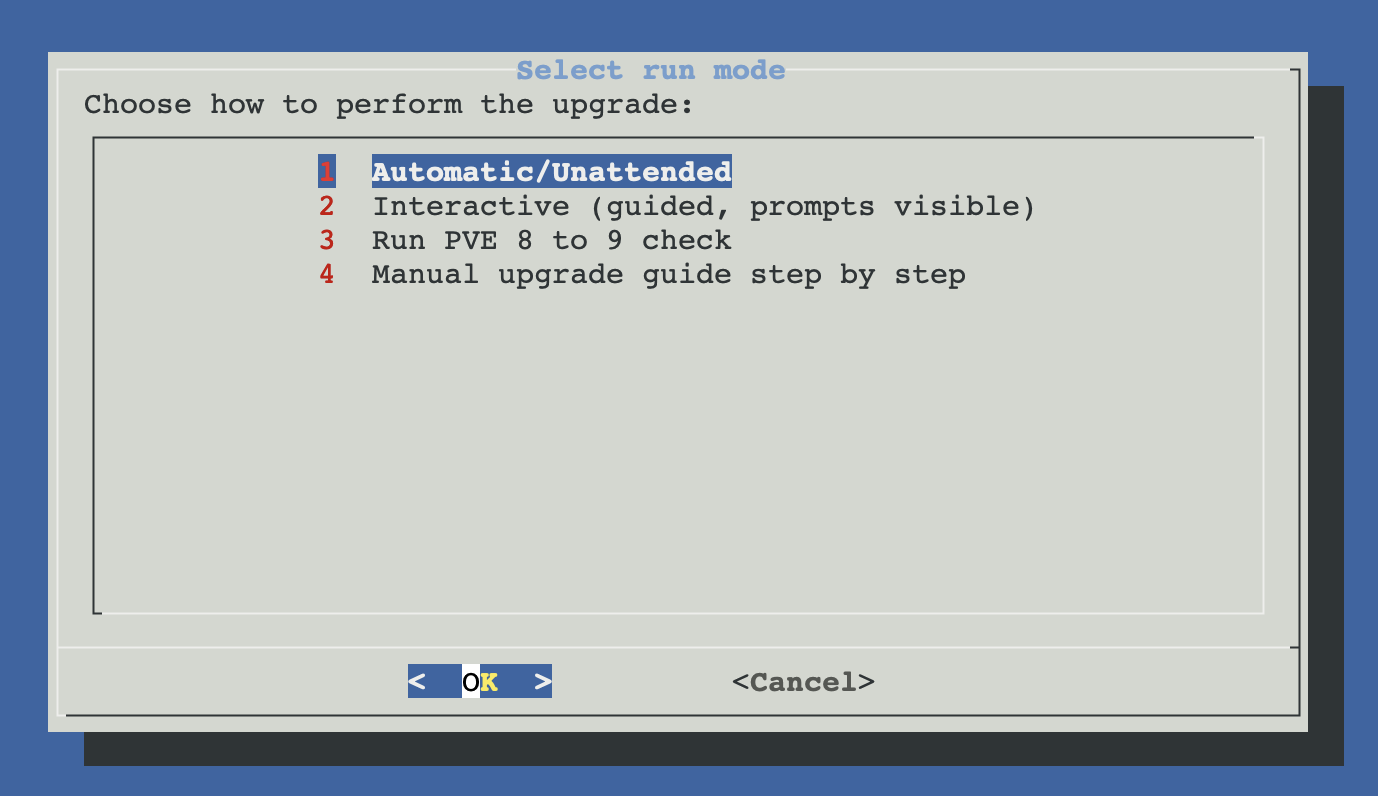
Three ways to upgrade
Same end state, different level of operator involvement. None of them lets you skip the pre-flight safeguards or the post-upgrade verification — the difference is purely how the dpkg prompts during dist-upgrade are handled and whether you watch each step or hand it all off.
Automatic / Unattended
One-shot. Sets ASSUME_YES=1 + DEBIAN_FRONTEND=noninteractive; dpkg config-file conflicts default to keep current (--force-confold).
- Fastest — no waiting for prompts
- Best for vanilla installs without custom config files
- Risk: a config you customised is silently kept and may shadow new defaults
Interactive
Same flow, but the user answers each dpkg prompt about config-file conflicts. Slower but maximum visibility.
- You see every config conflict and decide
- Best when you have customised
/etc/lvm,/etc/ssh, etc. - Consult the recommended-answers table in the manual procedure below
Manual upgrade guide
Read-only display of the 17-step procedure, faithful to the official Proxmox upgrade wiki. Run the commands by hand from a separate shell.
- Maximum control — you type every command
- Best when you want to learn the procedure or you trust nothing
- The script displays the steps; nothing is executed automatically
Plus a separate Pre-check
pve8to9 --full and offers guided remediation for the common blocking issues, then stops. Use it before committing to any of the three upgrade modes above. It also runs automatically as part of every upgrade flow, so this stand-alone option is for early verification or for re-running after manual fixes.Why the web terminal is blocked
All three upgrade modes detect termproxy / vncshell in the parent process chain and refuse to run. Reason: the Proxmox web terminal is served by pveproxy, which is one of the services that gets upgraded mid-flow. As soon as pveproxy restarts, your terminal session dies — and so does the upgrade script that was running inside it. The host is left half-upgraded, no good way to resume.
Use SSH or physical / IPMI / iKVM console
tmux or screen so the upgrade survives a brief network blip. The very first thing the script does is print the tmux/screen reminder if it detects you're in a plain SSH shell.Automatic / Unattended mode
The fully unattended path. Every dpkg prompt is auto-answered with safe defaults so the upgrade runs end-to-end without operator input. Use it on vanilla installs where you haven't hand-edited config files, or when you're running the upgrade as part of a maintenance window and just want it to finish.
Auto-mode-specific behaviour
| Setting | Effect |
|---|---|
ASSUME_YES=1 | Internal flag — every yes/no confirmation in the script auto-confirms |
DEBIAN_FRONTEND=noninteractive | apt / dpkg run without opening any debconf prompt |
--force-confdef | For untouched config files: install the maintainer's new version |
--force-confold | For files you customised: keep your version — never overwrite |
Auto-mode flow
Six sequential phases. Any failure in phases 1-4 aborts cleanly and the host stays on PVE 8 — nothing has been written yet. Phase 5 (dist-upgrade) is the point of no return.
┌─────────────────────────────────────────────────────────────────┐
│  1. PRE-FLIGHT CHECKS                              (read-only)  │
│─────────────────────────────────────────────────────────────────│
│  • Block if running from web terminal (termproxy / vncshell)    │
│  • Abort if host already on PVE 9.x                             │
│  • Verify ≥ 1024 MB free in /var/cache/apt/archives             │
│  • Ping download.proxmox.com                                    │
│  • If Ceph is installed: must already be on 19.x Squid          │
│  • Run pve8to9 --full → no FAILs (offer guided repair if any)   │
└────────────────────────────────┬────────────────────────────────┘
                                 │  all pass
                                 ▼
┌─────────────────────────────────────────────────────────────────┐
│  2. BRING PVE 8 TO LATEST 8.4.x                                 │
│─────────────────────────────────────────────────────────────────│
│  • Delegate to scripts/global/update-pve8.sh                    │
│  • Final apt update + dist-upgrade on the 8.x branch            │
│  • Ensures the documented upgrade prerequisites are met         │
└────────────────────────────────┬────────────────────────────────┘
                                 │
                                 ▼
┌─────────────────────────────────────────────────────────────────┐
│  3. REPOSITORY MIGRATION                                        │
│─────────────────────────────────────────────────────────────────│
│  • sed 's/bookworm/trixie/g' on /etc/apt/sources.list           │
│    and any /etc/apt/sources.list.d/*.list                       │
│  • Write deb822 .sources files for Proxmox + Debian + Ceph      │
│  • Try Enterprise repo → fall back to no-subscription on 401    │
│  • Comment out legacy .list files (do not delete yet)           │
│  • apt-get update with retry logic                              │
└────────────────────────────────┬────────────────────────────────┘
                                 │
                                 ▼
┌─────────────────────────────────────────────────────────────────┐
│  4. VALIDATE BEFORE WRITING ANYTHING                            │
│─────────────────────────────────────────────────────────────────│
│  • apt-cache policy proxmox-ve  →  candidate must be 9.x        │
│  • apt-get -s dist-upgrade  (dry-run)                           │
│       →  must NOT propose removing proxmox-ve                   │
│  • Both must pass; otherwise abort with a clear message         │
└────────────────────────────────┬────────────────────────────────┘
                                 │  point of no return
                                 ▼
┌─────────────────────────────────────────────────────────────────┐
│  5. RUN dist-upgrade  (UNATTENDED)                              │
│─────────────────────────────────────────────────────────────────│
│  apt-get -y \\                                                   │
│      -o Dpkg::Options::='--force-confdef' \\                     │
│      -o Dpkg::Options::='--force-confold' \\                     │
│      dist-upgrade                                               │
│                                                                 │
│  • Full Bookworm → Trixie + PVE 8 → 9                           │
│  • Output streams in real time                                  │
│  • Also tee'd to /var/log/pve8-a-pve9-'<'timestamp'>'.log           │
└────────────────────────────────┬────────────────────────────────┘
                                 │
                                 ▼
┌─────────────────────────────────────────────────────────────────┐
│  6. POST-UPGRADE                                                │
│─────────────────────────────────────────────────────────────────│
│  • EFI hosts:  apt install grub-efi-amd64                       │
│  • systemctl restart pve-manager                                │
│  • Re-run pve8to9 --full  →  confirm clean                      │
│  • Reboot prompt  (decline only if you have a reason)           │
└─────────────────────────────────────────────────────────────────┘
Pre-flight: what gets checked
| Check | Why it matters |
|---|---|
| Web terminal block | Prevents the upgrade from killing the shell that runs it |
| Already on 9.x | Aborts if the host already runs PVE 9 (nothing to do) |
| Latest PVE 8.4.x | Brings PVE 8 to its final patch level via the PVE 8 update worker first; an old 8.x has different upgrade prerequisites |
| pve8to9 --full | Proxmox's own upgrade-readiness check; FAILs block the upgrade until repaired |
| Disk space | ≥ 1024 MB free in /var/cache/apt/archives (downloaded .deb files) |
| Connectivity | Ping to download.proxmox.com — if down, no point starting |
| Ceph 19.x Squid | If Ceph is installed, must already be on 19.x. PVE 9 cannot run with Ceph 17/18. Override flags exist (--ignore-ceph-check, --warn-ceph-check) but use them only if you know what you're doing |
The dist-upgrade command (auto mode)
apt-get -y \
    -o Dpkg::Options::='--force-confdef' \
    -o Dpkg::Options::='--force-confold' \
    dist-upgrade
Output streams to stdout in real time and is also tee'd to /var/log/pve8-a-pve9-<timestamp>.log. You see everything — only the prompts are suppressed.
Post-upgrade tasks (auto mode)
- EFI hosts: installs
grub-efi-amd64(known issue per Proxmox docs — the upgrade doesn't pull it in automatically and the next boot would fail without it). - Restart
pve-manager. Forces a clean reload of the new daemons. - Re-run
pve8to9 --full. Surfaces any residual issues that the upgrade didn't resolve. If FAILs are reported, the same guided-repair menu as the pre-check appears. - Reboot prompt. "It is RECOMMENDED to reboot now to load the new kernel and services. Reboot now?" Decline only if you have a specific reason — running on the old kernel after a major upgrade is risky.
Interactive mode
Same overall flow as the automatic mode — same pre-flight checks, same repository migration, same post-upgrade verification. The only difference is in the dist-upgrade step: you answer every dpkg config-file conflict prompt yourself. ProxMenux passes the upgrade through to plain apt-get dist-upgrade without the --force-conf* flags.
The dist-upgrade command (interactive mode)
apt-get dist-upgrade
# (user answers each dpkg config-file conflict prompt as it appears)
When interactive is the right choice
- You've customised
/etc/lvm/lvm.conf,/etc/ssh/sshd_config,/etc/default/grubor any other config file that gets touched by the upgrade. - You want to see exactly which packages introduce config conflicts and decide on a per-file basis.
- You're upgrading a production host where any hidden change is unacceptable.
What to answer at each prompt
Manual upgrade procedure
This is what the Manual upgrade guide menu option displays — a faithful mirror of the official Proxmox 8-to-9 upgrade wiki organised in 4 phases. The script shows these commands; you type them yourself in a separate root shell. No automation — full visibility.
All commands need root
sudo. The Proxmox host itself runs as root by default; only relevant if you locked it down.Phase 1 — Preparation
Bring the host to the latest PVE 8.4.x, verify the version, validate Ceph (if used), run Proxmox's own pre-check, and start a terminal multiplexer to survive disconnections.
# Step 1 — Update PVE 8 to the latest 8.4+
apt update && apt dist-upgrade -y

# Step 2 — Verify version (must be 8.4.1 or newer)
pveversion

# Step 2.1 — Hyper-converged Ceph: must already be on 19.x Squid
ceph --version
# If older, follow https://pve.proxmox.com/wiki/Ceph_Squid

# Step 3 — Run the official upgrade-readiness check
pve8to9 --full
# If it warns about systemd-boot meta-package, remove it:
#   apt remove systemd-boot

# Step 4 — Start tmux or screen (so SSH disconnect doesn't kill the upgrade)
tmux new-session -s upgrade
# or
screen -S upgrade
Phase 2 — Repository migration
Switch every Debian and Proxmox repository from the Bookworm codename to Trixie, and convert the Proxmox sources to the new deb822 format. Pick step 7 OR step 8 depending on whether you have an Enterprise subscription. Skip step 9 if you don't run Ceph.
# Step 5 — Debian: bookworm → trixie
sed -i 's/bookworm/trixie/g' /etc/apt/sources.list

# Step 6 — Same for the legacy enterprise list (only if you use enterprise)
sed -i 's/bookworm/trixie/g' /etc/apt/sources.list.d/pve-enterprise.list

# Step 7 — Add the new PVE 9 enterprise repo (deb822) — Enterprise users only
cat > /etc/apt/sources.list.d/pve-enterprise.sources << EOF
Types: deb
URIs: https://enterprise.proxmox.com/debian/pve
Suites: trixie
Components: pve-enterprise
Signed-By: /usr/share/keyrings/proxmox-archive-keyring.gpg
EOF

# Step 8 — OR add the no-subscription repo (most home / lab users)
cat > /etc/apt/sources.list.d/proxmox.sources << EOF
Types: deb
URIs: http://download.proxmox.com/debian/pve
Suites: trixie
Components: pve-no-subscription
Signed-By: /usr/share/keyrings/proxmox-archive-keyring.gpg
EOF

# Step 8.1 — Refresh and verify proxmox-ve candidate is 9.x
apt update && apt policy | sed -n '1,120p'

# Step 9 — Update Ceph repo (only if you run Ceph)
cat > /etc/apt/sources.list.d/ceph.sources << EOF
Types: deb
URIs: http://download.proxmox.com/debian/ceph-squid
Suites: trixie
Components: no-subscription
Signed-By: /usr/share/keyrings/proxmox-archive-keyring.gpg
EOF

# Step 10 — Remove old .list files now superseded by deb822 .sources
rm -f /etc/apt/sources.list.d/pve-enterprise.list /etc/apt/sources.list.d/ceph.list

# Step 11 — Final apt update
apt update
Phase 3 — The dist-upgrade
The actual upgrade. Step 12 is optional but recommended (silences a torrent of audit messages during the upgrade). Step 13 is the long one — answer every dpkg prompt using the table below. Step 13.1 is EFI-only and per the official known issues.
# Step 12 — Disable kernel audit messages (optional)
systemctl disable --now systemd-journald-audit.socket

# Step 13 — The main upgrade (this takes a while)
apt dist-upgrade
# (answer prompts using the table below)

# Step 13.1 — EFI hosts: install grub for EFI (per known issues)
[ -d /sys/firmware/efi ] && apt install grub-efi-amd64
Recommended answers for the dpkg prompts
These are the answers the official Proxmox guide recommends. Y = install maintainer's new version (overwrites your file); N = keep your current file. Always check the diff first when in doubt:
| File / prompt | Recommended answer | Why |
|---|---|---|
| /etc/issue | N (keep current) | Banner you're used to seeing |
| /etc/lvm/lvm.conf | Y (maintainer) | PVE 9 needs the new LVM defaults |
| /etc/ssh/sshd_config | Y (maintainer) | Re-apply your customisations after |
| /etc/default/grub | N if customised | Boot params (IOMMU, PCI passthrough) live here |
| /etc/chrony/chrony.conf | Y (maintainer) | Time sync defaults updated for Trixie |
| Service restarts during upgrade | Yes (default) | Avoids reboot for most services |
apt-listchanges | Press q | Just exits the pager — info shown is the changelog summary |
Inspecting a specific dpkg conflict
Phase 4 — Post-upgrade
Verify the upgrade landed cleanly, reboot to load the PVE 9 kernel, confirm the new version, and (optional) modernise the few remaining legacy .list files into deb822.
# Step 14 — Re-run the readiness check (should be much cleaner now)
pve8to9 --full

# Step 15 — Reboot to load the new kernel and PVE 9 daemons
reboot

# Step 16 — After reboot, confirm PVE 9.x
pveversion
# Should show pve-manager/9.x.x

# Step 17 — Optional: modernise the remaining legacy .list files to deb822
apt modernize-sources
# (keeps .list backups as .bak)
Cluster & Ceph
Cluster: upgrade nodes one at a time
pvecm status. Do not upgrade more than one node at a time. Migrate guests off the node first, upgrade, reboot, verify the node is back in the cluster as PVE 9, only then move to the next node. Mixed PVE 8 / PVE 9 cluster works for the duration of the upgrade window, but live migration between mixed versions is not supported — only cold migration. HA groups will be migrated to the new HA rules format automatically.Ceph: upgrade Ceph FIRST, then Proxmox
pveceph upgrade per node) → reboot for new Ceph daemons → Proxmox upgrade per node. Skipping the Ceph step leaves the cluster broken until you fix it from the console. Full Ceph procedure: Ceph Squid upgrade wiki.Troubleshooting
Script aborts: "This script cannot be executed from the Proxmox web terminal"
tmux new -s pveupgrade first if you want to survive a brief network drop.pve8to9 reports FAIL and auto-repair Option 1 produces "command not found"
configure_repositories) that doesn't exist in the current codebase. Use Option 2 (show manual commands) and run them from a separate shell, or run the canonical fixes by hand: apt-get update, then re-run the upgrade.apt simulation flags "proxmox-ve will be REMOVED"
cat /etc/apt/sources.list.d/proxmox.sources — the Suites: line must say trixie, not bookworm. Also confirm apt-cache policy proxmox-ve shows a 9.x candidate from the new repo.dist-upgrade fails partway through
apt-get -f install to resolve broken dependencies, then re-run the upgrade. If that fails, check the log at /var/log/pve8-a-pve9-<timestamp>.log — the last lines usually pinpoint the offending package. Do not reboot until dpkg -l | grep ^iU returns empty (no half-installed packages).EFI host won't boot after reboot
grub-efi-amd64 install handles this. If you skipped that step or it failed, boot from the Proxmox installer ISO in rescue mode, mount the root, chroot, and apt-get install grub-efi-amd64 && update-grub.GUI does not load after upgrade
systemctl status pveproxy and systemctl restart pveproxy. If still broken, check journalctl -u pveproxy -b for the actual error.Network does not work after reboot
/etc/network/interfaces still references existing devices and ifupdown2 is installed: apt install ifupdown2. If interface names changed, see Persistent interface names.Cluster split-brain after upgrading one node
corosync on both: the QDevice / network config might have shifted. Run pvecm status on each node to confirm quorum.Files involved
scripts/utilities/upgrade_pve8_to_pve9.sh                         # main upgrade orchestrator
scripts/utilities/pve8to9_check.sh                                # pre-check (separate menu option)
scripts/utilities/proxmox-upgrade-pve8-to-pve9-manual-guide.sh    # 17-step runbook
scripts/global/update-pve8.sh                                     # PVE 8 worker (final patches)
/etc/apt/sources.list                                             # bookworm → trixie sed
/etc/apt/sources.list.d/proxmox.sources                           # created (deb822 PVE 9)
/etc/apt/sources.list.d/debian.sources                            # created (deb822 trixie)
/etc/apt/sources.list.d/ceph.sources                              # created if Ceph
/etc/apt/sources.list.d/*.list                                    # legacy files commented out / removed
/var/log/pve8-a-pve9-'<'timestamp'>'.log                              # full upgrade log
Official references
The script's manual procedure is a faithful mirror of these official sources. When in doubt during a real upgrade, follow the official wiki — ProxMenux helps you execute it, but the source of truth is Proxmox.
Video walkthrough
Prefer watching the upgrade run end-to-end before doing it yourself? This walkthrough demonstrates the ProxMenux upgrade flow in real time.
External video on YouTube. Plays in privacy-enhanced mode (no cookies until you press play).
Related
- Proxmox System Update — for the regular within-major-version updates (8.4.1 → 8.4.5, etc.).
- Utilities overview — back to the section overview.