
System Utilities Installer
Curated picker for 26 CLI utilities defined in the canonical PROXMENUX_UTILS list. Offers custom selection, install-all, six predefined groups and a verify-installations check. Uses the shared ensure_repositories() + install_single_package() pair so repo configuration and per-package feedback stay consistent across the project.
What this does
ensure_repositories sets up Proxmox + Debian repos for the running PVE major version, then install_single_package runs the install and verifies the resulting command is in PATH.Opening the installer
From the Utilities menu, choose System Utilities Installer. The main menu offers nine options:
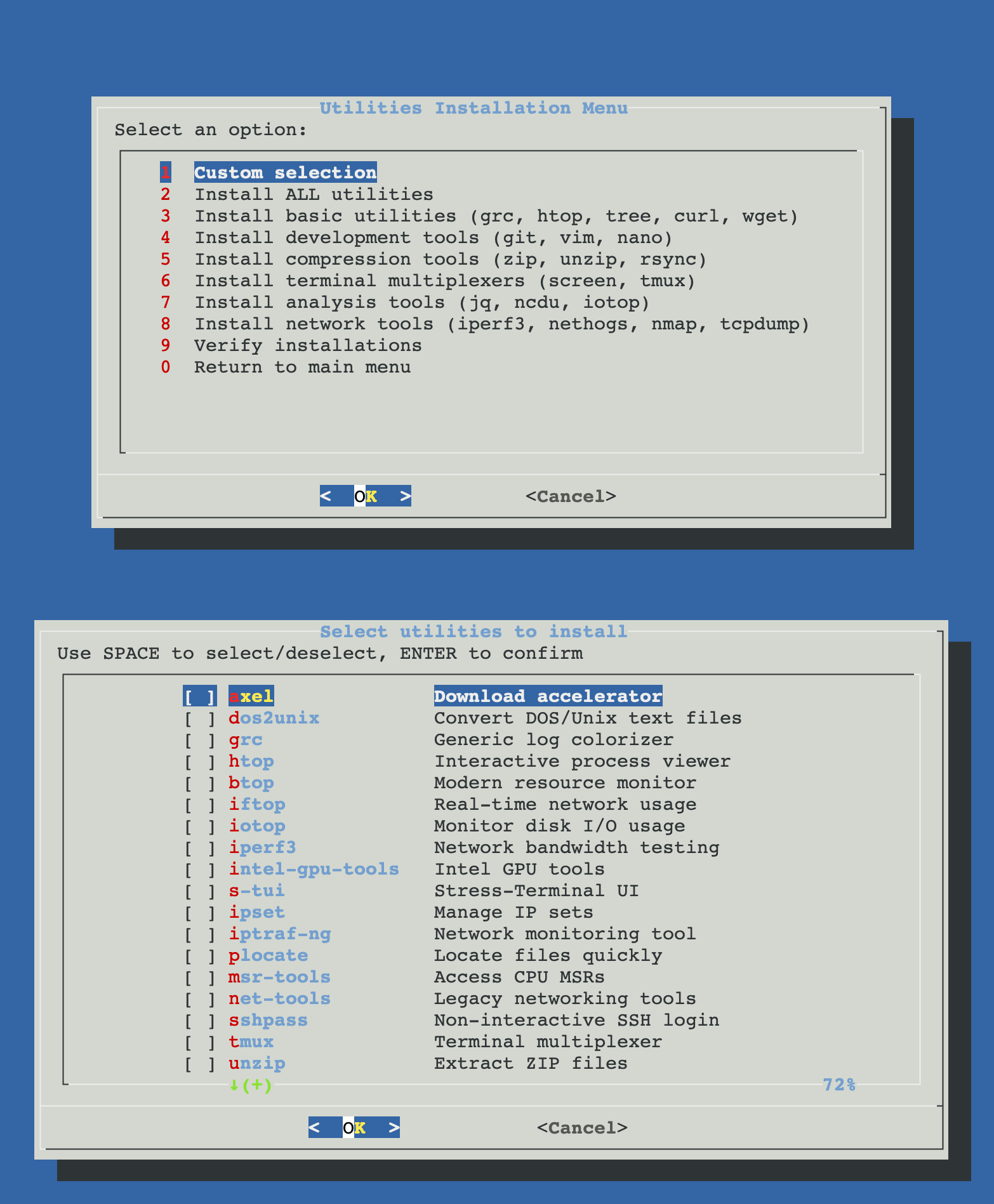
The 9 menu actions
| Option | Behaviour |
|---|---|
| 1. Custom selection | Dialog checklist of all 26 packages. Use SPACE to toggle, ENTER to confirm; only the selected ones are installed. |
| 2. Install ALL utilities | One-shot install of every package in PROXMENUX_UTILS. Use after a fresh Proxmox install. |
| 3. Basic | grc, htop, tree, curl, wget |
| 4. Development | git, vim, nano |
| 5. Compression | zip, unzip, rsync |
| 6. Terminal multiplexers | screen, tmux |
| 7. Analysis | jq, ncdu, iotop |
| 8. Network | iperf3, nethogs, nmap, tcpdump, lsof |
| 9. Verify installations | Walks every entry in PROXMENUX_UTILS, checks if the verify command is in PATH, prints an Available / Missing summary. |
The 26 packages
Defined in the shared scripts/global/utils-install-functions.sh as PROXMENUX_UTILS (format: package:verify_command:description). Other ProxMenux scripts (e.g. the network monitoring launchers for iftop / iptraf-ng / iperf3) reuse entries from this list so package + verify command stay in sync.
| Package | Verify command | Description |
|---|---|---|
| axel | axel | Download accelerator |
| aria2 | aria2c | Multi-source downloader |
| btop | btop | Modern resource monitor |
| cabextract | cabextract | Extract CAB files |
| chntpw | chntpw | Edit Windows registry / passwords |
| dos2unix | dos2unix | Convert DOS / Unix text files |
| genisoimage | genisoimage | Create ISO images |
| grc | grc | Generic log colorizer |
| htop | htop | Interactive process viewer |
| iftop | iftop | Real-time network usage |
| intel-gpu-tools | intel_gpu_top | Intel GPU tools |
| iotop | iotop | Monitor disk I/O usage |
| iperf3 | iperf3 | Network bandwidth testing |
| ipset | ipset | Manage IP sets |
| iptraf-ng | iptraf-ng | Network monitoring tool |
| libguestfs-tools | virt-filesystems | VM disk utilities |
| msr-tools | rdmsr | Access CPU MSRs |
| net-tools | netstat | Legacy networking tools |
| plocate | locate | Locate files quickly |
| s-tui | s-tui | Stress-Terminal UI |
| sshpass | sshpass | Non-interactive SSH login |
| tmux | tmux | Terminal multiplexer |
| unzip | unzip | Extract ZIP files |
| wimtools | wimlib-imagex | Manage WIM images |
| zip | zip | Create ZIP files |
| libguestfs-tools | virt-filesystems | VM disk utilities |
How a single package install works
ensure_repositoriesdetects PVE 8 or 9, writes Proxmox no-subscription + Debian sources files if missing, runsapt-get update.install_single_package "pkg" "verify_cmd" "description"runsapt-get install -y "$pkg"with feedback (msg_info/msg_ok/msg_error).- After install, the verify command is checked with
command -v "$verify_cmd". Three outcomes:- 0 (success): command available, package counted as Successful.
- 1 (failed): apt failed, counted as Failed.
- 2 (warning): apt succeeded but command not yet in PATH (hash refresh pending) — counted as With warnings.
- At the end of a group / custom install, a summary dialog shows Successful / With warnings / Failed counts.
Verify installations
Option 9 is read-only: it walks PROXMENUX_UTILS and runs command -v for each verify command. Output looks like this:
Total: 26
Available: 18
Missing: 8

✓ axel - Download accelerator
✓ aria2c - Multi-source downloader
✓ btop - Modern resource monitor
✗ cabextract - Extract CAB files
✓ dos2unix - Convert DOS / Unix text files
✗ genisoimage - Create ISO images
✓ grc - Generic log colorizer
...
Useful before running scripts that depend on these tools (e.g. uup_dump_iso_creator.sh needs aria2c + cabextract + wimlib-imagex). If anything is missing, run the matching group install or pick the missing packages via custom selection.
Troubleshooting
"Failed to configure repositories. Installation aborted."
cat /etc/apt/sources.list /etc/apt/sources.list.d/*.sources and apt-get update manually to see the actual error.A package is reported "With warnings" but the command works after I close the menu
apt-get install, the new binary is on disk but the current shell's PATH cache (hash -t) doesn't know yet. ProxMenux runs hash -r after each install, but in some shells the refresh only takes effect on the next prompt. Open a new shell and the command will work.An apt install hangs
DEBIAN_FRONTEND=noninteractive, which usually suppresses prompts, but a few packages still require user input. Cancel with Ctrl+C, run apt-get install -y <pkg> manually from a shell to see the prompt and decide.Files involved
scripts/utilities/system_utils.sh                    # this script
scripts/global/utils-install-functions.sh            # PROXMENUX_UTILS, ensure_repositories,
                                                     # install_single_package
/etc/apt/sources.list                                # may be touched by ensure_repositories
/etc/apt/sources.list.d/proxmox.sources              # created if missing (PVE 9)
/etc/apt/sources.list.d/debian.sources               # created if missing (PVE 9)
/etc/apt/sources.list.d/pve-no-subscription.list     # created if missing (PVE 8)
Related
- Proxmox System Update — for the actual
apt dist-upgradeon the host. - Live monitoring tools (Network) — uses iftop / iptraf-ng / iperf3 from this same list.
- Utilities overview — back to the section overview.